Configuring network access for Amazon S3 access points
When you create an Amazon S3 access point for an FSx for ONTAP volume, you configure how the access point can be reached over the network and who is authorized to use it. This section helps you choose the right network and access control configuration for your environment.
This section covers the network and IAM authorization layers — specifically, the access point's network origin, VPC endpoints, access point policies, VPC endpoint policies, IAM identity policies, and service control policies. For information about file system-level authorization (UNIX and Windows user permissions), see File system user identity and authorization.
Topics
How Amazon S3 evaluates access point requests
When a request is made through an Amazon S3 access point attached to an FSx for ONTAP volume, the request must be authorized by all of the following layers:
Network origin check — If the access point has a VPC network origin, the request must arrive through a VPC endpoint in the bound VPC. If not, the request is denied before any policy evaluation occurs.
VPC endpoint policy — If the request traverses a VPC endpoint, the endpoint's policy must allow the action on the access point resource.
access point policy — The access point's IAM resource policy is evaluated. For same-account access, either the access point policy or the caller's identity policy can grant access. For cross-account access, both must allow.
IAM identity policy — The requesting principal's identity-based policy is evaluated against the access point resource.
Service control policies (SCPs) — If the account is part of an AWS Organizations organization, any applicable SCPs must allow the action.
The network origin check occurs before policy evaluation. The remaining layers are evaluated together as part of the standard IAM authorization decision — an explicit Deny in any layer overrides Allow statements in other layers.
Choosing a network origin
When you create an Amazon S3 access point, you choose a network origin that determines how the access point can be reached. You cannot change the network origin after creation.
Internet origin
An access point with an internet network origin is similar to how S3 buckets are accessed by default. All requests still require valid IAM credentials and authorization — internet origin does not mean public or anonymous access. Amazon S3 enforces Block Public Access on all access points attached to FSx for ONTAP volumes, and you cannot disable this setting.
With internet origin, authenticated requests can come from anywhere — VPCs, on-premises networks, other AWS accounts, or the public internet. You control which authenticated callers are allowed using the access point policy and IAM identity policies.
With internet origin, you control access using the access point policy and IAM identity policies. For same-account callers, use explicit Deny statements in the access point policy to restrict access — an Allow-only policy is not sufficient because the caller's IAM identity policy can independently grant access. For cross-account callers, the access point policy must explicitly Allow the request, so omitting an Allow is sufficient to block access.
VPC origin
An access point with a VPC network origin is bound to a specific VPC and effectively behaves
as an explicit Deny policy statement that rejects any request where
aws:SourceVpc does not match the bound VPC. Because an explicit Deny always
overrides any Allow, even a completely permissive access point policy or IAM identity policy
cannot grant access to requests from outside the bound VPC.
Callers outside the bound VPC can still access the access point if their traffic is routed through a VPC endpoint in the bound VPC — for example, via VPC peering or Transit Gateway to an Amazon S3 Interface endpoint deployed in the bound VPC.
Key differences
| Internet origin | VPC origin | |
|---|---|---|
| Network enforcement | None — access controlled by policy only | Effectively an explicit Deny for requests not arriving through a VPC endpoint in the bound VPC |
| Multi-VPC access | Supported via policy conditions | Supported if callers route through an Interface endpoint in the bound VPC (via VPC peering or Transit Gateway) |
| Change access scope | Update the policy | Must recreate the access point to change the bound VPC |
| VPC endpoint required | Only if using aws:SourceVpc conditions |
Yes — requests must traverse an endpoint in the bound VPC |
How VPC origin enforcement works
When an access point has a VPC network origin, it effectively behaves as if there is an explicit
Deny policy statement that denies all requests where aws:SourceVpc does not
equal the VPC ID specified in the access point's VpcConfiguration. This Deny applies
to all principals, all Amazon S3 actions, and all resources within the access point.
Because this is an explicit Deny, it overrides any Allow statements — whether in the access point policy, the caller's IAM identity policy, or any other policy.
In practice, this means:
Requests must arrive through a VPC endpoint (Gateway or Interface) deployed in the bound VPC, because only VPC endpoints populate the
aws:SourceVpcattribute on the request.Requests from other VPCs are denied, because their VPC endpoints populate
aws:SourceVpcwith a different VPC ID.Requests from the internet are denied, because
aws:SourceVpcis not present on the request.
This is also why the error message for denied requests says "explicit deny in a resource-based policy."
Important
You cannot change an access point's network origin after creation. If you need to change from VPC origin to internet origin (or vice versa), you must delete the access point and create a new one.
VPC origin vs. internet origin with an explicit Deny
A VPC-origin access point and an internet-origin access point with a manually written
StringNotEquals aws:SourceVpc Deny achieve a similar result — both
deny requests not from the specified VPC. The key difference is:
VPC origin: The Deny is built into the access point's VPC configuration. You cannot accidentally remove it or misconfigure it.
Internet origin with Deny: You write and manage the Deny yourself. This gives you more flexibility (for example, allowing multiple VPCs) but also more responsibility — if the Deny is missing or misconfigured, the restriction is not enforced.
Using VPC endpoints with Amazon S3 access points
Amazon S3 access points work with both types of VPC endpoints for Amazon S3. The endpoint type you need depends on where your callers are located.
Gateway endpoints
Gateway endpoints are free and route-table based. When you create a Gateway endpoint, a route is added to the specified route tables that directs Amazon S3 traffic through the endpoint. This route applies only to traffic originating within the VPC.
Use Gateway endpoints for:
Amazon EC2 instances, Lambda functions, Amazon ECS tasks, and other compute resources within the VPC
Gateway endpoints do not route traffic that enters the VPC from:
On-premises networks via VPN or Direct Connect
Peered VPCs
Transit Gateway connections
For more information, see Gateway endpoints for Amazon S3 in the Amazon VPC User Guide.
Interface endpoints
Interface endpoints create an elastic network interface (ENI) with a private IP address in your subnet. Traffic must be explicitly directed to the endpoint's DNS name or private IP.
Use Interface endpoints for:
On-premises callers accessing Amazon S3 via VPN or Direct Connect
Cross-account callers accessing Amazon S3 via VPC peering
Any scenario where traffic enters the VPC from outside
When using an Interface endpoint, callers must either:
Use the
--endpoint-urlparameter pointing to the Interface endpoint's DNS name, orConfigure DNS to resolve Amazon S3 endpoints to the Interface endpoint's private IP (using Route 53 Resolver or on-premises DNS forwarding)
Interface endpoints have per-hour and per-GB charges. For more information, see
AWS PrivateLink
pricing
Using both endpoint types together
You can deploy both a Gateway endpoint and an Interface endpoint in the same VPC. This configuration is useful when you have both in-VPC callers and on-premises callers:
Gateway endpoint: Handles in-VPC traffic (free, transparent)
Interface endpoint: Handles on-premises traffic entering via VPN or Direct Connect (requires DNS configuration or
--endpoint-url)
Both endpoint types populate the aws:SourceVpc attribute with the VPC
ID, so both satisfy the VPC origin Deny condition.
VPC endpoint policies
VPC endpoint policies control which Amazon S3 resources can be accessed through the endpoint. By default, a VPC endpoint allows all Amazon S3 actions on all resources. You can scope the endpoint policy to allow only specific access points:
{
    "Version": "2012-10-17",
    "Statement": [
        {
            "Effect": "Allow",
            "Principal": "*",
            "Action": "s3:*",
            "Resource": [
                "arn:aws:s3:us-east-1:123456789012:accesspoint/my-access-point",
                "arn:aws:s3:us-east-1:123456789012:accesspoint/my-access-point/object/*"
            ]
        }
    ]
}
Access point policies
Amazon S3 access points support AWS Identity and Access Management (IAM) resource policies that allow you to control the use of the access point by resource, user, or other conditions. For cross-account access, both the access point policy and the caller's IAM identity policy must permit the request. For same-account access, either the access point policy or the caller's IAM identity policy can independently grant access — to restrict same-account callers, use explicit Deny statements in the access point policy. If the request traverses a VPC endpoint, the VPC endpoint policy must also permit the request.
For more information about access point policies, see Configuring IAM policies for using access points in the Amazon Simple Storage Service User Guide.
Condition keys for network-based access control
IAM provides global condition keys that you can use in access point policies to control access based on network properties of the request. These condition keys are included in the request context only under specific circumstances, as described in the following table.
| Condition key | Availability | Description |
|---|---|---|
aws:SourceVpc |
Included in the request context only if the requester uses a VPC endpoint to make the request. | Checks whether the request travels through the VPC that the VPC endpoint is attached to. Use this key to allow access to only a specific VPC. |
aws:SourceVpce |
Included in the request context only if the requester uses a VPC endpoint to make the request. | The ID of the VPC endpoint through which the request was made. |
aws:VpcSourceIp |
Included in the request context only if the request is made using a VPC endpoint. | Compares the IP address from which a request was made with the IP address that you specify in the policy. Matches only if the request originates from the specified IP address and goes through a VPC endpoint. |
aws:SourceIp |
Included in the request context only if the request does not traverse a VPC endpoint. | The public IP address of the caller. Not available for requests made through a VPC endpoint. |
Important
aws:SourceIp and aws:VpcSourceIp are mutually
exclusive. When a request traverses a VPC endpoint, aws:SourceIp is
not available — use aws:VpcSourceIp instead. When a request
comes from the internet (no VPC endpoint), aws:VpcSourceIp is not
available — use aws:SourceIp instead.
Important
The condition key aws:VpcSourceIp is case-sensitive.
For more information about IAM global condition keys, see AWS global condition context keys in the IAM User Guide.
Example scenarios
The following example scenarios show common configurations for Amazon S3 access points attached to FSx for ONTAP volumes. Each scenario includes the recommended network origin, VPC endpoint type, and access point policy.
Single VPC access
Use case: Amazon EC2 instances, Lambda functions, or Amazon ECS tasks within a single VPC access the access point. No external access needed.
With VPC network origin:
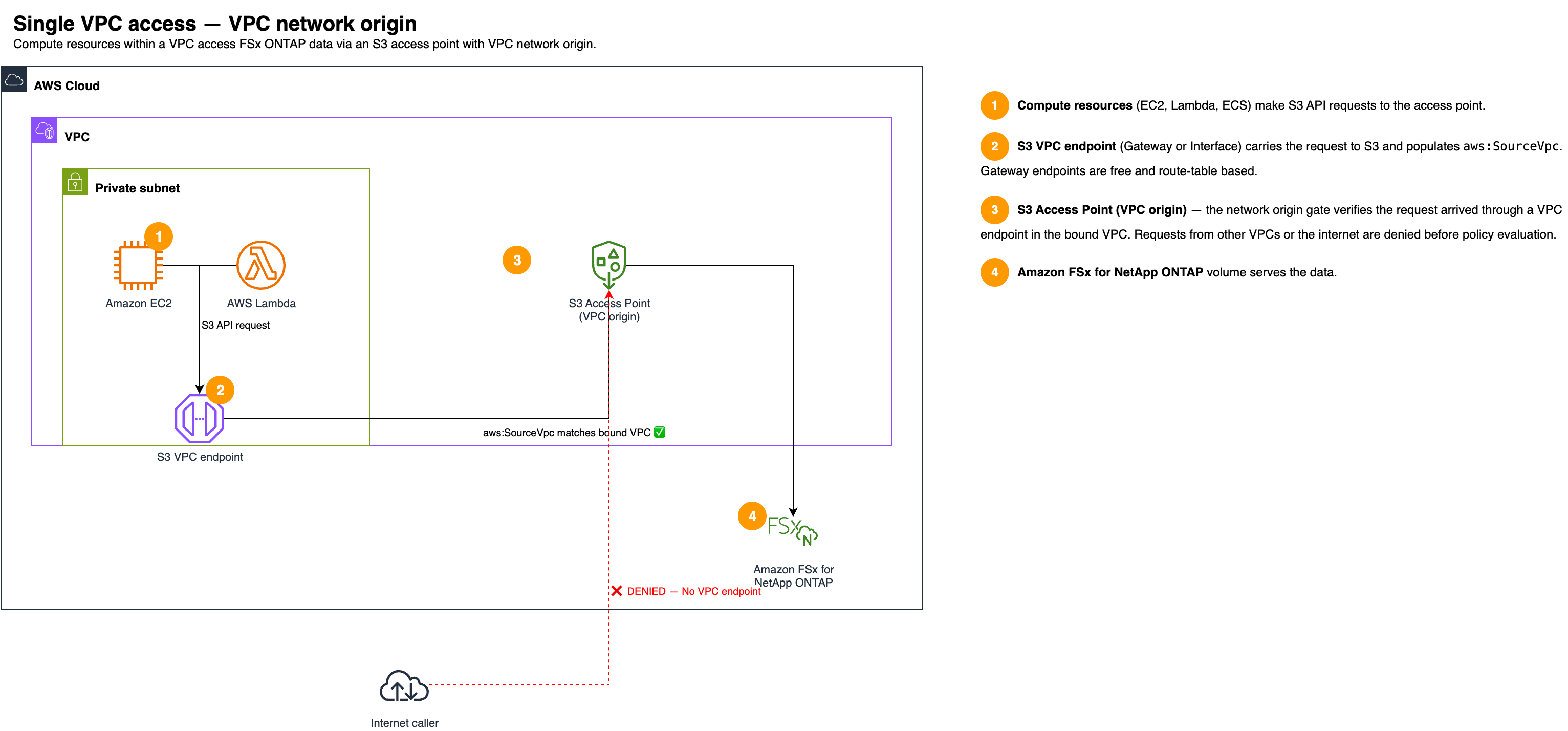
The VPC origin configuration effectively denies requests where
aws:SourceVpc does not match the bound VPC. Requests from other VPCs, the
internet, or on-premises networks are denied. You can use either a Gateway or Interface
Amazon S3 VPC endpoint.
Example access point policy (VPC origin): With VPC origin, the network restriction is built in. The access point policy only needs to grant the desired permissions.
{
    "Version": "2012-10-17",
    "Statement": [
        {
            "Effect": "Allow",
            "Principal": {"AWS": "arn:aws:iam::123456789012:role/my-app-role"},
            "Action": [
                "s3:GetObject",
                "s3:PutObject",
                "s3:ListBucket"
            ],
            "Resource": [
                "arn:aws:s3:us-east-1:123456789012:accesspoint/my-access-point",
                "arn:aws:s3:us-east-1:123456789012:accesspoint/my-access-point/object/*"
            ]
        }
    ]
}
With Internet network origin:
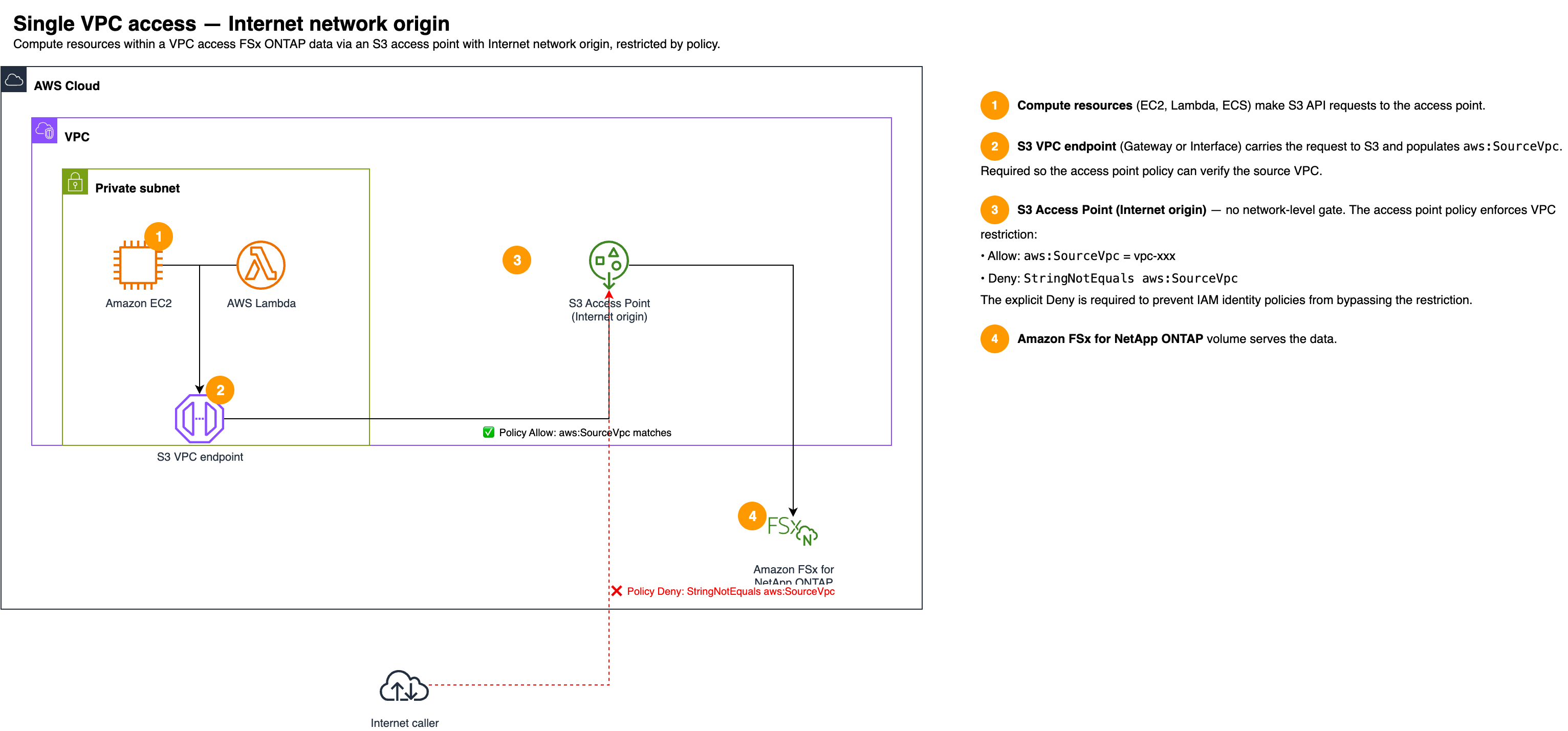
With internet origin, you restrict access to the VPC using aws:SourceVpc
conditions in the access point policy (with an explicit Deny). A VPC endpoint is required so
that aws:SourceVpc is populated on the request.
Example access point policy (internet origin): The policy includes both an Allow with a VPC condition and a Deny for requests not from the VPC.
{
    "Version": "2012-10-17",
    "Statement": [
        {
            "Effect": "Allow",
            "Principal": {"AWS": "arn:aws:iam::123456789012:role/my-app-role"},
            "Action": [
                "s3:GetObject",
                "s3:PutObject",
                "s3:ListBucket"
            ],
            "Resource": [
                "arn:aws:s3:us-east-1:123456789012:accesspoint/my-access-point",
                "arn:aws:s3:us-east-1:123456789012:accesspoint/my-access-point/object/*"
            ],
            "Condition": {
                "StringEquals": {"aws:SourceVpc": "vpc-1a2b3c4d"}
            }
        },
        {
            "Effect": "Deny",
            "Principal": "*",
            "Action": "s3:*",
            "Resource": [
                "arn:aws:s3:us-east-1:123456789012:accesspoint/my-access-point",
                "arn:aws:s3:us-east-1:123456789012:accesspoint/my-access-point/object/*"
            ],
            "Condition": {
                "StringNotEquals": {"aws:SourceVpc": "vpc-1a2b3c4d"}
            }
        }
    ]
}
Note
Both the Allow and Deny statements are required in the access point policy. Without the Deny statement, the VPC restriction may not be enforced for all callers.
| VPC origin | Internet origin | |
|---|---|---|
| Network enforcement | Built-in Deny | Policy-based (Allow + Deny) |
| VPC endpoint | Required (Gateway or Interface) | Required (for aws:SourceVpc) |
| access point policy | Minimal — built-in Deny handles restriction | Must include aws:SourceVpc Allow + Deny |
On-premises and VPC access
Use case: Both on-premises users (via VPN or Direct Connect) and in-VPC compute resources access the access point. All traffic stays private.
Important
Gateway endpoints do not route traffic entering the VPC from VPN, Direct Connect, or Transit Gateway connections. On-premises callers must use an Amazon S3 Interface endpoint. See Using VPC endpoints with Amazon S3 access points for details.

Both the Gateway endpoint (in-VPC traffic) and Interface endpoint (on-prem traffic) are in the same VPC, so both satisfy the VPC origin Deny condition.
| VPC origin | Internet origin | |
|---|---|---|
| In-VPC endpoint | Gateway (free) | Gateway (for aws:SourceVpc) |
| On-prem endpoint | Interface (required) | Interface (required) |
| On-prem DNS | Resolve Amazon S3 to Interface endpoint IP | Resolve Amazon S3 to Interface endpoint IP |
Multi-VPC access
Use case: Callers in multiple VPCs need to access the same access point. For example, applications in separate VPCs within the same account, or VPCs in different accounts that are connected through VPC peering or Transit Gateway.
There are two approaches for multi-VPC access, depending on whether you want to use policy-based controls or the VPC origin network enforcement.
Option 1: Internet origin with a Gateway endpoint in each VPC
Each VPC has its own Amazon S3 Gateway endpoint. Callers in each VPC access the access point
through their local Gateway endpoint, which populates aws:SourceVpc on
the request. The access point policy restricts access to the allowed VPC IDs.
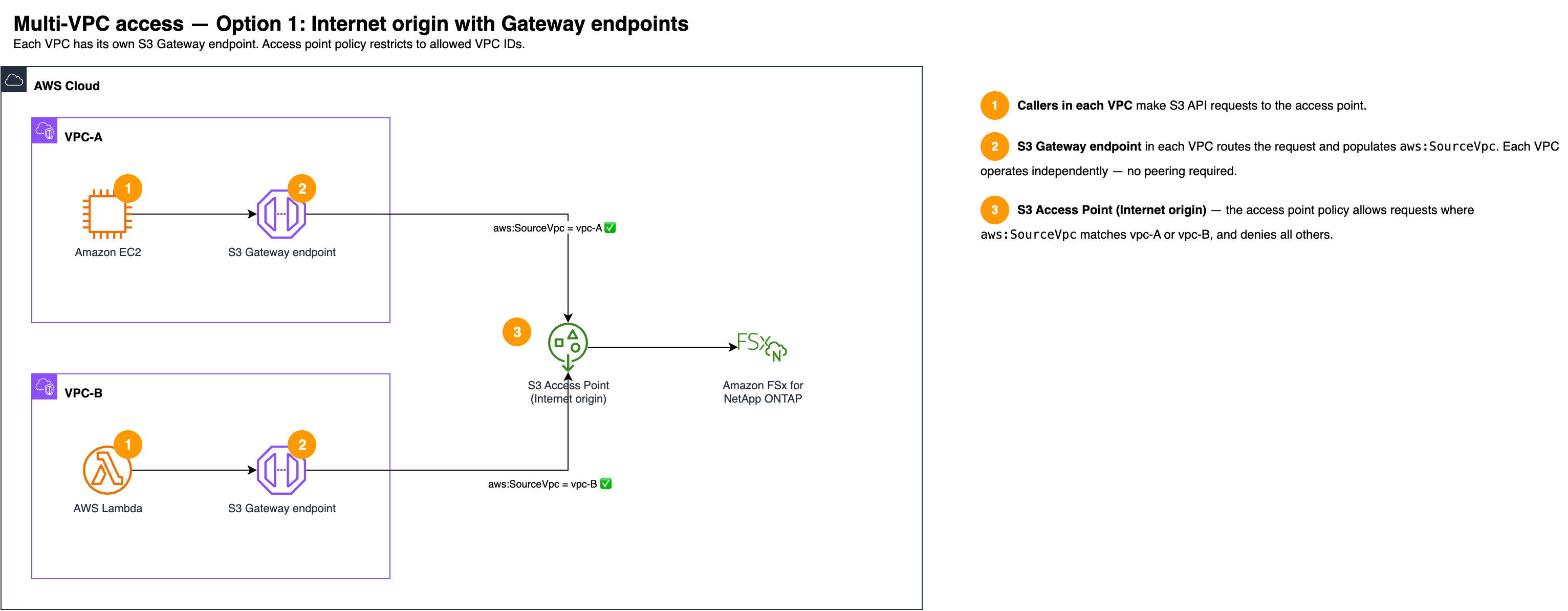
Network origin: Internet
VPC endpoints: Amazon S3 Gateway endpoint in each VPC (free, no additional configuration needed)
access point policy: Allow with
aws:SourceVpclisting all VPC IDs, plus a Deny withStringNotEquals
Note
Both the Allow and Deny statements are required in the access point policy. Without the Deny statement, the VPC restriction may not be enforced for all callers.
This option is simpler to set up because each VPC operates independently — no VPC peering or Transit Gateway is required. To add or remove VPCs, update the access point policy.
Option 2: VPC origin with a centralized Interface endpoint

One VPC hosts an Amazon S3 Interface endpoint, and the access point is created with VPC origin bound to that VPC. Other VPCs route their Amazon S3 traffic to the Interface endpoint through VPC peering or Transit Gateway. Because all requests arrive through an endpoint in the bound VPC, they satisfy the VPC origin enforcement.
Network origin: VPC (bound to the VPC hosting the Interface endpoint)
VPC endpoints: Amazon S3 Interface endpoint in the bound VPC
Connectivity: VPC peering or Transit Gateway between the other VPCs and the bound VPC
access point policy: Minimal — the VPC origin enforcement handles the network restriction
Caller configuration: Callers in other VPCs must use
--endpoint-urlor DNS configuration to route requests through the Interface endpoint
This option provides stronger enforcement because the VPC origin restriction cannot be bypassed through policy changes. However, it requires VPC peering or Transit Gateway connectivity, and the Interface endpoint has per-hour and per-GB charges. For more information about Interface endpoints, see AWS PrivateLink for Amazon S3 in the Amazon Simple Storage Service User Guide.
Troubleshooting network access issues
When an Amazon S3 access point request fails, the error message often does not indicate which authorization layer denied the request. Use the following guidance to diagnose common issues.
AccessDenied with "explicit deny in a resource-based policy"
This error can come from multiple sources. Work through the following checks in order:
1. Check the VPC origin Deny (VPC-origin access points only)
If the access point has a VPC network origin, it effectively denies requests where
aws:SourceVpc does not match the bound VPC. Verify that:
A VPC endpoint (Gateway or Interface) exists in the bound VPC.
The caller's traffic is routing through that endpoint. For in-VPC callers, verify the Gateway endpoint's route table is associated with the caller's subnet. For on-premises callers, verify they are using an Interface endpoint (Gateway endpoints do not route VPN or Direct Connect traffic).
The caller is in the bound VPC, not a peered VPC. Requests from peered VPCs are denied unless routed through an Interface endpoint in the bound VPC.
2. Check the VPC endpoint policy
If the request traverses a VPC endpoint, the endpoint's policy must allow the action on the access point resource. The default endpoint policy allows all actions on all resources. If you have scoped the policy, verify it includes the access point ARN.
3. Check the access point policy
Verify that the access point policy allows the requesting principal. Check for Deny statements with conditions that might match the request.
4. Check the caller's IAM identity policy
The caller's IAM role or user must have permissions to perform the Amazon S3 action on the access point ARN.
5. Check service control policies (SCPs)
If the account is part of an AWS Organizations organization, verify that no SCPs deny Amazon S3 actions on the access point.
On-premises callers get AccessDenied but in-VPC callers succeed
This typically means on-premises traffic is not routing through a VPC endpoint:
Gateway endpoints do not route on-premises traffic. Traffic entering the VPC from VPN, Direct Connect, or Transit Gateway connections is not affected by Gateway endpoint routes. Create an Amazon S3 Interface endpoint for on-premises callers.
Verify the Interface endpoint's security group allows inbound HTTPS (port 443) from the on-premises CIDR.
Verify on-premises DNS resolves Amazon S3 endpoints to the Interface endpoint's private IP, or that callers use
--endpoint-url.
Access point policy conditions appear to have no effect
Allow-only policies do not restrict access. If you use conditions (such as
aws:SourceVpc) only in an Allow statement without a corresponding Deny, the caller's IAM identity policy can independently grant access. Add an explicit Deny statement with the inverse condition.Case sensitivity. The condition key
aws:VpcSourceIpis case-sensitive.Mutually exclusive condition keys.
aws:SourceIpandaws:VpcSourceIpare mutually exclusive.aws:SourceIpis not available when the request traverses a VPC endpoint — useaws:VpcSourceIpinstead. Conversely,aws:VpcSourceIpis not available for internet requests — useaws:SourceIp. This applies to all policies that use these condition keys, including access point policies, VPC endpoint policies, and IAM identity policies.
