Granting Quick access to Active Directory users
Note
This access approach is available only for the Enterprise edition of Amazon Quick. For more information, see User management for Enterprise edition in the Quick documentation.
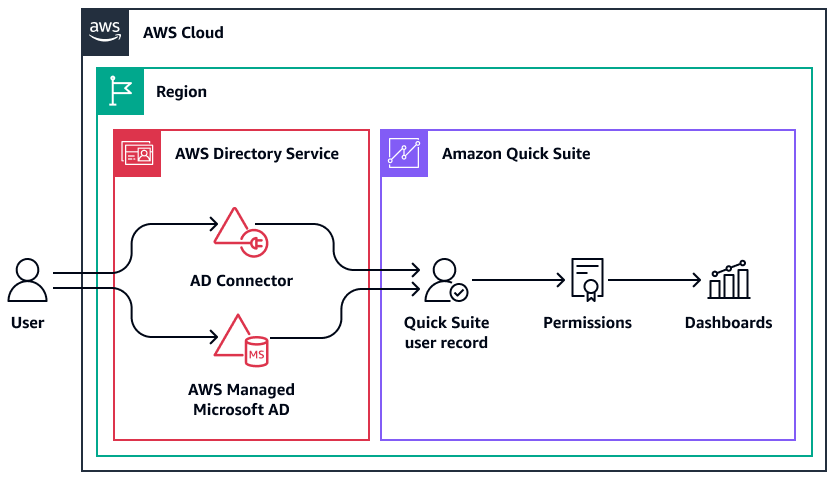
The following are the characteristics of this architecture and access approach:
-
The Amazon Quick user record is linked to the user in Active Directory.
-
You assign Quick admin, author, or reader access to Active Directory groups.
-
Quick access is provisioned based on the mapped Active Directory group memberships.
-
User passwords are managed in Active Directory.
-
The user must log in directly through the Quick console
. -
You cannot combine this Quick access approach with other approaches.
Considerations and use cases
You can use Microsoft Active Directory users and groups to manage access to Quick. Quick supports either the AWS Directory Service for Microsoft Active Directory (AWS Managed Microsoft AD) or Active Directory Connector (AD Connector).
AWS Managed Microsoft AD is an Active Directory host in the AWS Cloud that offers most of the same functionality of Active Directory. If you have an existing self-managed directory that you want to use for Quick, you can use AD Connector. This service redirects directory requests to your self-managed Active Directory—in another AWS Region or on-premises—without caching any information in the cloud. Both AD Connector and AWS Managed Microsoft AD are part of AWS Directory Service.
Your directory or directory connection in Directory Service must be in the same AWS Region where you are signing up for Quick. When you sign up for Quick, you specify the Active Directory domain as well as the specific Active Directory groups that will be used for access control.
This access approach is best suited for organizations that want to use their existing Active Directory access management processes. This approach manages Quick access and roles through Active Directory group memberships.
An important consideration when using this approach is that it cannot be combined with other approaches. For example, you can create a hybrid access approach using IAM users and Quick local users. Consider this approach carefully. If you select this approach when you set up Quick, you are committing to it. You cannot change to a different approach later.
This is not the only access approach that uses Active Directory. In this approach, Quick access is provisioned based on group membership in Active Directory, and the Quick user record is linked directly to the Active Directory user. You can also use Active Directory as an identity source for user federation. For more information, see Federated users in this guide.
Prerequisites
-
Enterprise edition of Quick
-
Permissions to subscribe to Quick, create users, and manage Active Directory (see IAM identity-based policies for Amazon Quick: all access for Enterprise edition)
Configuring access for Active Directory users
After you confirm the details of your directory, you can sign up for Quick. For instructions, see Signing up for a Quick subscription. Note the following when configuring this type of access:
-
In the Quick sign-up wizard, choose Enterprise, and then choose Use Active Directory.
-
Go to the Quick console, and then choose Manage access to Quick.
-
Select the Active Directory groups that should have Quick access, and assign them Quick admin, author, or reader roles. For instructions, see Managing user access.
