Les traductions sont fournies par des outils de traduction automatique. En cas de conflit entre le contenu d'une traduction et celui de la version originale en anglais, la version anglaise prévaudra.
Flux de données, ports et chiffrement dans Deadline Cloud
Les examens de sécurité du contenu, tels que les audits de sécurité des studios et les questionnaires d'intégration des fournisseurs, demandent un diagramme de flux de données. Le diagramme couvre les composants de la ferme de rendu, l'endroit où chaque composant s'exécute, la manière dont les données circulent entre eux et la manière dont les connexions et les données stockées sont cryptées. Le schéma et les tableaux de cette page répondent à ces questions pour un déploiement classique de AWS Deadline Cloud. Pour plus d'informations sur les contrôles de sécurité que vous pouvez configurer pour chaque partie de la batterie de serveurs, consultezContrôles de sécurité dans Deadline Cloud.
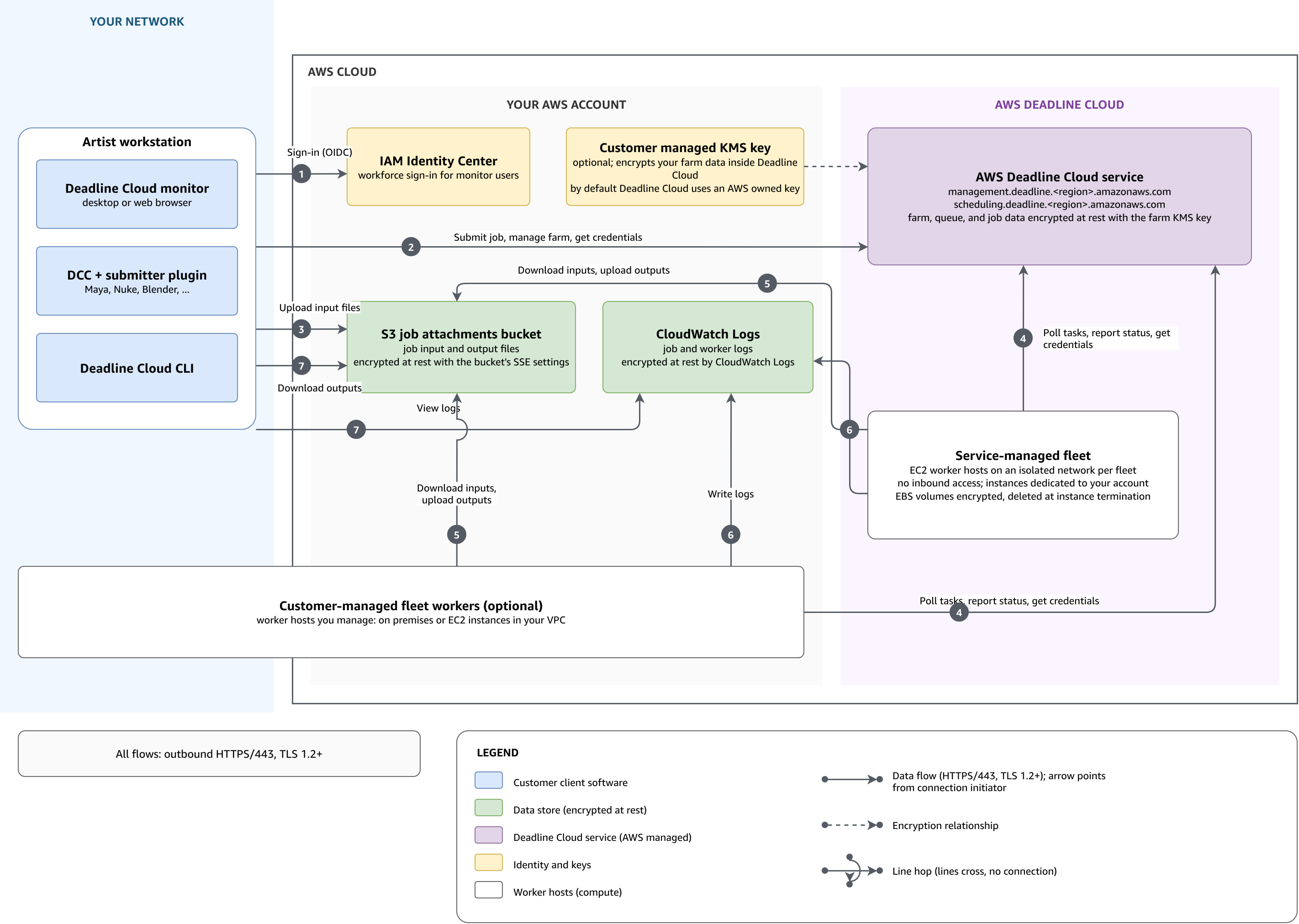
Les composants et leur mode de fonctionnement
Une ferme de rendu Deadline Cloud s'étend sur trois sites : votre réseau, votre AWS compte et Deadline Cloud lui-même, qui en AWS assure la gestion. Customer-managed les employés de la flotte font exception : c'est vous qui choisissez où ils travaillent.
Le tableau suivant décrit chaque composant et son emplacement d'exécution.
| Composant | Où il fonctionne | Objectif |
|---|---|---|
Moniteur Deadline Cloud, émetteurs intégrés et interface de ligne de commande Deadline Cloud |
Votre réseau |
Outils clients sur les postes de travail des artistes qui soumettent des tâches, chargent et téléchargent des fichiers et suivent l'avancement des tâches. |
AWS IAM Identity Center |
Votre AWS compte |
Sign-in et les niveaux d'accès pour les utilisateurs du moniteur. Pour plus d'informations, consultez la section Gestion des utilisateurs. |
Compartiment de pièces jointes aux tâches Amazon Simple Storage Service |
Votre AWS compte |
Fichiers d'entrée et de sortie pour les tâches. Chaque file d'attente possède son propre compartiment et son propre préfixe racine, de sorte que les limites d'autorisation des files d'attente s'appliquent également aux fichiers. |
CloudWatch Journaux Amazon |
Votre AWS compte |
Journaux des tâches et journaux des travailleurs. |
AWS Key Management Service clé |
Votre AWS compte, ou AWS géré |
La clé qui chiffre les données de votre ferme dans Deadline Cloud. Par défaut, Deadline Cloud utilise AWS une clé personnelle que vous ne gérez pas. Vous pouvez fournir une clé gérée par le client depuis votre compte lorsque vous créez la ferme. Pour de plus amples informations, veuillez consulter Gestion des clés. |
Customer-managed travailleurs de la flotte |
À vous de choisir : des machines sur votre réseau ou des instances Amazon Elastic Compute Cloud sur votre VPC |
Les hôtes Worker que vous gérez et qui exécutent votre logiciel et l'agent Worker de Deadline Cloud. Une flotte gérée par le client n'a besoin que d'un accès HTTPS sortant. Si les travailleurs s'exécutent dans votre VPC, les AWS PrivateLink points de terminaison facultatifs permettent de conserver leur trafic à l'intérieur du VPC. |
Service Deadline Cloud |
AWS géré |
Les points de terminaison du service |
Service-managed travailleurs de la flotte |
AWS géré |
Instances Amazon EC2 sur un réseau isolé pour chaque flotte. Les instances sont dédiées à votre compte et n'acceptent aucune connexion entrante. |
Flux de données, ports et protocoles
Chaque client et chaque travailleur du diagramme initie ses connexions sortantes vers un AWS point de terminaison via HTTPS sur le port TCP 443. Nous avons besoin du protocole TLS 1.2 pour chiffrer les connexions en transit et nous recommandons le protocole TLS 1.3. Deadline Cloud n'établit pas de connexions entrantes avec votre réseau. Les numéros de flux du tableau suivant correspondent aux chiffres du diagramme.
| Flux | Connexion | Description |
|---|---|---|
1 |
Surveillez jusqu'à IAM Identity Center |
Surveillez les utilisateurs qui se connectent AWS IAM Identity Center avec OpenID Connect (OIDC). |
2 |
Du poste de travail au terminal de gestion |
Les soumissionnaires, la CLI et le moniteur soumettent des tâches, gèrent les ressources de la ferme et demandent des informations d'identification de rôle temporaires via. |
3 |
Poste de travail vers Amazon S3 |
Les pièces jointes aux tâches téléchargent les fichiers d'entrée dans le compartiment Amazon S3 de la file d'attente. |
4 |
Travailleurs vers le terminal de planification |
Les employés des deux types de flottes interrogent les tâches, signalent les progrès et le statut, et demandent des informations d'identification de rôle temporaires via |
5 |
Les employés passent à Amazon S3 |
Les travailleurs téléchargent les fichiers d'entrée depuis le compartiment de la file d'attente et y téléchargent les fichiers de sortie. |
6 |
Travailleurs à CloudWatch enregistrer |
L'agent de travail rédige les journaux des tâches et des travailleurs. |
7 |
Workstation to CloudWatch Logs et Amazon S3 |
Le moniteur lit les journaux des tâches, tandis que le moniteur et l'interface de ligne de commande téléchargent les fichiers de sortie. |
Ni les outils clients ni les travailleurs ne détiennent d'informations d'identification durables pour les ressources de la file d'attente. Les deux demandent des informations d'identification temporaires à Deadline Cloud et reçoivent les autorisations que vous attachez aux rôles de file d'attente et de flotte :
-
Le moniteur, l'interface de ligne de commande et les soumissionnaires appellent
AssumeQueueRoleForUserpour charger et télécharger les pièces jointes des tâches, ainsi queAssumeQueueRoleForReadpour un accès en lecture seule, tel que la lecture des journaux des tâches. -
Un travailleur
AssumeFleetRoleForWorkerdemande le rôle de flotte, puis le rôleAssumeQueueRoleForWorkerde file d'attente de la tâche qu'il exécute.
Pour plus d'informations sur les rôles et les attributions de chacun d'entre eux, consultezRôles du service.
Si votre studio filtre le trafic Web sortant, consultez la liste complète Environnements réseau restreints des points de terminaison à autoriser. Pour empêcher le trafic entre votre VPC et Deadline Cloud d'accéder à Internet public, utilisez les points de terminaison de AWS PrivateLink l'interface. Pour de plus amples informations, veuillez consulter Accès AWS Deadline Cloud en utilisant un point de terminaison d'interface (AWS PrivateLink).
Accès à l'application Web Monitor
L'URL de votre moniteur est accessible depuis n'importe quel endroit sur Internet et vous ne pouvez pas restreindre l'URL à un ensemble d'adresses IP. https:// L'URL renvoie à l'application Web du moniteur, qui est la même application pour chaque moniteur Deadline Cloud. L'application ne contient aucune donnée sur votre parc, votre file d'attente ou vos tâches, et toute personne ouvrant l'URL voit une page de connexion.monitor-alias.region.deadlinecloud.amazonaws.com
Les données de votre ferme parviennent au moniteur via les API Deadline Cloud. C'est donc lors des appels d'API que l'accès est accordé ou refusé. Une fois que vous vous êtes connecté via AWS IAM Identity Center (IAM Identity Center), Deadline Cloud assume le rôle de moniteur pour vous. Le moniteur appelle ensuite les API depuis le navigateur avec les informations d'identification temporaires du rôle. L'IAM autorise chaque appel. Les politiques gérées relatives au rôle de moniteur autorisent chaque action uniquement aux niveaux d'accès que vous avez accordés. Pour plus d'informations, consultez les sections Surveiller le rôle et Gérer les utilisateurs.
Pour que les données de la ferme soient accessibles uniquement depuis votre propre réseau, appliquez la restriction aux appels d'API au lieu de l'URL. Vous pouvez autoriser uniquement vos plages d'adresses IP ou uniquement les demandes qui arrivent via vos points de terminaison VPC. Pour de plus amples informations, veuillez consulter Restreindre l'accès de la ferme à votre réseau.
Résumé du chiffrement
Chaque banque de données est cryptée indépendamment au repos. La AWS KMS clé de batterie de serveurs s'applique uniquement aux données détenues par Deadline Cloud ; votre compartiment Amazon S3 et vos groupes de journaux utilisent leurs propres paramètres de chiffrement.
-
En transit : toutes les connexions utilisent le protocole HTTPS, le protocole TLS 1.2 étant requis et le protocole TLS 1.3 recommandé. Pour de plus amples informations, veuillez consulter Chiffrement en transit.
-
Données de la ferme : le service Deadline Cloud chiffre les données de votre ferme, de votre file d'attente et de vos tâches au repos à l'aide de la AWS KMS clé de la ferme. Vous pouvez utiliser la clé AWS détenue par défaut ou fournir une clé gérée par le client lorsque vous créez la ferme. Pour de plus amples informations, veuillez consulter Gestion des clés.
-
Pièces jointes aux tâches : Amazon Simple Storage Service chiffre vos fichiers d'entrée et de sortie au repos à l'aide du chiffrement côté serveur configuré sur le bucket. Par défaut, Amazon S3 utilise les clés gérées par Amazon S3 (SSE-S3). Pour utiliser votre propre AWS KMS clé à la place, configurez le compartiment pour SSE-KMS et accordez au rôle de file d'attente l'accès à la clé. Pour plus d'informations, consultez la section Pièces jointes aux tâches dans Deadline Cloud.
-
Volumes de travailleurs : dans les flottes gérées par les services, Deadline Cloud chiffre les volumes Amazon Elastic Block Store attachés aux instances de travail et supprime les volumes lorsque les instances se terminent. Pour de plus amples informations, veuillez consulter Chiffrement au repos.
-
Journaux : Amazon CloudWatch Logs chiffre les journaux des tâches et les journaux des collaborateurs au repos à l'aide de son propre chiffrement côté serveur. Pour utiliser votre propre AWS KMS clé à la place, associez-la au groupe de journaux. Pour plus d'informations, consultez la section Chiffrer les données de journal dans CloudWatch Logs à l'aide AWS KMS du guide de l'utilisateur Amazon CloudWatch Logs.
