REST API
REST APIs help create APIs that follow the
REST
architectural style
While designing a REST API, a key consideration is security. Use
least
privilege
Private endpoint type
To make APIs accessible only from Amazon VPCs, you can use REST APIs with the private endpoint type. The traffic goes over the AWS network. There are five options to invoke a private API through different domain name system (DNS) names:
-
Private DNS names
-
Interface VPC endpoint public DNS hostnames
-
Amazon Route 53 alias
-
Custom domain names
-
Direct Connect
While configuring private APIs, there are several key points to consider. The "DNS Names for Private APIs" section provides use cases, pros, and cons about each option.
IP address considerations
Private REST APIs only support dualstack (IPv4 and IPv6) IP address types. You cannot restrict a private API to accept only IPv4 traffic. When working with private APIs, consider the following:
The
aws:SourceVpcandaws:SourceVpceresource policy conditions filter by VPC ID and VPC endpoint ID respectively. They work identically regardless of whether the client uses IPv4 or IPv6.If you use IP-based conditions such as
aws:SourceIpin your resource policy, you must include both IPv4 and IPv6 Classless Inter-Domain Routing (CIDR) ranges.To send IPv6 traffic to your private API, configure dualstack settings on your VPC endpoint. You cannot modify the IP address type through API Gateway.
For on-premises environments that use IPv4 only, traffic still works because the VPC endpoint accepts IPv4 connections. The dualstack constraint applies to the API Gateway side, not to the client side.
For more information, see IP address types for REST APIs in API Gateway.
DNS names for private APIs
Table 1 – Private API DNS names
| DNS names | Private DNS option on VPCs | Pros | Cons |
|---|---|---|---|
| Private DNS names | Enabled | Easy to set up | DNS issue with regional and edge-optimized APIs |
| Private custom domain name | Not required (Route 53 Private Hosted Zone Alias) | Human-readable URL, AWS RAM sharing cross-account, no Host header needed | New alias required per each new VPC endpoint, TLS 1.2 only, no wildcard domains, two resource policies required, 15 minutes provisioning approximately |
| Interface VPC endpoint public DNS hostnames | Disabled | The domain name is publicly resolvable | Requires a Host or x-apigw-api-id header in requests |
| Route53 alias | Disabled |
The domain name is publicly resolvable. The host or x-apigw-api-id header is not required |
Requires an interface VPC endpoint association with each private API |
Private DNS names
This option works when the private DNS option on an interface VPC endpoint is enabled. In addition, to resolve the name, AmazonProvidedDNS should be present in the DHCP options set for the clients in the VPC. Because those are the only requirements, this option is usually easy to use for a simple use case such as invoking a private API within a VPC.
However, if you use a custom DNS server, a conditional
forwarder must be set on the DNS that points to the
AmazonProvidedDNS or
Route53
Resolver. Because of the private DNS option enabled on
the interface VPC endpoint, DNS queries against
*.execute-api.amazonaws.com will be resolved to private IPs of
the endpoint. This causes issues when clients in the VPC try
to invoke regional or edge-optimized APIs, because those types
of APIs must be accessed over the internet. Traffic through
interface VPC endpoints is not allowed. There are two workarounds:
(1) use an edge-optimized custom domain name, or (2) turn off private DNS,
create a private hosted zone for each private API in the VPC, and provision
the required records in Route 53. This allows private APIs to resolve while still
enabling invocation of public default endpoints from the VPC. See
Why
do I get an HTTP 403 Forbidden error when connecting to my API Gateway APIs from a VPC?
Map a private REST API to a private custom domain name (for example, api.internal.example.com) backed by an AWS Certificate Manager (ACM) certificate. The consumer creates a domain name access association between a VPC endpoint and the custom domain, then resolves the name through a Route 53 private hosted zone. This option supports cross-account sharing through AWS RAM and routing rules for header/path-based traffic management. TLS is fixed at TLS-1-2. Wildcard custom domain names are not supported.
For more information, review the architecture patterns Cross-Account Architecture Using a Private Custom Domain Name and Multi-Region Private API Gateway using Private Custom Domains.
VPC endpoint public DNS hostnames
If your use case requires the private DNS option to be turned
off, consider using interface VPC endpoint public DNS
hostnames. When you create an interface VPC endpoint, it also
generates the public DNS hostname. When invoking a private API
through the hostname, you must pass a Host or x-apigw-api-id
header.
The header requirement can cause issues when the hostname is
used in a web application. For cross-origin, non-simple
requests, modern browsers send a
preflight
request
Amazon Route 53 alias
This Amazon Route 53
Each alias is generated after associating a VPC endpoint to a private API. The association is required every time you create new interface VPC endpoints and private APIs.
Resource-based policy
Resource-based policies are attached to a resource like a REST API in API Gateway. For resource-based policies, you can specify who has access to the resource and what actions are permitted.
Unlike Regional and edge-optimized endpoint types, private APIs
require the use of a resource policy. Deployments without a
resource policy will fail. The resource policy must explicitly
allow access from specific VPCs (using aws:sourceVpc) or VPC endpoints
(using aws:sourceVpce). Without these conditions, API invocations will
return 403 Forbidden errors. For private APIs, there are additional keys within the
condition block you can use in the resource policy, such as aws:sourceVpc and
aws:SourceVpce. The aws:sourceVpc policy allows traffic to
originate from specific VPCs, and aws:SourceVpce allows traffic
originating from interface VPC endpoints. If you use IP-based conditions such as
aws:SourceIp, you must include both IPv4 and IPv6 CIDR ranges because
private APIs only support dualstack.
Private integration
Private integrations allow routing traffic from API Gateway to resources within your VPCs. The integrations are based on VPC links, which encapsulate connections between API Gateway and targeted VPC resources.
VPC link types for REST APIs
API Gateway supports two types of VPC links for REST APIs:
-
VPC links V2 (recommended) — Support both ALB and NLB as integration targets. Created using the
apigatewayv2 create-vpc-linkAPI. Recommended for all new REST API private integrations. -
VPC links V1 (legacy) — Support NLB only. Created using the
apigateway create-vpc-linkAPI. Still supported, but AWS recommends that you do not create new VPC links V1.
For more information, see Private integrations for REST APIs in API Gateway
VPC link V2 operational considerations
The following considerations apply to all patterns that use VPC links V2:
-
After you create a VPC link V2, you cannot change its subnets or security groups. To change these, create a new VPC link V2 and update your integrations.
-
60-day inactivity timeout. If no traffic is sent over the VPC link for 60 days, it becomes INACTIVE and API Gateway deletes its network interfaces. API requests that depend on the VPC link fail. When traffic resumes, API Gateway reprovisions network interfaces, which can take a few minutes.
-
Same-account requirement. The load balancer, VPC link, and API must all be owned by the same AWS account.
-
Regional availability. See VPC links V2 availability by Region for the current list.
Design considerations for private integration
With VPC links V2, you can now use ALB directly as an integration target for REST APIs, removing the need to place an NLB in front of an existing ALB.
NLB listener types include TCP (SSL passthrough or non-SSL traffic) and TLS (ending the SSL connection on NLB). WebSocket APIs use VPC links V1 and support NLB as the integration target.
Sample architecture patterns
When implementing a private API, using an authorizer such as
AWS Identity and Access Management
Basic architecture
In the basic architecture, Amazon EC2 instances and VPC-enabled
AWS Lambda

REST private API basic architecture
Best practices
-
Use a single VPC endpoint to access multiple private APIs. This reduces the number of VPC endpoints that you might need.
-
Associate your VPC endpoint to your API. This creates a Route 53 alias DNS record and simplifies invoking your private API.
-
Turn on private DNS for your VPC endpoint. When you turn on private DNS, you can invoke your API within a VPC without passing the Host or
x-apigw-api-idheader. However, if you turn on private DNS, you cannot access the default endpoint for Regional or edge-optimized APIs from the same VPC. To work around this, turn off private DNS and create a private hosted zone for each private API. See Why do I get an HTTP 403 Forbidden error when connecting to my API Gateway APIs from a VPC?on the AWS re:Post website for the troubleshooting steps. -
Restrict access to your private API to specific VPCs or VPC endpoints. Add
aws:SourceVpcoraws:SourceVpceconditions to your API's resource policy to restrict access. -
For the most secure data perimeter, create a VPC endpoint policy. This controls access to the VPC endpoints that can invoke your private API.
Cross-Account Architecture Using a VPC Endpoint
If you want to allow access to a private API from other
accounts, an interface VPC endpoint in a different account can
be used to invoke the API. However, they both must exist in the
same
Region

REST private API cross-account architecture
The following example shows a resource policy that allows access from a specific VPC endpoint in Account B:
{
  "Version": "2012-10-17",
  "Statement": [
    {
      "Effect": "Allow",
      "Principal": "*",
      "Action": "execute-api:Invoke",
      "Resource": "execute-api:/*",
      "Condition": {
        "StringEquals": {
          "aws:SourceVpce": "vpce-xxxxxxxxxxxx"
        }
      }
    }
  ]
}
Best practices
-
Use
aws:SourceVpceconditions for the most granular cross-account access control. This restricts access to a specific VPC endpoint rather than an entire VPC. -
Create a VPC endpoint policy in Account B to control which APIs the endpoint can invoke.
-
Ensure the security group attached to the VPC endpoint allows inbound TCP port 443 traffic.
Cross-Account Architecture Using a Private Custom Domain Name
Amazon API Gateway supports custom domain names for private APIs. This feature provides an alternative approach for cross-account access that simplifies URL management and decouples the consumer from the API's internal identifier.
In this pattern, the API provider (Account A) creates a private custom domain name backed by an AWS Certificate Manager (ACM) certificate and maps it to a private REST API. The provider then shares the private custom domain name with the API consumer (Account B) using AWS RAM. The consumer creates a domain name access association between their VPC endpoint and the shared private custom domain name, and configures a Route 53 private hosted zone to resolve the custom domain name to the VPC endpoint.

REST private API cross-account architecture using a private custom domain name
How it works
-
Account A (Provider) creates a private custom domain name (api.internal.example.com) with an ACM certificate that covers the domain name.
-
Account A maps the private custom domain name to a private REST API using a base path mapping (/prod).
-
Account A shares the private custom domain name with Account B using AWS RAM.
-
Account B (Consumer) accepts the AWS RAM resource share.
-
Account B creates a domain name access association between their VPC endpoint and the shared private custom domain name.
-
Account B creates a Route 53 private hosted zone for api.internal.example.com and adds an alias record pointing to the VPC endpoint.
-
Account B clients invoke the API at https://api.internal.example.com/prod/resource.
Considerations
-
Two resource policies are required. The API consumer needs access from both the private custom domain name resource policy and the private API resource policy. Any VPC endpoint policies or authorization on the private API also apply.
-
TLS version is fixed at TLS 1.2. All private custom domain names use the TLS-1-2 security policy. You cannot configure a different security policy.
-
Domain name access associations take approximately 15 minutes to become ready after creation.
-
You cannot invoke two private custom domain names with the same name from the same VPC endpoint. If you need to invoke multiple private custom domain names with the same DNS name, associate each with a different VPC endpoint.
-
Private custom domain names do not need to be unique across accounts. Both Account A and Account B can create api.internal.example.com, as long as each has an ACM certificate that covers the domain name.
-
Requirement in the same region still applies. The private custom domain name, the private API, and the consumer's VPC endpoint must all be in the same AWS Region.
-
Wildcard certificates are supported, but wildcard custom domain names are not.
When to use this pattern
Use the private custom domain name approach instead of the VPC endpoint approach when:
-
You want consumers to invoke the API using a human-readable URL rather than the API's execution endpoint.
-
You need to decouple the consumer from the API's internal ID, allowing the provider to replace or version the underlying API without changing the consumer's URL.
-
You want centralized management and auditability of cross-account sharing through AWS RAM.
-
You need base path mappings to route different paths to different APIs behind a single domain name.
Use the VPC endpoint approach when:
-
You need a simpler setup without ACM certificates or DNS configuration.
-
The consumer is comfortable using the execute-api endpoint directly.
-
You do not need to share the API with multiple accounts through a centralized mechanism.
For more information, see Custom domain names for private APIs in API Gateway.
On-premises architecture
If you have users accessing from on-premises locations, you need a Direct Connect or VPN connection between the on-premises networks and your VPC. All requests must still go through interface VPC endpoints. For the on-premises architecture, VPC endpoint public DNS hostnames or Route 53 alias records are good options when invoking private APIs. If on-premises users access the network through a web application, Route 53 alias records are a better approach to avoid CORS issues. If the Route 53 alias record option does not work, one solution is to create a conditional forwarder on an on-premises DNS pointing to a Route 53 resolver inbound endpoint. See Resolving DNS queries between VPCs and your network.
The following diagram shows a sample architecture where on-premises clients access a web application hosted in the on-premises network. The web application uses a private API for its API endpoint. For the private API endpoint, a Route 53 alias is used. Because a Route 53 alias record is publicly resolvable, there is no need to set up a conditional forwarder on on-premises DNS servers to resolve the hostname.

REST private API on-premises architecture
DNS resolution options for on-premises clients
On-premises clients need to resolve the private API hostname to the VPC endpoint's private IP addresses. There are three approaches:
-
Route 53 alias record (recommended for web applications). Associate the VPC endpoint with the private API to create a Route 53 alias DNS record. The alias record is publicly resolvable, so on-premises DNS servers can resolve it without additional configuration. This avoids CORS issues when the API is called from a browser-based web application.
-
VPC endpoint public DNS hostnames. Use the VPC endpoint's public DNS hostname directly (for example, vpce-01234567abcdef012-abcdefgh.execute-api.us-east-1.vpce.amazonaws.com). Pass the Host header or
x-apigw-api-idheader to identify the target API. This approach does not require Route 53 alias association but exposes the VPC endpoint ID in the URL. -
Route 53 Resolver inbound endpoint with conditional forwarder. Create a Route 53 Resolver inbound endpoint in the VPC and configure a conditional forwarder on the on-premises DNS servers to forward queries for the execute-api domain to the Resolver endpoint. This approach is useful when private DNS is turned on for the VPC endpoint and you want on-premises clients to use the standard
{restapi-id}.execute-api.{region}.amazonaws.com.rproxy.govskope.cahostname. For more information, see Resolving DNS queries between VPCs and your network.
Best practices
-
Use AWS Direct Connect for production workloads that require consistent network performance. Use VPN as a backup or for lower-throughput use cases.
-
Associate the VPC endpoint with the private API to create a Route 53 alias record. This simplifies DNS resolution from on-premises and avoids CORS issues for browser-based clients.
-
Ensure the security group on the VPC endpoint allows TCP port 443 inbound from the CIDR ranges used by the Direct Connect or VPN connection.
-
Create a VPC endpoint policy to restrict which private APIs can be invoked through the endpoint.
Multi-Region Private API Gateway using a Network Load Balancer
You might want to build active-active or active-passive multi-Region API deployments for addressing requirements like failover between Regions, reduce API latency when there are API clients in other Regions and meeting data sovereignty requirements.
Because custom domain names were not originally supported for private APIs, this pattern uses a Network Load Balancer (NLB) in front of the API Gateway with the same TLS certificate configured for the desired custom domain name. Each Region has a VPC endpoint set up for the private API Gateway to be accessed from the VPC. A Route 53 private hosted zone in each VPC has alias records pointing to the NLB with the desired routing policy.
The solution has private APIs configured with private custom domain names associated
with a certificate from AWS
Certificate Manager
-
Failover routing policy: This is used in an active-passive setup where the API Gateway primary Region receives the traffic in normal operation, and the API Gateway secondary Region receives the traffic only when there is a failure in primary Region. This requires a health check to be configured and enabled in Route 53.
-
Weighted routing policy: This is used in an active-active setup where a portion of traffic is always sent to the secondary Region. This can also be configured with a health check, similar to the failover policy, where traffic will only be routed to healthy Regions.
To resolve the private API custom domain name, there is an inbound resolver endpoint setup for both Regions, which provides two or more private IPs in each VPC across multiple availability zones to ensure high availability. This enables the resolution of the custom domain name using the VPC resolver.
The solution above uses a Network Load Balancer (NLB), however, an Application Load Balancer (ALB) can be used instead if required. When using an ALB, target groups need to be created with VPC endpoint IP addresses. The target group health check path should be set to /ping (API Gateway service health check) to return a HTTP 200 success code, otherwise the health check will fail with a 403 response. The Route 53 private hosted zone in each VPC has alias records configured to point to ALB hostname with the desired routing policy. The API Gateway, VPC endpoint and Route 53 inbound resolver setup remains as described for the NLB.
The following diagram shows a sample architecture for on-premises clients to access private API Gateway APIs deployed across two AWS Regions. However, the solution described above can equally apply to clients accessing from another VPC or AWS account with appropriate DNS configurations on client VPC and appropriate resource policy on the private API. The on-premises DNS server is configured to forward the request for the private API domain name to the inbound resolver endpoint private IP addresses in the nearest Region and a fallback IP address pointing to the farther Region.
The solution assumes mechanisms are in place to synchronize state (if any) across Regions for the backend APIs and associated datastores.

Multi-Region API Gateway integrated with on-premises via Route 53 Resolver using a Network Load Balancer
Best practices
-
Use the NLB target group health check against custom heartbeat to verify API Gateway service health. The heartbeat endpoint returns HTTP 200 without requiring authentication.
-
Place ACM certificates in each Region independently. Use ACM automatic renewal to avoid certificate expiration disruptions.
-
For on-premises connectivity, use Direct Connect as the primary path and site-to-site VPN as a backup.
-
Ensure the Route 53 Resolver inbound endpoint has IP addresses in multiple Availability Zones for high availability.
-
Test failover regularly.
Multi-Region Private API Gateway using Private Custom Domains
This pattern uses private custom domain names in each Region, each backed by an ACM certificate and mapped to the regional private REST API. Route 53 private hosted zone records with failover or weighted routing policies direct traffic to the appropriate Region's VPC endpoint. This approach eliminates the Network Load Balancer required in Multi-Region Private API Gateway using a Network Load Balancer pattern.
Components per Region
Each Region requires the following resources:
-
ACM certificate covering the custom domain name (for example *.internal.example.com or api.internal.example.com). ACM certificates are regional resources — you must create or import a certificate in each Region independently.
-
Private REST API with a resource policy.
-
Private custom domain name (for example api.internal.example.com) backed by the regional ACM certificate.
-
Base path mapping or routing rule connecting the custom domain name to the private API.
-
Interface VPC endpoint for execute-api.
-
A domain name access association between the VPC endpoint and the private custom domain name.
-
A resource policy on the private custom domain name.
Connectivity for on-premises clients
For on-premises clients accessing the multi-Region private API from a corporate data center, the following additional resources are required:
-
AWS Direct Connect connection or site-to-site VPN between the corporate data center and the client VPC. Direct Connect is recommended for production workloads that require consistent network performance; VPN can serve as a backup path.
-
Route 53 Resolver inbound endpoint in the client VPC, providing private IP addresses that the on-premises DNS servers can forward queries to.
-
Conditional forwarder on the on-premises DNS servers, configured to forward queries for the custom domain name (for example,
internal.example.com) to the Route 53 Resolver inbound endpoint IP addresses.
DNS and failover
A Route 53 private hosted zone associated with the client VPC contains records for the custom domain name. The following routing policies can help achieve the multi-Region architecture:
-
Failover routing policy: This is used in an active-passive setup where the primary Region receives traffic in normal operation, and the secondary Region receives traffic only when there is a failure in the primary Region. This requires a Route 53 health check. Because Route 53 health checks cannot directly reach private endpoints, use a CloudWatch alarm-based health check. For more information, see Configure custom health checks for DNS failover for an API Gateway API.
-
Weighted routing policy: This is used in an active-active setup where a portion of traffic is always sent to the secondary Region. This can also be configured with a health check, similar to the failover policy, where traffic is only routed to healthy Regions.

Multi-Region API Gateway integrated with on-premises via Route 53 Resolver using Private Custom Domains
Best practices
-
Create Route 53 health checks and CloudWatch alarms in US East (N. Virginia) to monitor your secondary Region endpoints.
-
Use ACM certificates in each Region. Use ACM automatic renewal to avoid certificate expiration disruptions.
-
For on-premises connectivity, use Direct Connect as the primary path and site-to-site VPN as a backup. Ensure the Route 53 Resolver inbound endpoint has IP addresses in multiple Availability Zones for high availability.
-
Test failover regularly. Verify that the secondary Region's private API, custom domain name, domain name access association, and backend are all functional before relying on failover.
Private integration architecture with Amazon ECS
Amazon Elastic Container Service

Cross-VPC ECS Access via Private Integration with Private API
Best practices
-
Use an ALB with IP-type target groups for Amazon ECS tasks. This allows Amazon ECS to register and deregister task IP addresses automatically as tasks scale.
-
Use an internal (private) ALB when implementing private integrations with API Gateway. Configure the ALB as internal to restrict direct internet access, then use VPC Link V2 to enable secure connectivity between API Gateway and the private ALB.
-
Configure health checks on the ALB target group to monitor Amazon ECS task health. Use application-level health checks (for example, HTTP 200 on /health) rather than TCP-only checks.
-
Monitor the VPC link V2 status for the INACTIVE state. Consider setting up a CloudWatch alarm or EventBridge rule to detect VPC link state changes.
-
Use stage variables to reference the VPC link V2 ID. This allows you to use different VPC links per deployment stage without changing the API definition.
Private integration cross-account
Many customers want to use API Gateway with resources that exist
in a different AWS account. Although the VPC Link must exist in
the same account as the API Gateway API, it is still possible to
access resources in another account
using AWS PrivateLink
API Gateway supports VPC links V2 for REST APIs. VPC links V2 allow private integrations with Application Load Balancers (ALB) in addition to Network Load Balancers. VPC links V1 (NLB-only) are considered legacy and AWS recommends using VPC links V2 for new implementations.
The following diagram shows a sample architecture where a PrivateLink (VPC Endpoint Service) connection has been established between the Central API Gateway Account and an Elastic Container Service (ECS) cluster in Resource Account A and a EC2 Auto Scaling Group (ASG) in Resource Account B. As this is a REST API Gateway the VPC Link uses a Network Load Balancer (NLB) to point to the private IP addresses of the VPC Endpoint for each PrivateLink connection. API Gateway can invoke cross-account Lambda functions without the need for VPC link by using resource-based policies.
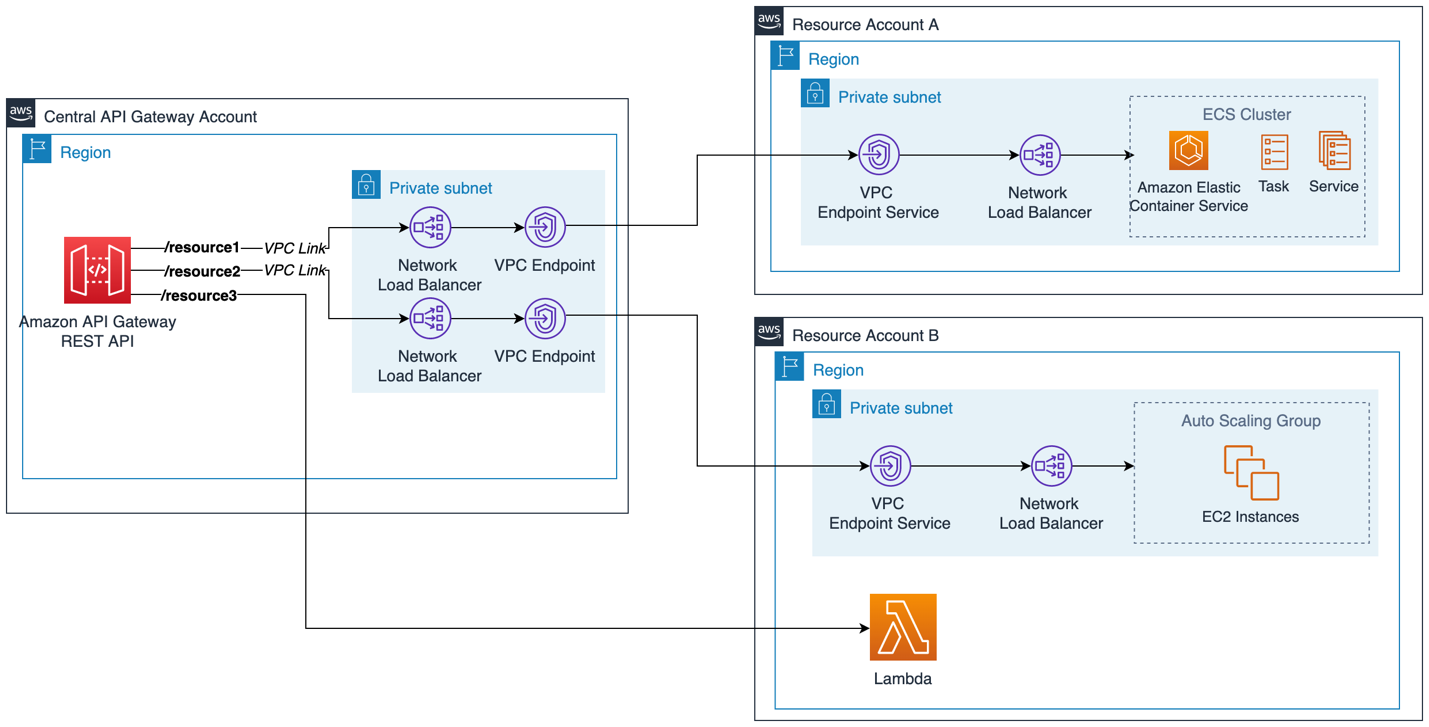
REST private cross-account integration using AWS PrivateLink and NLB
In the preceding example there is no private routing between the different account VPCs. PrivateLink provides a secure private connection to a single endpoint. Example use cases for this architecture include where there are overlapping CIDR ranges between VPCs, or you wish to provide access to only a specific service or application rather than create a route to all resources in another VPC.
With VPC links V2, you can use either an ALB or an NLB in the Central API Gateway Account as the VPC link target. ALB support for REST APIs via VPC Link V2 was introduced in November 2025. For existing implementations using VPC Link V1 or earlier REST API setups, migration to V2 might be required to leverage ALB integration. The load balancer's target group uses IP-type targets pointing to the private IP addresses of the VPC endpoints (PrivateLink connections to the Resource Accounts).
For this cross-account PrivateLink pattern, consider the following when choosing between ALB and NLB in the Central Account. ALB is appropriate when you need Layer 7 features in the Central Account, such as path-based routing to direct traffic to different Resource Account backends, or host-based routing to consolidate multiple services behind a single VPC link.
In the following architecture there is no private routing between the different account VPCs. PrivateLink provides a secure private connection to a single endpoint. Example use cases for this architecture include where there are overlapping CIDR ranges between VPCs, or you want to provide access to only a specific service or application rather than create a route to all resources in another VPC.

REST private cross-account integration using AWS PrivateLink and ALB
Resource Account Requirements
Each Resource Account must expose its backend behind an NLB configured as a VPC Endpoint Service target. Only Network Load Balancers (NLB) or Gateway Load Balancers (GWLB) can serve as VPC Endpoint Service targets. Application Load Balancers cannot be used directly as VPC Endpoint Service targets. If your backend uses ALBs, place an NLB in front of the ALB within the Resource Account.
The Resource Account NLB serves as the PrivateLink service provider and is separate from the Central Account load balancer used for the VPC link. This architecture requirement applies regardless of whether the Central Account uses VPC Link V1 or V2.
Connection Management
-
The Resource Account must accept VPC endpoint connection requests from the Central Account (or configure auto-accept)
-
VPC Endpoint Services can restrict access to specific AWS accounts or IAM principals through service policies
Best Practices
Central Account Configuration
-
Use IP-type target groups on the Central Account load balancer
-
Register VPC endpoint ENI private IP addresses as targets
-
Important: VPC endpoint IPs can change during maintenance - implement monitoring and automated target group updates
-
If using ALB in the Central Account, leverage content-based routing to direct traffic to different Resource Account backends
Monitoring and Security
-
Monitor VPC link V2 status for INACTIVE states
-
Implement VPC Endpoint Service policies in Resource Accounts to control cross-account access
-
Set up CloudWatch alarms for target group health and VPC endpoint status
If you already have a cross-account VPC architecture in place using VPC Peering or AWS Transit Gateway. NLB or ALB can be used for the VPC Link and pointed directly to the private IP addresses of the resources in a different account, removing the need for the VPC Endpoint and simplifying the architecture. This is shown in the following sample architecture.
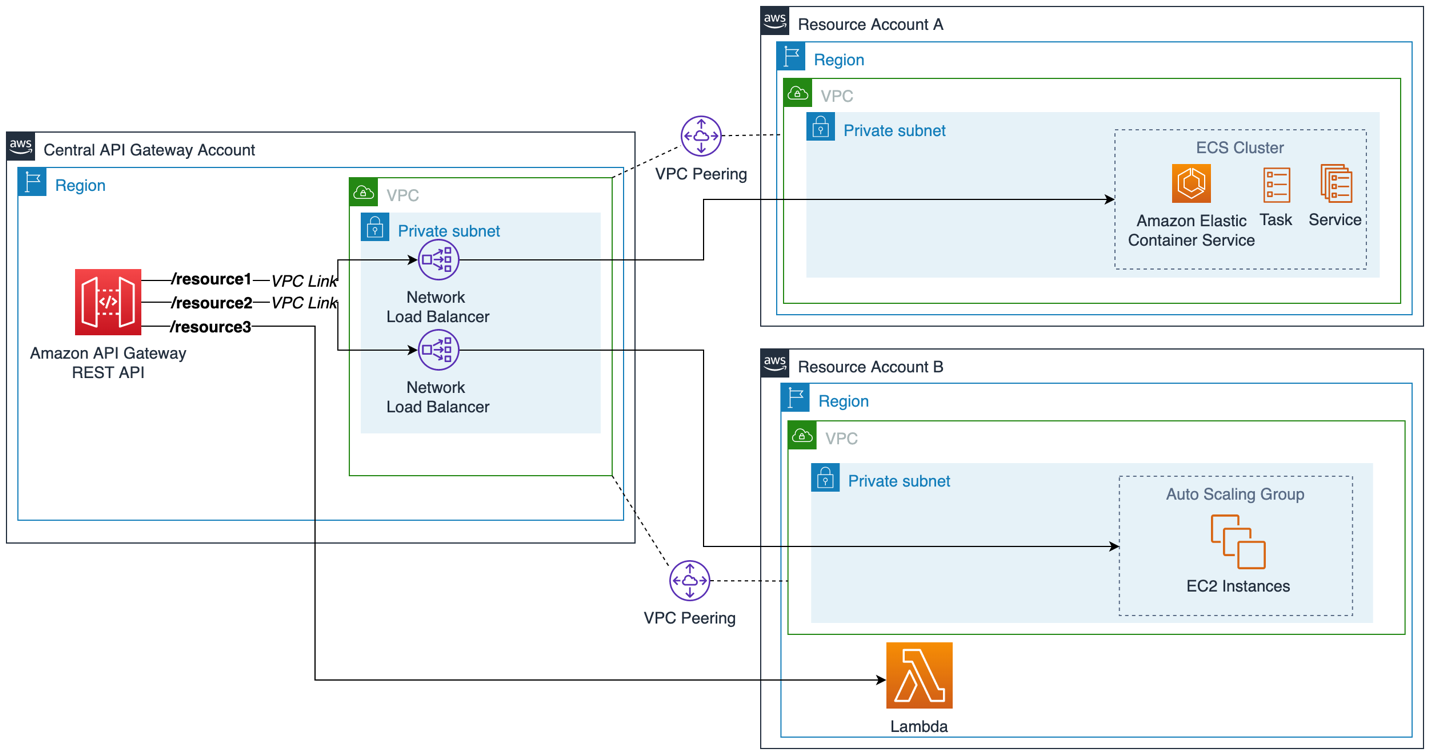
REST private cross-account integration using VPC Peering (NLB - ALB)
The following summary highlights the main architecture features of the API architectural patterns described above:
PrivateLink Pattern
-
Higher initial setup (VPC Endpoint Service and policies).
-
Ongoing operational complexity (VPC endpoint IP management).
-
Double load balancer architecture increases troubleshooting complexity.
-
More AWS resources to monitor and maintain.
-
CIDR overlapping supported.
VPC Peering Pattern
-
Lower setup if cross-account connectivity already exists.
-
Higher initial setup if peering needs to be established.
-
Simpler operational model (direct IP targeting).
-
Fewer components in the data path.
-
Requires careful CIDR planning to avoid overlaps.
Best Practices
-
Ensure VPC peering route tables are configured to allow traffic from the Central Account VPC subnets to the Resource Account backend subnets.
-
Use IP-type target groups on the Central Account load balancer. Register the backend resource private IP addresses as targets.
-
Configure security groups in the Resource Account to allow inbound traffic from the Central Account load balancer's CIDR range or security group.
-
Monitor the VPC link V2 status for the INACTIVE state.
-
Use stage variables to reference the VPC link V2 ID for flexibility across deployment stages.
