Las traducciones son generadas a través de traducción automática. En caso de conflicto entre la traducción y la version original de inglés, prevalecerá la version en inglés.
Notificaciones de eventos secretos
Secrets Manager publica eventos en Amazon EventBridge cuando las etiquetas de tus secretos cambian. Puede crear EventBridge reglas que coincidan con estos eventos y enviarlas a los objetivos para crear flujos de trabajo basados en eventos.
Cómo EventBridge dirige los eventos de Secrets Manager
A continuación se describe cómo EventBridge funciona con los eventos de Secrets Manager.
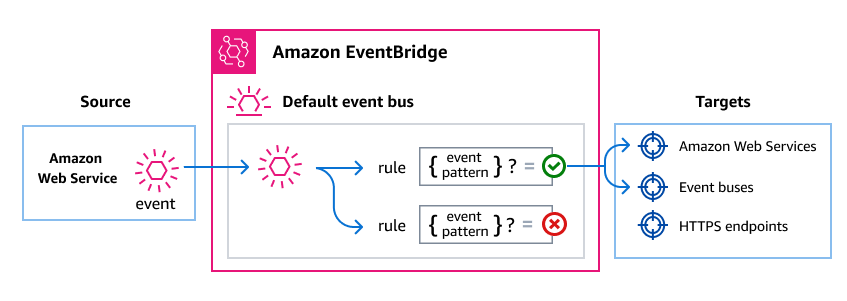
Como ocurre con muchos AWS servicios, Secrets Manager genera y envía eventos al bus de eventos EventBridge predeterminado. Un bus de eventos es un enrutador que recibe eventos y los envía a destinos u objetivos, que se especifican. Los objetivos pueden incluir otros AWS servicios, aplicaciones personalizadas y aplicaciones de socios de SaaS.
EventBridge enruta los eventos de acuerdo con las reglas que usted crea en el bus de eventos. Para cada regla, se debe especificar un filtro o patrón de eventos para seleccionar solo los eventos que desee. Cada vez que se envía un evento al bus de eventos, lo EventBridge compara con cada regla. Si el evento coincide con la regla, lo EventBridge enruta a los destinos especificados.
El siguiente diagrama muestra cómo EventBridge dirige los eventos de Secrets Manager desde el bus de eventos predeterminado a los destinos que especifique.
Para obtener más información, consulte Creación de reglas en la Guía del EventBridge usuario.
Eventos de Secrets Manager
Secrets Manager publica un Secret Label Updated evento en el bus de EventBridge eventos predeterminado cada vez que cambia una etiqueta de puesta en escena, excepto AWSPENDING yAWSPREVIOUS. Esto incluye etiquetas personalizadas. Los eventos están habilitados de forma predeterminada para todos los secretos. Para consumir estos eventos, debes crear EventBridge reglas que coincidan con ellos y dirigirlos a un objetivo. Para ver la lista completa de los servicios que puede utilizar como objetivos, consulte EventBridge los objetivos en la Guía del EventBridge usuario.
Secrets Manager no publica eventos para cambios en los metadatos, como las etiquetas, la descripción, la configuración de rotación o las actualizaciones de la política de recursos.
| Tipo de detalle del evento | Description (Descripción) |
|---|---|
|
Secrets Manager trasladó una etiqueta de puesta en escena a una nueva versión de un secreto. |
Estructura de evento
Todos los eventos de AWS los servicios contienen dos tipos de datos:
Un conjunto común de campos que contiene metadatos sobre el evento, como el AWS servicio que lo origina, la hora en que se generó el evento, la cuenta y la región en las que tuvo lugar el evento, etc. Para ver las definiciones de estos campos generales, consulte Estructura de eventos en Amazon EventBridge Events Reference.
-
Un campo
detailque contiene los datos específicos de ese evento en particular.
Crear patrones de eventos que coincidan con los eventos de Secrets Manager
Los patrones de eventos son filtros en los que se especifica qué datos deben contener los eventos que se desean seleccionar.
Cada patrón de eventos es un objeto JSON que contiene:
-
Un atributo
sourceque identifica el servicio que envía el evento. Para los eventos de Secrets Manager, la fuente esaws.secretsmanager. -
(Opcional): un atributo
detail-typeque contiene una matriz de los nombres de eventos que deben coincidir. -
(Opcional): un atributo
detailque contiene cualquier otro dato de evento con el que coincidir.
El siguiente patrón de eventos coincide con los eventos cuando la AWSCURRENT etiqueta pasa a una nueva versión, lo que indica que el valor secreto activo ha cambiado:
{
  "source": ["aws.secretsmanager"],
  "detail-type": ["Secret Label Updated"],
  "detail": {
    "labelUpdated": ["AWSCURRENT"]
  }
}
El siguiente patrón de eventos coincide con los cambios de etiqueta solo en el caso de los secretos cuyos nombres comiencen porMyTestSecret:
{
  "source": ["aws.secretsmanager"],
  "detail-type": ["Secret Label Updated"],
  "detail": {
    "name": [{"prefix": "MyTestSecret"}]
  }
}
El siguiente patrón de eventos combina filtros para que coincidan solo cuando se AWSCURRENT cambian los secretos con nombres que comienzan porprod/:
{
  "source": ["aws.secretsmanager"],
  "detail-type": ["Secret Label Updated"],
  "detail": {
    "name": [{"prefix": "prod/"}],
    "labelUpdated": ["AWSCURRENT"]
  }
}
Si utilizas etiquetas de organización personalizadas en tus flujos de trabajo, puedes hacer coincidir los eventos con esas etiquetas. El siguiente ejemplo coincide cuando MyLabel se mueve una etiqueta denominada:
{
  "source": ["aws.secretsmanager"],
  "detail-type": ["Secret Label Updated"],
  "detail": {
    "labelUpdated": ["MyLabel"]
  }
}
Para obtener más información sobre cómo escribir patrones de eventos, consulte Patrones de eventos en la Guía del EventBridge usuario.
La creación del patrón de eventos es un paso más en el proceso más amplio de creación de la regla. Para obtener más información, consulte Creación de reglas en la Guía del EventBridge usuario.
