Las traducciones son generadas a través de traducción automática. En caso de conflicto entre la traducción y la version original de inglés, prevalecerá la version en inglés.
Póngase en contacto con Lightsail como socio
Como socio de Amazon Lightsail, puede ponerse en contacto con el equipo de Lightsail si tiene preguntas o comentarios sobre sus esfuerzos como socio directamente desde la consola de Lightsail. Esta es también la forma en que puede solicitar el aumento de la cuota de servicio de Lightsail en todas las cuentas de los miembros de una organización.
Para contactar con el equipo de Lightsail
-
Inicie sesión en la consola de Lightsail.
-
En la página de inicio de Lightsail, elija su usuario o rol en el menú de navegación superior.
-
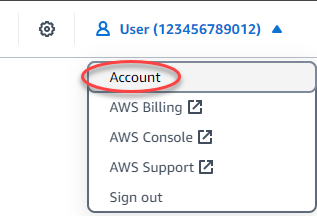
Elija Account (Cuenta) en el menú desplegable.
-
En la pestaña Perfil, en la sección de socios de Lightsail, seleccione Contactar con Lightsail.
importante
La acción Contactar con Lightsail solo está disponible para la cuenta que solicitó convertirse en socio de Lightsail y fue aceptada. Para obtener más información, consulte Conviértase en socio de Lightsail.

-
Complete los campos necesarios del formulario de solicitud. Si solicita un aumento de la cuota de servicio para Lightsail, puede especificar varias cuentas de miembros.

-
Seleccione Enviar.
Si proporciona su dirección de correo electrónico, es posible que lo contacten para dar seguimiento a sus comentarios.
