Las traducciones son generadas a través de traducción automática. En caso de conflicto entre la traducción y la version original de inglés, prevalecerá la version en inglés.
Flujo de datos, puertos y cifrado en Deadline Cloud
Las revisiones de seguridad del contenido, como las auditorías de seguridad de los estudios y los cuestionarios de incorporación de proveedores, requieren un diagrama de flujo de datos. El diagrama describe los componentes de la granja de renderizado, dónde se ejecuta cada componente, cómo se mueven los datos entre ellos y cómo se cifran las conexiones y los datos almacenados. El diagrama y las tablas de esta página responden a las preguntas de una implementación típica de AWS Deadline Cloud. Para obtener más información sobre los controles de seguridad que puede configurar para cada parte de la granja, consulteControles de seguridad en Deadline Cloud.
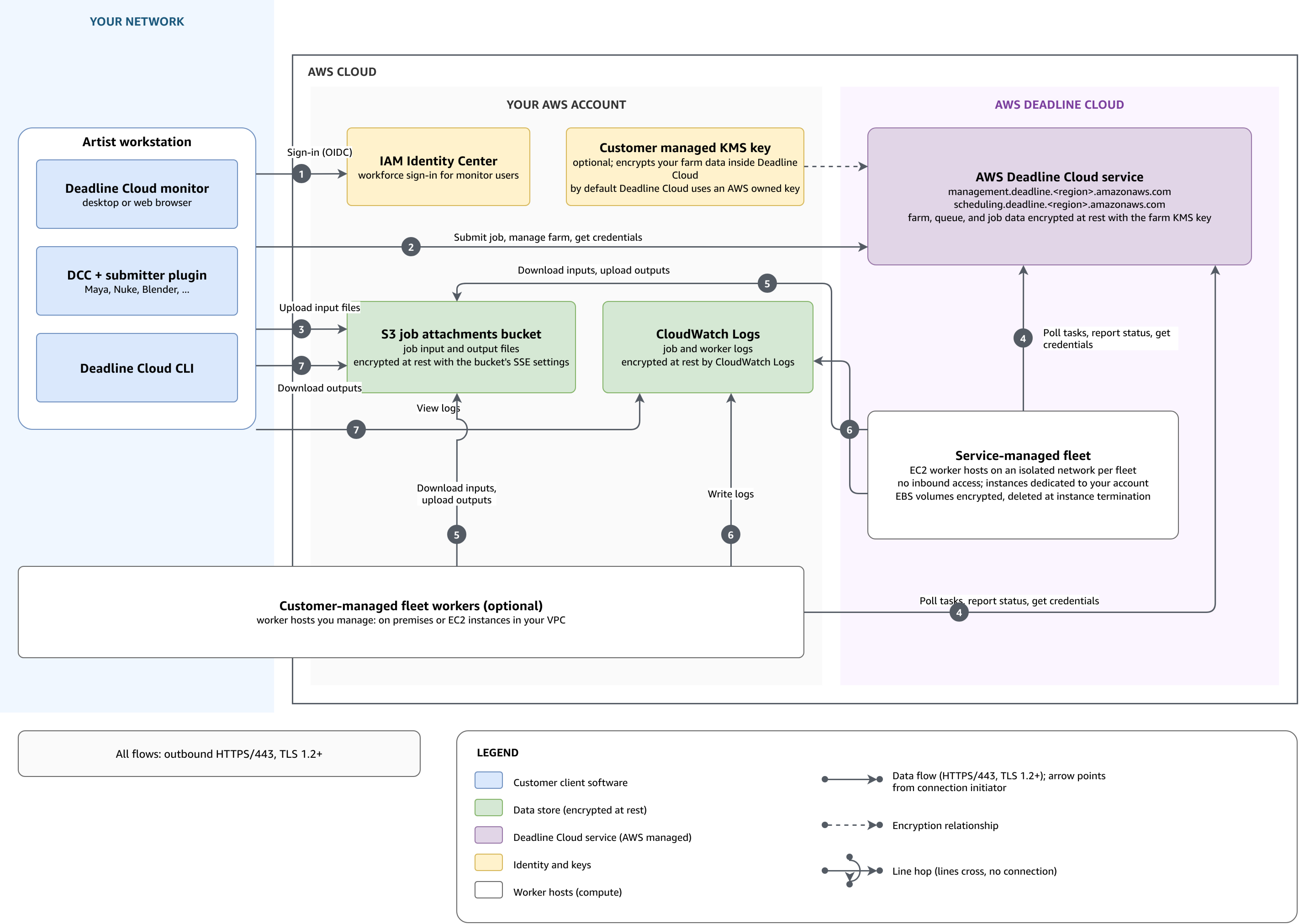
Los componentes y dónde se ejecutan
Una granja de renderizado de Deadline Cloud abarca tres ubicaciones: su red, su AWS cuenta y la propia Deadline Cloud, que AWS administra. Customer-managed los trabajadores de la flota son la excepción: tú eliges dónde trabajan.
En la tabla siguiente se describe cada componente y dónde se ejecuta.
| Componente | Dónde se ejecuta | Finalidad |
|---|---|---|
El monitor de Deadline Cloud, los remitentes integrados y la CLI de Deadline Cloud |
Su red |
Herramientas para clientes en estaciones de trabajo para artistas que envían trabajos, suben y descargan archivos y hacen un seguimiento del progreso de los trabajos. |
AWS IAM Identity Center |
Tu cuenta AWS |
Sign-in y niveles de acceso para los usuarios de monitoreo. Para obtener más información, consulte Administración de usuarios. |
Depósito de adjuntos de trabajos de Amazon Simple Storage Service |
Tu AWS cuenta |
Archivos de entrada y salida para trabajos. Cada cola tiene su propio bucket y prefijo raíz, por lo que los límites de los permisos de cola también se aplican a los archivos. |
Registros de Amazon CloudWatch |
Tu AWS cuenta |
Registros de trabajos y registros de trabajadores. |
AWS Key Management Service clave |
Tu AWS cuenta o AWS gestionada |
La clave que cifra los datos de tu granja en Deadline Cloud. De forma predeterminada, Deadline Cloud usa AWS una clave propia que tú no administras. Puedes proporcionar una clave gestionada por el cliente desde tu cuenta al crear la granja. Para obtener más información, consulte Administración de claves. |
Customer-managed trabajadores de la flota |
Su elección: máquinas en su red o instancias de Amazon Elastic Compute Cloud en su VPC |
Los servidores Worker que administras ejecutan tu software y el agente de trabajo de Deadline Cloud. Una flota gestionada por el cliente solo necesita acceso HTTPS saliente. Si los trabajadores trabajan en su VPC, los AWS PrivateLink puntos de enlace opcionales mantienen su tráfico dentro de la VPC. |
Servicio Deadline Cloud |
AWS gestionado |
Los puntos finales del servicio |
Service-managed trabajadores de la flota |
AWS gestionado |
Instancias de Amazon EC2 en una red aislada para cada flota. Las instancias están dedicadas a su cuenta y no aceptan conexiones entrantes. |
Flujos de datos, puertos y protocolos
Todos los clientes y trabajadores del diagrama inician sus conexiones de salida a un AWS punto final a través de HTTPS en el puerto TCP 443. Necesitamos TLS 1.2 para cifrar las conexiones en tránsito y recomendamos TLS 1.3. Deadline Cloud no realiza conexiones entrantes a tu red. Los números de flujo de la tabla siguiente coinciden con los números del diagrama.
| Flujo | Connection | Description (Descripción) |
|---|---|---|
1 |
Supervise hasta el centro de identidad de IAM |
Supervise el inicio de sesión de los usuarios AWS IAM Identity Center con OpenID Connect (OIDC). |
2 |
Desde la estación de trabajo hasta el punto final de administración |
Los remitentes, la CLI y el monitor envían los trabajos, administran los recursos de la granja y solicitan credenciales de funciones temporales a través de ellos. |
3 |
De estación de trabajo a Amazon S3 |
Los archivos adjuntos al trabajo suben los archivos de entrada al bucket de Amazon S3 de la cola. |
4 |
Los trabajadores van al punto final de programación |
Los trabajadores de ambos tipos de flotas consultan las tareas, informan sobre el progreso y el estado y solicitan credenciales de puestos temporales a través de ellas |
5 |
¿Trabajan en Amazon S3? |
Los trabajadores descargan los archivos de entrada del bucket de la cola y suben los archivos de salida a él. |
6 |
Workers to Logs CloudWatch |
El agente trabajador escribe los registros de trabajos y trabajadores. |
7 |
De la estación de trabajo a CloudWatch Logs y a Amazon S3 |
El monitor lee los registros de trabajos y el monitor y la CLI descargan los archivos de salida. |
Ni las herramientas del cliente ni los trabajadores tienen credenciales duraderas para los recursos de la cola. Ambos solicitan credenciales temporales a Deadline Cloud y reciben los permisos que tú atribuyes a las funciones de cola y flota:
-
El monitor, la CLI y los remitentes llaman
AssumeQueueRoleForUserpara cargar y descargar los archivos adjuntos de los trabajos y para acceder a ellos en modo de solo lectura, por ejemplo,AssumeQueueRoleForReadpara leer los registros de los trabajos. -
Un trabajador
AssumeFleetRoleForWorkersolicita la función de flota y, a continuación,AssumeQueueRoleForWorkerla función de cola del trabajo que ejecuta.
Para obtener más información sobre los roles y lo que otorga cada uno, consulteRoles de servicio.
Si tu estudio filtra el tráfico web saliente, consulta Entornos de red restringidos la lista completa de terminales que se pueden incluir en la lista. Para mantener el tráfico entre tu VPC y Deadline Cloud alejado de la Internet pública, usa los puntos finales de la interfaz. AWS PrivateLink Para obtener más información, consulte Acceso AWS Deadline Cloud utilizando un punto final de interfaz (AWS PrivateLink).
Acceso a la aplicación web del monitor
Se puede acceder a la URL de su monitor desde cualquier ubicación de Internet y no puede restringirla a un conjunto de direcciones IP. https:// La URL sirve a la aplicación web del monitor, que es la misma aplicación para todos los monitores de Deadline Cloud. La aplicación no contiene ningún dato sobre su granja, cola o empleo, y cualquier persona que abra la URL verá una página de inicio de sesión.monitor-alias.region.deadlinecloud.amazonaws.com
Los datos de tu granja llegan al monitor a través de las API de Deadline Cloud, por lo que en las llamadas a la API se concede o deniega el acceso. Tras iniciar sesión a través del AWS IAM Identity Center (IAM Identity Center), Deadline Cloud asume la función de monitor en tu nombre. A continuación, el monitor llama a las API desde el navegador con las credenciales temporales del rol. IAM autoriza todas las llamadas. Las políticas administradas sobre la función de monitor permiten cada acción solo en los niveles de acceso que usted haya otorgado. Para obtener más información, consulte Rol de supervisión y Administración de usuarios.
Para que solo se pueda acceder a los datos de la granja desde su propia red, aplique la restricción a las llamadas a la API en lugar de a la URL. Solo puedes permitir tus intervalos de IP o solo las solicitudes que lleguen a través de los puntos de enlace de la VPC. Para obtener más información, consulte Restrinja el acceso de las granjas a su red.
Resumen del cifrado
Cada almacén de datos se cifra en reposo de forma independiente. La AWS KMS clave de granja solo se aplica a los datos que contiene Deadline Cloud; su bucket de Amazon S3 y sus grupos de registros utilizan su propia configuración de cifrado.
-
En tránsito: todas las conexiones utilizan HTTPS; se requiere TLS 1.2 y se recomienda TLS 1.3. Para obtener más información, consulte Cifrado en tránsito.
-
Datos de la granja: el servicio Deadline Cloud cifra los datos de la granja, las colas y los trabajos en reposo con la clave de la granja. AWS KMS Puedes usar la clave propia predeterminada o proporcionar una clave AWS gestionada por el cliente al crear la granja. Para obtener más información, consulte Administración de claves.
-
Archivos adjuntos de trabajo: Amazon Simple Storage Service cifra los archivos de entrada y salida en reposo con el cifrado del lado del servidor configurado en el bucket. De forma predeterminada, Amazon S3 usa las claves administradas de Amazon S3 (). SSE-S3 Para usar su propia AWS KMS clave en su lugar, configure el bucket SSE-KMS y conceda al rol de cola acceso a la clave. Para obtener más información, consulte Adjuntos los trabajos en Deadline Cloud.
-
Volúmenes de trabajadores: en las flotas gestionadas por servicios, Deadline Cloud cifra los volúmenes de Amazon Elastic Block Store adjuntos a las instancias de trabajo y elimina los volúmenes cuando las instancias finalizan. Para obtener más información, consulte Cifrado en reposo.
-
Registros: Amazon CloudWatch Logs cifra los registros de trabajos y los registros de trabajadores en reposo con su propio cifrado del lado del servidor. Para usar su propia AWS KMS clave en su lugar, asocie la clave al grupo de registros. Para obtener más información, consulte Cifrar datos de registro en CloudWatch registros utilizando AWS KMS la guía del usuario de Amazon CloudWatch Logs.
