Uso de las implementaciones azul/verde para base de datos global de Amazon Aurora
Las implementaciones azul/verde de Amazon RDS ofrecen la capacidad de probar los cambios en las bases de datos de forma segura. Para la base de datos global, las implementaciones azul/verde le permiten realizar operaciones de actualización y mantenimiento con un tiempo de inactividad mínimo. Puede crear un entorno provisional totalmente administrado (verde) que refleje todo el entorno de producción (azul), incluido el clúster principal y todas las regiones secundarias asociadas en varias regiones de AWS. El entorno provisional refleja su configuración de producción, lo que le permite probar los cambios de forma fiable antes de cambiarse al nuevo entorno. Durante todo el proceso, las implementaciones azul/verde mantienen sincronizados los entornos provisionales y de producción. Cuando esté listo para convertir su entorno provisional en el nuevo entorno de producción, realice una transición azul/verde. Esta operación hace que las regiones principales y todas las secundarias pasen a un entorno verde, con un tiempo de inactividad normalmente inferior a un minuto. El servicio cambia automáticamente el nombre de los clústeres, las instancias y los puntos de conexión para que coincidan con el entorno de producción original, lo que permite a las aplicaciones acceder al nuevo entorno de producción sin necesidad de cambios de configuración y minimiza la sobrecarga operativa.
Temas
Beneficios de usar implementaciones azul/verde con base de datos global de Aurora
-
Realice actualizaciones de la versión principal, la versión secundaria y el sistema, incluidos parches de bases de datos y actualizaciones del sistema operativo en las bases de datos globales de Aurora, a la vez que mantiene un tiempo de inactividad mínimo.
-
Cree un entorno provisional (verde) listo para la producción en las regiones principal y secundaria de la base de datos global para probar e implementar las nuevas características de la base de datos.
-
Realice la transición de forma segura mediante las barreras de protección de transición integradas, con un tiempo de inactividad normalmente inferior a un minuto, en función de la carga de trabajo.
-
Mantiene las capacidades de recuperación ante desastres durante el proceso de transición azul/verde, lo que permite la conmutación por error de base de datos global durante la transición azul/verde.
-
El tráfico se dirigirá al nuevo entorno de producción sin necesidad de realizar cambios en las aplicaciones.
Como funcionan las implementaciones azul/verde con la base de datos global de Aurora
Para obtener más información sobre cómo crear, ver, cambiar y eliminar una implementación azul/verde, consulte Uso de las implementaciones azul/verde de Amazon Aurora para actualizar las bases de datos. Puede utilizarla para realizar actualizaciones de versiones principales o secundarias, mejorar el rendimiento de la base de datos mediante actualizaciones de parámetros y adoptar nuevas características de base de datos, con un tiempo de inactividad mínimo.
A continuación, se muestra una representación de cómo se ve una implementación azul/verde de la base de datos global de Aurora con una región secundaria antes y después de una transición azul/verde.
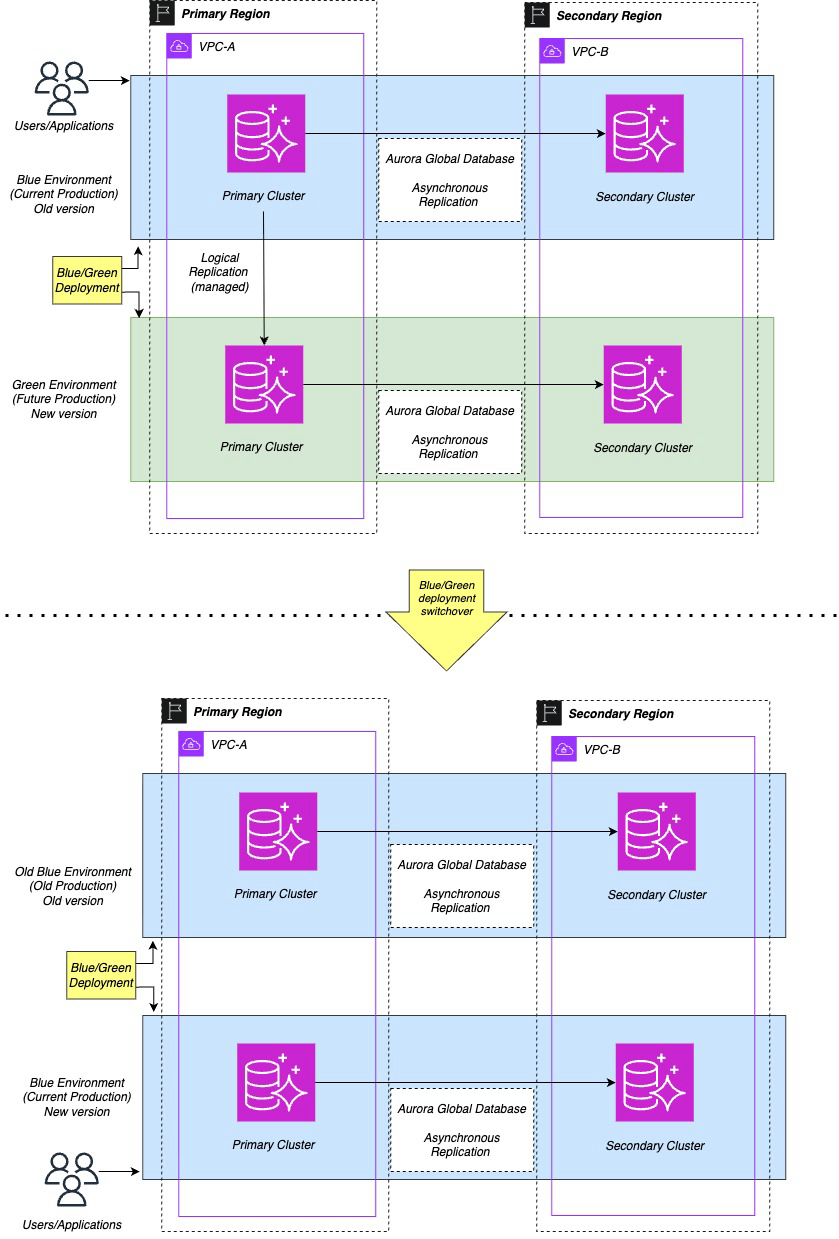
Puede crear una implementación azul/verde a partir de la región principal de la base de datos global. Seleccione las configuraciones del motor, como la versión principal o secundaria del motor, el grupo de parámetros de base de datos y el grupo de parámetros del clúster de base de datos para el entorno verde. Amazon RDS copia la topología del entorno azul para el entorno verde. A continuación, se muestra una representación visual en la Consola de administración de AWS.

nota
La conmutación por error global se admite durante una transición azul/verde, pero la transición global no se admite durante una transición azul/verde.
Cuando se inicia una conmutación por error global durante una transición azul/verde de RDS, la región de destino vuelve automáticamente al entorno azul o avanza al entorno verde antes de que se produzca la conmutación por error global.
Para obtener información sobre cómo crear, ver, cambiar y eliminar implementaciones azul/verde, consulte Uso de las implementaciones azul/verde de Amazon Aurora para actualizar las bases de datos. Siga el mismo flujo de trabajo para las bases de datos globales, con instrucciones específicas en los pasos correspondientes.
