Edit quick responses in Connect Customer
This topic explains how to use the Connect Customer admin website to edit a quick response. To edit a quick response programmatically, see UpdateQuickResponse in the Connect AI agents API Reference.
To edit a response
-
Log in to the Connect Customer admin website at https://instance name.my.connect.aws/. Use an Admin account, or an account assigned to a security profile that has Content Management - Quick responses - Edit permission.
-
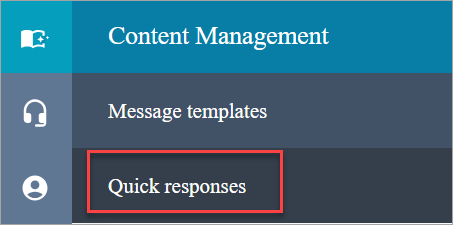
On the navigation bar, choose Content Management, then Quick responses.
-
On the Quick responses page, choose the name of the quick response that you want to edit. You can also select the checkbox next to the response, then choose Edit.
-
As needed, change the following fields:
-
Name
-
Description
-
Shortcut key
-
Routing Profiles
-
Activate/Deactivate quick response
-
Content
-
Channel
-
-
Choose Save.
