Use customer first callback mode in Connect Customer
When you set up queued callbacks, you have the additional choice of whether to use agent first callback mode or customer first callback mode.
-
Agent first callback mode is the default. The callback is offered to an agent to accept or reject before the call is dialed to a customer.
-
Customer first callback mode is available only when Next Generation Connect Customer is enabled for your Connect Customer instance. In this mode, Connect Customer dials the customer first and only offers the callback to an agent if the customer answers the callback that they've received.
Important
-
Customer first callback mode is not available in the pay-per-feature pricing model.
-
If you disable Next Generation Connect Customer after you've already activated and started using customer first callback, customer first callback mode is also disabled.
Contents
The lifecycle of a customer first callback
The lifecycle for customer first callbacks is spread across three different contacts, as shown in the following diagram.
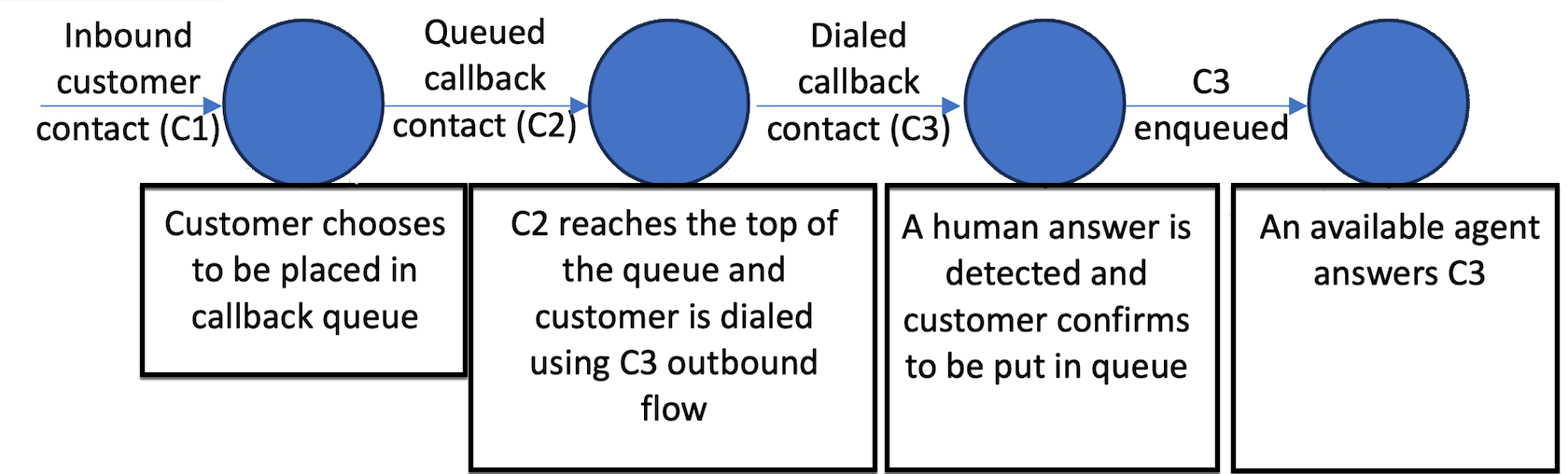
Following is a description of each contact.
-
Inbound customer contact (C1) is an inbound voice contact. It looks like every other inbound customer contact.
-
Queued callback contact (C2) is the queued leg of the customer first callback. It has a new initiation method of CALLBACK_CUSTOMER_FIRST_QUEUED.
-
C2 triggers the creation flow, if you selected Set creation flow in the Transfer to queue block. It does this before it is queued in the working queue, and after the Initial delay, if that is specified in the Transfer to queue block.
-
C2 does not support the Maximum number of retries and Minimum time between attempts settings in the Transfer to queue block. That functionality is only available for agent first callbacks.
-
-
Dialed callback contact (C3) is the dialed leg of the customer first callback. It has a new initiation method of CALLBACK_CUSTOMER_FIRST_DIALED.
-
C3 triggers the required outbound callback flow that you specified in the Transfer to queue flow block. You only specify an outbound callback flow for customer first callback mode, not for agent first callback mode.
-
For customer first callbacks, you configure retries and time between attempts in the outbound flow specified for C3, based on the output of the Check call progress flow block. The purpose of this is to determine whether a contact has been answered by a voicemail or human voice.
-
After the customer's presence is confirmed, the flow for C3 should have a Transfer to queue flow block configured to place the contact in its queue to find the next available agent.
-
You can customize the routing priority of this contact within the flow by using the Set routing criteria or Change routing priority / age blocks.
-
Note
-
You must set the final working queue at least once before C2 is created.
-
You can do this in the C1 inbound flow by using the Set working queue. Or, while configuring C2 you can specify the queue in the Transfer to queue block.
-
You can modify the final working queue by using Set creation flow for C2, or by using the outbound flow that you specify for C3.
-
-
When you set the final working queue for the callback at any point in the contact's lifecycle (step C1, C2, or C3), the following stages inherit it.
Retries for customer first callbacks
Retry behavior for customer first callbacks differs significantly from agent first callbacks. Retries are configured on the dialed callback contact (C3), not on the queued callback contact (C2).
How retries work
-
C2 does not support retries. The Maximum number of retries and Minimum time between attempts settings in the Transfer to queue block are only available for agent first callbacks.
-
For customer first callbacks, retries are configured in the outbound callback flow specified for C3.
-
When a retry is needed (for example, voicemail is detected), a new dialed callback contact – C4 – is created. C4 inherits the user-defined attributes set on C3.
Configure retries with Check Call Progress
Use the Check call progress block in the C3 outbound flow to detect whether a human or voicemail answered the call. Based on the output, configure the flow as follows:
-
Voicemail detected (
VOICEMAIL_BEEP,VOICEMAIL_NO_BEEP) – Set aretryattribute on C3, then recreate the callback contact (C4). -
Human detected (
HUMAN_ANSWERED) – Transfer to queue so an agent can join the call. -
Other or unresolved states – Configure fallback handling as needed.
The AnsweringMachineDetectionStatus field on the C3 contact record
captures the full answering machine detection result. Possible values
include:
HUMAN_ANSWERED | VOICEMAIL_BEEP |
VOICEMAIL_NO_BEEP | AMD_UNANSWERED |
AMD_UNRESOLVED | AMD_NOT_APPLICABLE |
SIT_TONE_BUSY | SIT_TONE_INVALID_NUMBER |
SIT_TONE_DETECTED | FAX_MACHINE_DETECTED |
AMD_ERROR
Adjust priority for retry contacts
To ensure retry contacts are routed appropriately, use the callback creation flow that runs when the C4 contact is created. The recommended approach is:
-
Set a retry attribute on C3 – Before recreating the callback contact, use a Set contact attributes block in the C3 outbound flow to add a user-defined attribute (for example,
retry = true). -
C4 inherits C3's user-defined attributes – When the C4 contact is created, it automatically inherits all user-defined attributes from C3, including the
retryattribute. -
Check for the retry attribute in C4's callback creation flow – In the callback creation flow configured for C4, use a Check contact attributes block to evaluate whether the
retryattribute is present. -
Adjust routing priority if retrying – If the
retryattribute is present, use a Set routing criteria or Change routing priority / age block to enqueue the contact with an adjusted priority before it enters the working queue.
This approach allows you to differentiate first-attempt callbacks from retries and apply custom prioritization logic without relying on external state.
Note
Retry contacts (C4) are placed at the back of the queue – they do not retain their original position. You can compensate for this by adjusting routing priority or routing age in C4's callback creation flow as described above.
Note
The Set routing criteria block can be used in the outbound flow to dynamically increase priority across retry attempts (for example, priority 5 to 3 to 1 using a retry counter attribute). Priority changes take effect at the point the contact re-enters the queue.
Control retry timing
By default, retry timing is not system-controlled for customer first callbacks – you have full control over when a retry is initiated.
To introduce a delay between retry attempts, add a Wait block in the C4 creation flow before transferring to queue. This allows you to define a specific interval (for example, wait 5 minutes before queueing), preventing immediate back-to-back dial attempts.
A typical retry flow with timing control looks like:
-
Check call progress – voicemail detected.
-
Set contact attributes – set
retry = true(and optionally increment a retry counter). -
Create callback – recreate the contact as C4.
-
Wait block – for the desired interval before queueing.
Metrics for customer first callbacks
You can access the following metrics in either the Queue performance dashboard or by using the GetMetricDataV2 API.
Example contact records for customer first callbacks
Following are example contact records to show what information is stored for the C2 and C3 legs of a customer first callback.
Example C2 queued customer first callback contact record
InitialContactId : C1 (Inbound contact)
ContactId : C2 (this contact)
PreviousContactId : C1 (Inbound contact)
NextContactId : C3 (Dialed customer first callback contact)
Channel : VOICE,
InitiationMethod : CALLBACK_CUSTOMER_FIRST_QUEUED,

ConnectedToSystemTimeStamp : time // Timestamp when callback creation flow got started

CustomerEndpoint : customer phone number endpoint

DisconnectTimestamp : time // Timestamp indicating contact is disconnected and customer will be dialed

DisconnectReason : // Disconnect reason code

InitiationTimeStamp : time // Timestamp indicating customer first callback has been created in connect systems

QueueInfo : {
    Arn : arn // Queue arn representing customer first callback queue
    EnqueueTimeStamp : time // Timestamp indicating customer first callback has been put in queue and waiting out to dial.
    DequeueTimeStamp : time // Timestamp indicating customer first callback has been taken out from queue to dial out end customer.
    Duration : time // total time it took connect systems to dial out end customer.
}
Example C3 dialed customer first callback contact
InitialContactId : C1 (Inbound contact)
ContactId : C3 (this contact)
PreviousContactId : C2 (Queued customer first callback contact)
Channel : VOICE,
InitiationMethod : CALLBACK_CUSTOMER_FIRST_DIALED,

ConnectedToSystemTimeStamp : time // Timestamp when the outbound call associated with callback was connected with customer.

CustomerEndpoint : customer phone number endpoint

SystemEndpoint : Outbound caller id assigned to the outbound queue

Agent : {
    // All agent information associated with the outbound call.
    // Like Agent Arn, ConnectToAgentTimestamp, ACW duration etc.
}

AgentConnectionAttempts : number

DisconnectTimestamp : time // Timestamp indicating outbound call for the callback is disconnected

DisconnectReason : // Disconnect reason code

SegmentAttributes : {
    'connect:TrafficType' : 'CUSTOMER_FIRST_CALLBACK'
},

AnsweringMachineDetectionStatus : HUMAN_ANSWERED|VOICEMAIL_BEEP|VOICEMAIL_NO_BEEP|AMD_UNANSWERED|AMD_UNRESOLVED|AMD_NOT_APPLICABLE|SIT_TONE_BUSY|SIT_TONE_INVALID_NUMBER|SIT_TONE_DETECTED|FAX_MACHINE_DETECTED|AMD_ERROR|AMD_UNRESOLVED_SILENCE(WIP)

CustomerVoiceActivity : {
    GreetingStartTimestamp : timestamp
    GreetingEndTimestamp : timestamp
}

InitiationTimeStamp : time // Timestamp indicating start of outbound call to customer

QueueInfo : {
    Arn : arn // Queue arn representing customer first callback queue
    EnqueueTimeStamp : time // Timestamp indicating customer first callback has been put in queue to join with agent.
    DequeueTimeStamp : time // Timestamp indicating customer first callback has been taken out from queue to join with agent.
    Duration : time // total time it took connect systems to join dialed end customer with agent.
    CallbackTotalQueueDuration : time // total time the customer first callback spent in queue (Includes the total queued time for C2 and C3.)
}
Sample flows for customer first callbacks
The following sample flows show how you can configure a flow for customer first callbacks.
Sample Inbound call flow
The following image shows a Transfer to queue block in a flow.

In this flow, the Transfer to queue has Set creation flow configured and an outbound dial flow is specified.

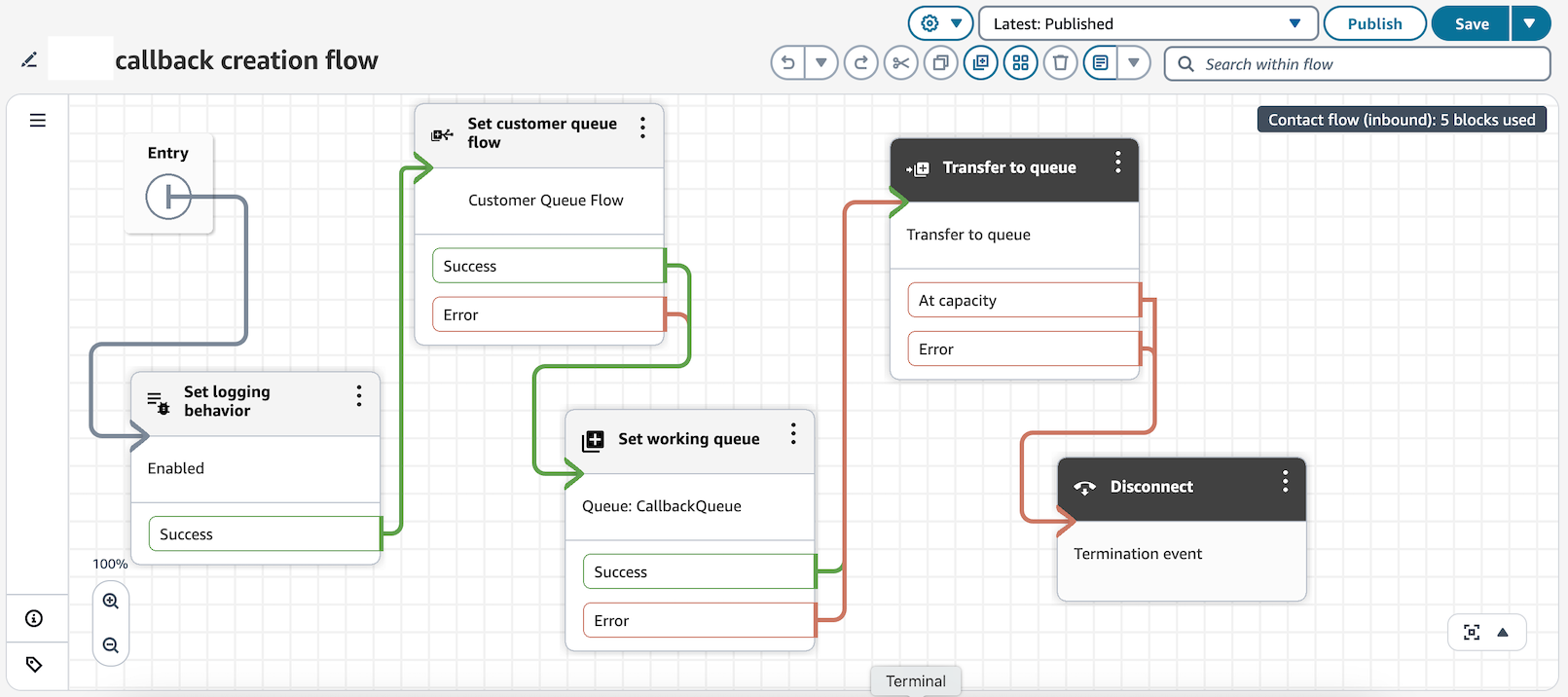
Sample callback creation flow configuration
The following image shows a sample callback creation flow. The Set customer queue flow block is configured so a customer queue flow runs while the callback contact is in queue waiting for agent availability to dial out to customers.
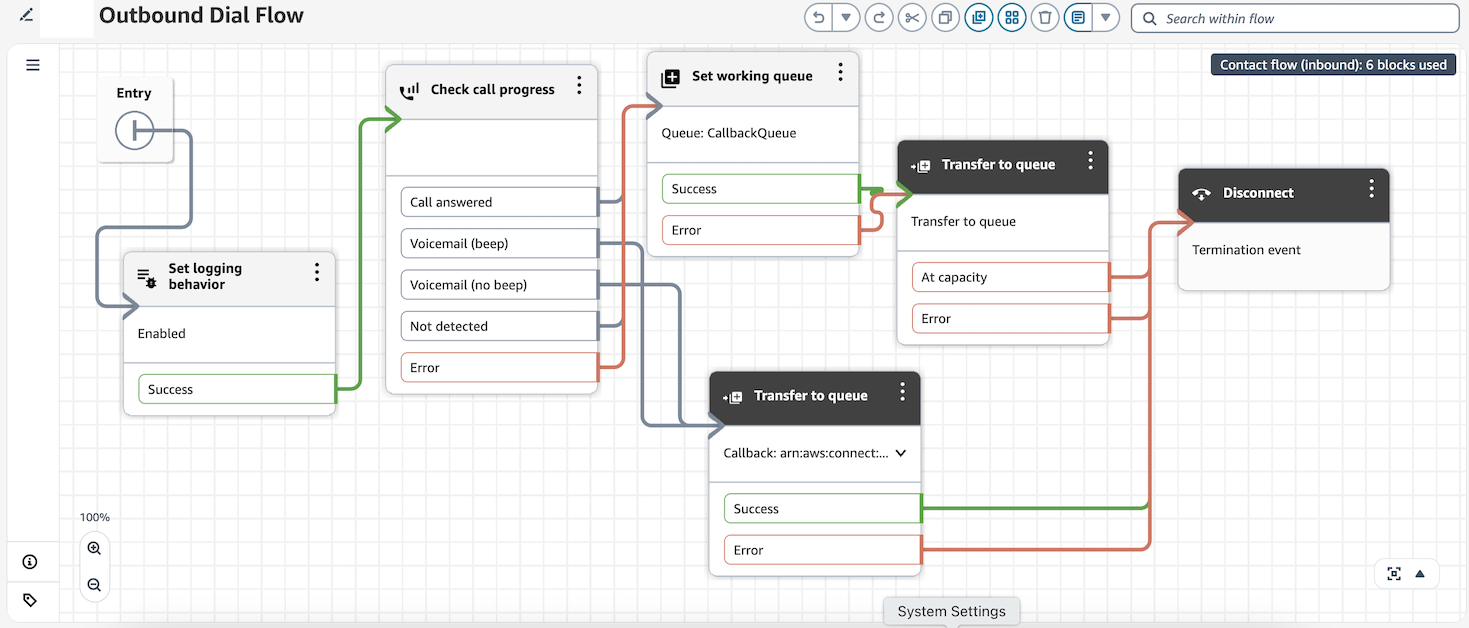
Example outbound dial flow for callbacks
In the outbound dial flow shown in the following image, Connect Customer evaluates the presence of the customer by using a Check call progress block. If voicemail is detected, a callback contact is recreated. If a customer is detected on other end of the call, the call is transferred to queue for the agent to be joined to the customer.