How lifecycle hooks work in Auto Scaling groups
An Amazon EC2 instance transitions through different states from the time it launches until it is terminated. You can create custom actions for your Auto Scaling group to act when an instance transitions into a wait state due to a lifecycle hook.
The following illustration shows the transitions between Auto Scaling instance states when you use lifecycle hooks for scale out and scale in.
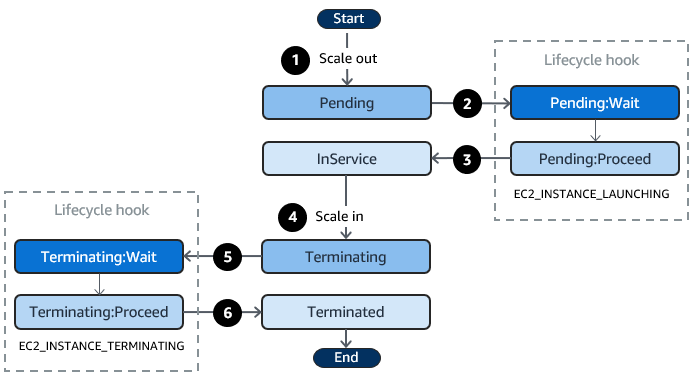
As shown in the preceding diagram:
-
The Auto Scaling group responds to a scale-out event and begins launching an instance.
-
The lifecycle hook puts the instance into a wait state (
Pending:Wait) and then performs a custom action.The instance remains in a wait state until you either complete the lifecycle action, or the timeout period ends. By default, the instance remains in a wait state for one hour, and then the Auto Scaling group continues the launch process (
Pending:Proceed). If you need more time, you can restart the timeout period by recording a heartbeat. If you complete the lifecycle action when the custom action has completed and the timeout period hasn't expired yet, the period ends and the Auto Scaling group continues the launch process. -
The instance enters the
InServicestate and the health check grace period starts. However, before the instance reaches theInServicestate, if the Auto Scaling group is associated with an Elastic Load Balancing load balancer, the instance is registered with the load balancer, and the load balancer starts checking its health. After the health check grace period ends, Amazon EC2 Auto Scaling begins checking the health state of the instance. -
The Auto Scaling group responds to a scale-in event and begins terminating an instance. If the Auto Scaling group is being used with Elastic Load Balancing, the terminating instance is first deregistered from the load balancer. If connection draining is enabled for the load balancer, the instance stops accepting new connections and waits for existing connections to drain before completing the deregistration process.
-
The lifecycle hook puts the instance into a wait state (
Terminating:Wait) and then performs a custom action.The instance remains in a wait state either until you complete the lifecycle action, or until the timeout period ends (one hour by default). After you complete the lifecycle hook or the timeout period expires, the instance transitions to the next state (
Terminating:Proceed). -
The instance is terminated.
Important
Instances in a warm pool also have their own lifecycle with corresponding wait states, as described in Lifecycle state transitions for instances in a warm pool.
Lifecycle state transitions for instances undergoing root volume replacement
The following diagram shows the transition between Auto Scaling instance states when you use lifecycle hooks for replace root volume:

As shown in the preceding diagram:
-
Auto Scaling group responds to an instance refresh and selects an instance for root volume replacement. The instance enters the
ReplacingRootVolumestate. If the instance is registered with a load balancer it is deregistered from the load balancer. -
The lifecycle hook puts the instance into a wait state (
ReplacingRootVolume:Wait) and then performs a custom action. The instance remains in a wait state until you either complete the lifecycle action, or the timeout period ends. If you complete the lifecycle action when the custom action has completed and the timeout period hasn't expired yet, the period ends and the Auto Scaling group continues the root volume replacement process. -
The instance completes its root volume replacement and enters the
RootVolumeReplacedstate. -
The instance enters the
Pendingstate. -
The lifecycle hook puts the instance into a wait state (
Pending:Wait) and then performs a custom action. The instance remains in a wait state either until you complete the lifecycle action, or until the timeout period ends. After you complete the lifecycle hook or the timeout period expires, the instance transitions to the next state (Pending:Proceed). -
The instance enters the
InServicestate. However, before the instance reaches theInServicestate, if the Auto Scaling group is associated with an Elastic Load Balancing load balancer, the instance is registered with the load balancer.
