# Using Elastic Beanstalk with other AWS services
The topics in this section describe the many ways you can use additional AWS services with your Elastic Beanstalk application. To implement your application's environments, Elastic Beanstalk manages resources of other AWS services or uses their functionality. In addition, Elastic Beanstalk integrates with AWS services that it doesn't use directly as part of your environments.
**Topics**
+ [Architectural overview](#AWSHowTo.architecture)
+ [Using Elastic Beanstalk with Amazon CloudFront](AWSHowTo.cloudfront.md)
+ [Logging Elastic Beanstalk API calls with AWS CloudTrail](AWSHowTo.cloudtrail.md)
+ [Using Elastic Beanstalk with Amazon CloudWatch](AWSHowTo.cloudwatch.md)
+ [Using Elastic Beanstalk with Amazon CloudWatch Logs](AWSHowTo.cloudwatchlogs.md)
+ [Using Elastic Beanstalk with Amazon EventBridge](AWSHowTo.eventbridge.md)
+ [Finding and tracking Elastic Beanstalk resources with AWS Config](AWSHowTo.config.md)
+ [Using Elastic Beanstalk with Amazon DynamoDB](AWSHowTo.dynamoDB.md)
+ [Using Elastic Beanstalk with Amazon ElastiCache](AWSHowTo.ElastiCache.md)
+ [Using Elastic Beanstalk with Amazon Elastic File System](services-efs.md)
+ [Using Elastic Beanstalk with AWS Identity and Access Management](AWSHowTo.iam.md)
+ [Using Elastic Beanstalk with Amazon RDS](AWSHowTo.RDS.md)
+ [Using Elastic Beanstalk with Amazon S3](AWSHowTo.S3.md)
+ [Using Elastic Beanstalk with AWS Secrets Manager and AWS Systems Manager Parameter Store](AWSHowTo.secrets.md)
+ [Using Elastic Beanstalk with Amazon VPC](vpc.md)
## Architectural overview
The following diagram illustrates an example architecture of Elastic Beanstalk across multiple Availability Zones working with other AWS products such as Amazon CloudFront, Amazon Simple Storage Service (Amazon S3), and Amazon Relational Database Service (Amazon RDS).
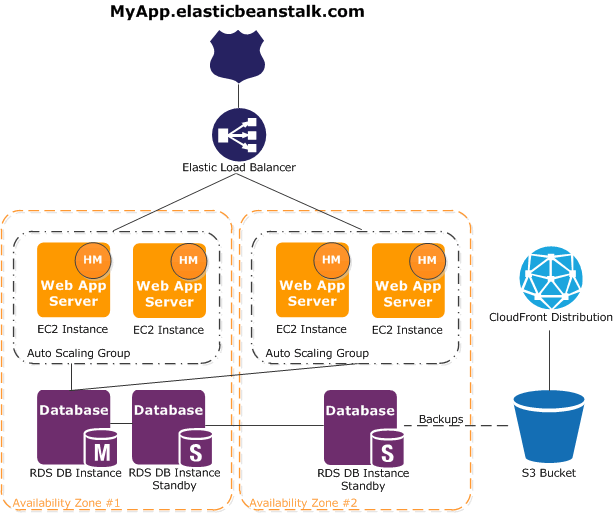
To plan for fault-tolerance, it is advisable to have N\+1 Amazon EC2 instances and spread your instances across multiple Availability Zones. In the unlikely case that one Availability Zone goes down, you will still have your other Amazon EC2 instances running in another Availability Zone. You can adjust Amazon EC2 Auto Scaling to allow for a minimum number of instances as well as multiple Availability Zones. For instructions on how to do this, see [Auto Scaling your Elastic Beanstalk environment instances](using-features.managing.as.md). For more information about building fault-tolerant applications, go to [ Building Fault-Tolerant Applications on AWS](http://media.amazonwebservices.com/AWS_Building_Fault_Tolerant_Applications.pdf).
The following sections discuss in more detail integration with Amazon CloudFront, Amazon CloudWatch, Amazon DynamoDB Amazon ElastiCache, Amazon RDS, Amazon Route 53, Amazon Simple Storage Service, Amazon VPC , and IAM.