Integrating AWS DevOps Agent with Amazon EventBridge
You can integrate AWS DevOps Agent with your event-driven applications by using events that occur during investigation and mitigation lifecycles. AWS DevOps Agent sends events to Amazon EventBridge when the state of an investigation or mitigation changes. You can then create EventBridge rules that take action based on these events.
For example, you can create rules that perform the following actions:
Invoke an AWS Lambda function to process investigation results when an investigation completes.
Send an Amazon SNS notification when an investigation fails or times out.
Update a ticketing system when a new investigation is created.
Start an AWS Step Functions workflow when a mitigation action completes.
How EventBridge routes AWS DevOps Agent events
AWS DevOps Agent sends events to the EventBridge default event bus. EventBridge then evaluates the events against the rules that you create. When an event matches a rule's event pattern, EventBridge sends the event to the specified targets.
The following diagram shows how EventBridge routes AWS DevOps Agent events.
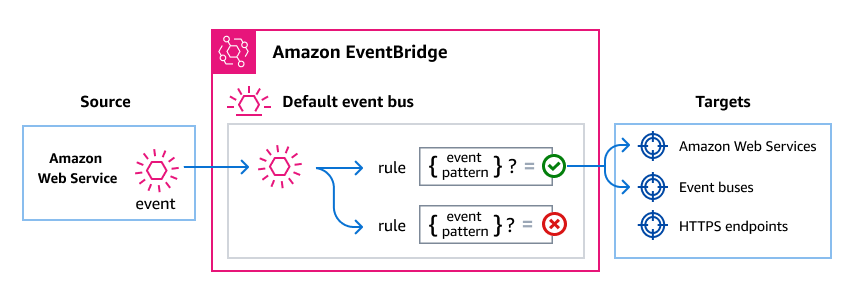
AWS DevOps Agent sends an event to the EventBridge default event bus when an investigation or mitigation lifecycle state changes.
EventBridge evaluates the event against the rules that you created.
If the event matches a rule's event pattern, EventBridge sends the event to the targets specified in the rule.
AWS DevOps Agent events
AWS DevOps Agent sends the following events to EventBridge. All events use the source aws.aidevops.
AWS DevOps Agent emits these events for investigations, including the mitigation phase of an investigation. Other kinds of agent work, such as incident prevention evaluations and custom agent invocations, do not emit these events.
The time field of each event is the time that the investigation or mitigation was last updated, not the time that EventBridge received the event. A field with no value is omitted from detail rather than set to null.
Supported investigation events
| detail-type | Description |
|---|---|
Investigation Created |
An investigation was created in the agent space. |
Investigation Priority Updated |
The priority of an investigation was changed. |
Investigation In Progress |
An investigation started active analysis. |
Investigation Completed |
An investigation finished successfully with findings. |
Investigation Failed |
An investigation encountered an error and could not complete. |
Investigation Timed Out |
An investigation exceeded the maximum allowed duration. |
Investigation Cancelled |
An investigation was canceled before completion. |
Investigation Pending Triage |
An investigation is awaiting triage before active analysis begins. |
Investigation Linked |
An investigation was linked to a related incident or ticket. |
Investigation Skipped |
An investigation was skipped because it matched skip criteria defined in a skill. The event does not include the reason that the investigation was skipped. |
Supported mitigation events
| detail-type | Description |
|---|---|
Mitigation In Progress |
A mitigation action started. |
Mitigation Completed |
A mitigation action finished successfully. |
Mitigation Failed |
A mitigation action encountered an error and could not complete. |
Mitigation Timed Out |
A mitigation action exceeded the maximum allowed duration. |
Mitigation Cancelled |
A mitigation action was canceled before completion. |
For detailed field descriptions and example events, see AWS DevOps Agent events detail reference.
Creating event patterns that match AWS DevOps Agent events
EventBridge rules use event patterns to select events and route them to targets. An event pattern matches the structure of the events that it handles. You create event patterns to filter AWS DevOps Agent events based on the event fields.
The following examples show event patterns for common use cases.
Match all AWS DevOps Agent events
The following event pattern matches all events from AWS DevOps Agent.
{
  "source": ["aws.aidevops"]
}
Match only investigation events
The following event pattern uses a prefix match to select only investigation lifecycle events.
{
  "source": ["aws.aidevops"],
  "detail-type": [{"prefix": "Investigation"}]
}
Match only completion and failure events
The following event pattern matches events for completed or failed investigations and mitigations.
{
  "source": ["aws.aidevops"],
  "detail-type": [
    "Investigation Completed",
    "Investigation Failed",
    "Mitigation Completed",
    "Mitigation Failed"
  ]
}
Match events for a specific agent space
The following event pattern matches events from a specific agent space.
{
  "source": ["aws.aidevops"],
  "detail": {
    "metadata": {
      "agent_space_id": ["your-agent-space-id"]
    }
  }
}
For more information about event patterns, see Amazon EventBridge event patterns in the Amazon EventBridge User Guide.
Retrieving an investigation or mitigation summary
A Completed event identifies the summary that the agent produced, but it does not contain the summary text. The summary is stored as a journal record. To read it, call the ListJournalRecords operation with values taken from the event.
| Value from the event | `ListJournalRecords` parameter |
|---|---|
detail.metadata.agent_space_id |
agentSpaceId (required) |
detail.metadata.execution_id |
executionId (required) |
| Not in the event | recordType — use investigation_summary_md for an investigation summary, or mitigation_summary_md for a mitigation summary |
ListJournalRecords returns a list of JournalRecord objects. An execution can have more than one summary record of the same type. Select the record whose recordId matches detail.data.summary_record_id, then read its content. AWS DevOps Agent has no operation that returns a single journal record by ID.
Note the following before you build on summary_record_id:
The field is present only when a summary record was written for the execution. A
Completedevent without it means that no summary is available for that execution, so you must handle its absence.Failed,Timed Out, andCancelledevents never include it.To retrieve the summary, you need the
aidevops:ListJournalRecordspermission in the account that runs your event consumer.
For more information about permissions, see DevOps Agent IAM permissions.
Retrieve a summary with the AWS CLI
The following command lists the investigation summary records for an execution:
aws devops-agent list-journal-records \
  --agent-space-id e5f6g7h8-9012-34ab-cdef-example00000 \
  --execution-id b2c3d4e5-6789-01ab-cdef-example22222 \
  --record-type investigation_summary_md
Process a completed investigation in AWS Lambda
The following Python function shows one way for a rule target to handle these events. It is a sample, not a required implementation. EventBridge supports other target types, and your target decides what to do with an event. This example reads the summary for a completed investigation, and ignores an event that carries no summary:
import boto3

devops_agent = boto3.client("devops-agent")

INVESTIGATION_SUMMARY = "investigation_summary_md"
MITIGATION_SUMMARY = "mitigation_summary_md"


def lambda_handler(event, context):
    detail = event["detail"]
    metadata = detail["metadata"]
    data = detail["data"]

    summary_record_id = data.get("summary_record_id")
    if not summary_record_id:
        # A completed task does not always produce a summary.
        return {"summary": None}

    record_type = (
        MITIGATION_SUMMARY
        if event["detail-type"].startswith("Mitigation")
        else INVESTIGATION_SUMMARY
    )

    paginator = devops_agent.get_paginator("list_journal_records")
    pages = paginator.paginate(
        agentSpaceId=metadata["agent_space_id"],
        executionId=metadata["execution_id"],
        recordType=record_type,
    )

    for page in pages:
        for record in page["records"]:
            if record["recordId"] == summary_record_id:
                return {"summary": record["content"]}

    return {"summary": None}
Use detail-type to decide which record type to request. Both investigation and mitigation events report data.task_type as INVESTIGATION, so task_type does not distinguish them.
Amazon EventBridge permissions
AWS DevOps Agent doesn't require additional permissions to deliver events to EventBridge. The events are sent to the default event bus automatically.
Depending on the targets that you configure for your EventBridge rules, you might need to add specific permissions. For more information about the permissions required for targets, see Using resource-based policies for Amazon EventBridge in the Amazon EventBridge User Guide.
Additional EventBridge resources
For more information about EventBridge concepts and configuration, see the following topics in the Amazon EventBridge User Guide:
