Die vorliegende Übersetzung wurde maschinell erstellt. Im Falle eines Konflikts oder eines Widerspruchs zwischen dieser übersetzten Fassung und der englischen Fassung (einschließlich infolge von Verzögerungen bei der Übersetzung) ist die englische Fassung maßgeblich.
Beispiel: Zeichnen von Begrenzungsrahmen um Gesichtsbedeckungen
Die folgenden Beispiele zeigen Ihnen, wie Sie Begrenzungsrahmen um Gesichtsbedeckungen zeichnen, die bei Personen entdeckt wurden. Ein Beispiel, das Amazon DynamoDB verwendet AWS Lambda , finden Sie im AWS Documentation SDK Examples GitHub
Um Gesichtsbedeckungen zu erkennen, verwenden Sie den API-Vorgang DetectProtectiveEquipmentohne Speicherung. Das Bild wird aus dem lokalen Dateisystem geladen. Sie stellen das Eingabebild an DetectProtectiveEquipment als Bild-Byte-Array (base64-kodierte Bild-Bytes) zur Verfügung. Weitere Informationen finden Sie unter Arbeiten mit Bildern.
Im Beispiel wird ein Begrenzungsrahmen um die erkannten Gesichtsbedeckungen herum angezeigt. Der Begrenzungsrahmen ist grün, wenn die Gesichtsbedeckung den Körperteil vollständig bedeckt. Andernfalls wird ein roter Begrenzungsrahmen angezeigt. Als Warnung wird innerhalb des Begrenzungsrahmens der Gesichtsbedeckung ein gelber Begrenzungsrahmen angezeigt, wenn die Erkennungssicherheit unter dem angegebenen Zuverlässigkeitswert liegt. Wenn keine Gesichtsbedeckung erkannt wird, wird ein roter Begrenzungsrahmen um die Person herum gezeichnet.
Die Bildausgabe sieht folgendermaßen oder ähnlich aus.
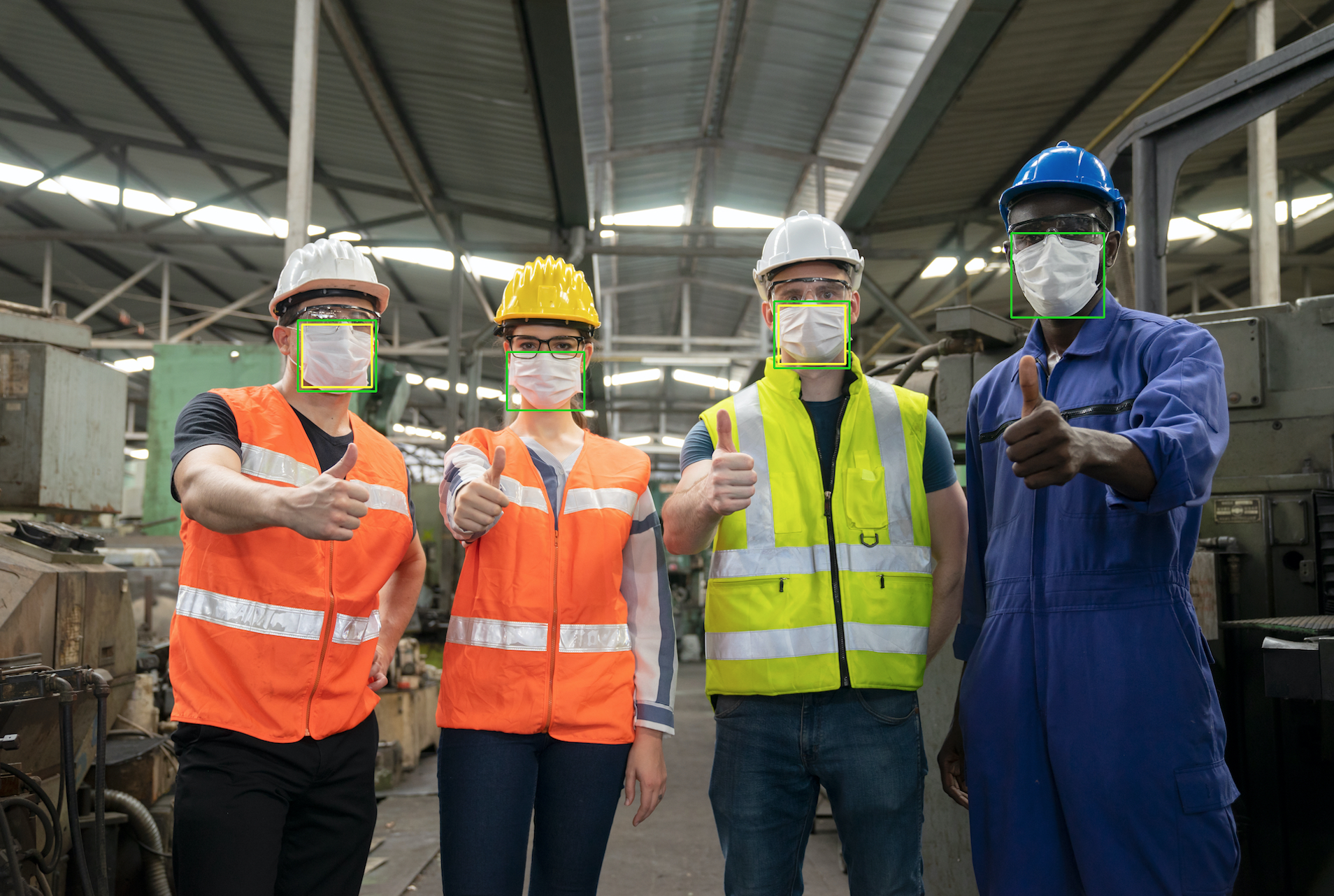
So zeigen Sie Begrenzungsrahmen auf erkannten Gesichtsbedeckungen an
Wenn Sie dies noch nicht getan haben:
Erstellen oder aktualisieren Sie einen Benutzer mit
AmazonRekognitionFullAccess-Berechtigungen. Weitere Informationen finden Sie unter Schritt 1: Einrichten eines AWS-Kontos und Erstellen eines Benutzers.Installieren und konfigurieren Sie die AWS CLI und die AWS SDKs. Weitere Informationen finden Sie unter Schritt 2: Richten Sie das ein AWS CLI und AWS SDKs.
Verwenden Sie die folgenden Beispiele zum Aufrufen der
DetectProtectiveEquipment-Operation. Informationen zur Anzeige von Begrenzungsrahmen in einem Bild finden Sie unter Anzeigen von Begrenzungsrahmen.- Java
-
In der Funktion
mainändern Sie Folgendes:Der Wert von
photozum Pfad- und Dateinamen einer lokalen Bilddatei (PNG oder JPEG).Der Wert von
confidencebis zum gewünschten Zuverlässigkeitsniveau (50–100).
//Loads images, detects faces and draws bounding boxes.Determines exif orientation, if necessary. package com.amazonaws.samples; import java.awt.*; import java.awt.image.BufferedImage; import java.util.List; import javax.imageio.ImageIO; import javax.swing.*; import java.io.ByteArrayInputStream; import java.io.ByteArrayOutputStream; import java.io.File; import java.io.FileInputStream; import java.io.InputStream; import java.nio.ByteBuffer; import com.amazonaws.util.IOUtils; import com.amazonaws.client.builder.AwsClientBuilder; import com.amazonaws.services.rekognition.AmazonRekognition; import com.amazonaws.services.rekognition.AmazonRekognitionClientBuilder; import com.amazonaws.services.rekognition.model.BoundingBox; import com.amazonaws.services.rekognition.model.DetectProtectiveEquipmentRequest; import com.amazonaws.services.rekognition.model.DetectProtectiveEquipmentResult; import com.amazonaws.services.rekognition.model.EquipmentDetection; import com.amazonaws.services.rekognition.model.Image; import com.amazonaws.services.rekognition.model.ProtectiveEquipmentBodyPart; import com.amazonaws.services.rekognition.model.ProtectiveEquipmentPerson; // Calls DetectFaces and displays a bounding box around each detected image. public class PPEBoundingBox extends JPanel { private static final long serialVersionUID = 1L; BufferedImage image; static int scale; DetectProtectiveEquipmentResult result; float confidence=80; public PPEBoundingBox(DetectProtectiveEquipmentResult ppeResult, BufferedImage bufImage, float requiredConfidence) throws Exception { super(); scale = 2; // increase to shrink image size. result = ppeResult; image = bufImage; confidence=requiredConfidence; } // Draws the bounding box around the detected faces. public void paintComponent(Graphics g) { float left = 0; float top = 0; int height = image.getHeight(this); int width = image.getWidth(this); int offset=20; Graphics2D g2d = (Graphics2D) g; // Create a Java2D version of g. // Draw the image. g2d.drawImage(image, 0, 0, width / scale, height / scale, this); g2d.setColor(new Color(0, 212, 0)); // Iterate through detected persons and display bounding boxes. List<ProtectiveEquipmentPerson> persons = result.getPersons(); for (ProtectiveEquipmentPerson person: persons) { BoundingBox boxPerson = person.getBoundingBox(); left = width * boxPerson.getLeft(); top = height * boxPerson.getTop(); Boolean foundMask=false; List<ProtectiveEquipmentBodyPart> bodyParts=person.getBodyParts(); if (bodyParts.isEmpty()==false) { //body parts detected for (ProtectiveEquipmentBodyPart bodyPart: bodyParts) { List<EquipmentDetection> equipmentDetections=bodyPart.getEquipmentDetections(); for (EquipmentDetection item: equipmentDetections) { if (item.getType().contentEquals("FACE_COVER")) { // Draw green or red bounding box depending on mask coverage. foundMask=true; BoundingBox box =item.getBoundingBox(); left = width * box.getLeft(); top = height * box.getTop(); Color maskColor=new Color( 0, 212, 0); if (item.getCoversBodyPart().getValue()==false) { // red bounding box maskColor=new Color( 255, 0, 0); } g2d.setColor(maskColor); g2d.drawRect(Math.round(left / scale), Math.round(top / scale), Math.round((width * box.getWidth()) / scale), Math.round((height * box.getHeight())) / scale); // Check confidence is > supplied confidence. if (item.getCoversBodyPart().getConfidence()< confidence) { // Draw a yellow bounding box inside face mask bounding box maskColor=new Color( 255, 255, 0); g2d.setColor(maskColor); g2d.drawRect(Math.round((left + offset) / scale), Math.round((top + offset) / scale), Math.round((width * box.getWidth())- (offset * 2 ))/ scale, Math.round((height * box.getHeight()) -( offset* 2)) / scale); } } } } } // Didn't find a mask, so draw person bounding box red if (foundMask==false) { left = width * boxPerson.getLeft(); top = height * boxPerson.getTop(); g2d.setColor(new Color(255, 0, 0)); g2d.drawRect(Math.round(left / scale), Math.round(top / scale), Math.round(((width) * boxPerson.getWidth()) / scale), Math.round((height * boxPerson.getHeight())) / scale); } } } public static void main(String arg[]) throws Exception { String photo = "photo"; float confidence =80; int height = 0; int width = 0; BufferedImage image = null; ByteBuffer imageBytes; // Get image bytes for call to DetectProtectiveEquipment try (InputStream inputStream = new FileInputStream(new File(photo))) { imageBytes = ByteBuffer.wrap(IOUtils.toByteArray(inputStream)); } //Get image for display InputStream imageBytesStream; imageBytesStream = new ByteArrayInputStream(imageBytes.array()); ByteArrayOutputStream baos = new ByteArrayOutputStream(); image=ImageIO.read(imageBytesStream); ImageIO.write(image, "jpg", baos); width = image.getWidth(); height = image.getHeight(); //Get Rekognition client AmazonRekognition rekognitionClient = AmazonRekognitionClientBuilder.defaultClient(); // Call DetectProtectiveEquipment DetectProtectiveEquipmentRequest request = new DetectProtectiveEquipmentRequest() .withImage(new Image() .withBytes(imageBytes)); DetectProtectiveEquipmentResult result = rekognitionClient.detectProtectiveEquipment(request); // Create frame and panel. JFrame frame = new JFrame("Detect PPE"); frame.setDefaultCloseOperation(JFrame.EXIT_ON_CLOSE); PPEBoundingBox panel = new PPEBoundingBox(result, image, confidence); panel.setPreferredSize(new Dimension(image.getWidth() / scale, image.getHeight() / scale)); frame.setContentPane(panel); frame.pack(); frame.setVisible(true); } } - Java V2
-
Dieser Code stammt aus dem AWS Documentation SDK Examples GitHub Repository. Das vollständige Beispiel finden Sie hier
. import java.awt.*; import java.awt.image.BufferedImage; import java.io.*; import java.util.List; import javax.imageio.ImageIO; import javax.swing.*; import software.amazon.awssdk.auth.credentials.ProfileCredentialsProvider; import software.amazon.awssdk.core.ResponseBytes; import software.amazon.awssdk.core.SdkBytes; import software.amazon.awssdk.regions.Region; import software.amazon.awssdk.services.rekognition.model.BoundingBox; import software.amazon.awssdk.services.rekognition.model.DetectProtectiveEquipmentRequest; import software.amazon.awssdk.services.rekognition.model.EquipmentDetection; import software.amazon.awssdk.services.rekognition.model.ProtectiveEquipmentBodyPart; import software.amazon.awssdk.services.rekognition.model.ProtectiveEquipmentPerson; import software.amazon.awssdk.services.rekognition.model.ProtectiveEquipmentSummarizationAttributes; import software.amazon.awssdk.services.rekognition.model.Image; import software.amazon.awssdk.services.rekognition.model.RekognitionException; import software.amazon.awssdk.services.s3.S3Client; import software.amazon.awssdk.services.rekognition.RekognitionClient; import software.amazon.awssdk.services.s3.model.GetObjectRequest; import software.amazon.awssdk.services.s3.model.GetObjectResponse; import software.amazon.awssdk.services.s3.model.S3Exception; import software.amazon.awssdk.services.rekognition.model.DetectProtectiveEquipmentResponse; //snippet-end:[rekognition.java2.display_mask.import] /** * Before running this Java V2 code example, set up your development environment, including your credentials. * * For more information, see the following documentation topic: * * https://docs.aws.amazon.com/sdk-for-java/latest/developer-guide/get-started.html */ public class PPEBoundingBoxFrame extends JPanel { DetectProtectiveEquipmentResponse result; static BufferedImage image; static int scale; float confidence; public static void main(String[] args) throws Exception { final String usage = "\n" + "Usage: " + " <sourceImage> <bucketName>\n\n" + "Where:\n" + " sourceImage - The name of the image in an Amazon S3 bucket that shows a person wearing a mask (for example, masks.png). \n\n" + " bucketName - The name of the Amazon S3 bucket (for example, amzn-s3-demo-bucket). \n\n"; if (args.length != 2) { System.out.println(usage); System.exit(1); } String sourceImage = args[0]; String bucketName = args[1]; Region region = Region.US_EAST_1; S3Client s3 = S3Client.builder() .region(region) .credentialsProvider(ProfileCredentialsProvider.create("profile-name")) .build(); RekognitionClient rekClient = RekognitionClient.builder() .region(region) .credentialsProvider(ProfileCredentialsProvider.create("profile-name")) .build(); displayGear(s3, rekClient, sourceImage, bucketName); s3.close(); rekClient.close(); } // snippet-start:[rekognition.java2.display_mask.main] public static void displayGear(S3Client s3, RekognitionClient rekClient, String sourceImage, String bucketName) { float confidence = 80; byte[] data = getObjectBytes(s3, bucketName, sourceImage); InputStream is = new ByteArrayInputStream(data); try { ProtectiveEquipmentSummarizationAttributes summarizationAttributes = ProtectiveEquipmentSummarizationAttributes.builder() .minConfidence(70F) .requiredEquipmentTypesWithStrings("FACE_COVER") .build(); SdkBytes sourceBytes = SdkBytes.fromInputStream(is); image = ImageIO.read(sourceBytes.asInputStream()); // Create an Image object for the source image. software.amazon.awssdk.services.rekognition.model.Image souImage = Image.builder() .bytes(sourceBytes) .build(); DetectProtectiveEquipmentRequest request = DetectProtectiveEquipmentRequest.builder() .image(souImage) .summarizationAttributes(summarizationAttributes) .build(); DetectProtectiveEquipmentResponse result = rekClient.detectProtectiveEquipment(request); JFrame frame = new JFrame("Detect PPE"); frame.setDefaultCloseOperation(JFrame.EXIT_ON_CLOSE); PPEBoundingBoxFrame panel = new PPEBoundingBoxFrame(result, image, confidence); panel.setPreferredSize(new Dimension(image.getWidth() / scale, image.getHeight() / scale)); frame.setContentPane(panel); frame.pack(); frame.setVisible(true); } catch (RekognitionException e) { e.printStackTrace(); System.exit(1); } catch (Exception e) { e.printStackTrace(); } } public static byte[] getObjectBytes (S3Client s3, String bucketName, String keyName) { try { GetObjectRequest objectRequest = GetObjectRequest .builder() .key(keyName) .bucket(bucketName) .build(); ResponseBytes<GetObjectResponse> objectBytes = s3.getObjectAsBytes(objectRequest); return objectBytes.asByteArray(); } catch (S3Exception e) { System.err.println(e.awsErrorDetails().errorMessage()); System.exit(1); } return null; } public PPEBoundingBoxFrame(DetectProtectiveEquipmentResponse ppeResult, BufferedImage bufImage, float requiredConfidence) { super(); scale = 1; // increase to shrink image size. result = ppeResult; image = bufImage; confidence=requiredConfidence; } // Draws the bounding box around the detected masks. public void paintComponent(Graphics g) { float left = 0; float top = 0; int height = image.getHeight(this); int width = image.getWidth(this); int offset=20; Graphics2D g2d = (Graphics2D) g; // Create a Java2D version of g. // Draw the image. g2d.drawImage(image, 0, 0, width / scale, height / scale, this); g2d.setColor(new Color(0, 212, 0)); // Iterate through detected persons and display bounding boxes. List<ProtectiveEquipmentPerson> persons = result.persons(); for (ProtectiveEquipmentPerson person: persons) { List<ProtectiveEquipmentBodyPart> bodyParts=person.bodyParts(); if (!bodyParts.isEmpty()){ for (ProtectiveEquipmentBodyPart bodyPart: bodyParts) { List<EquipmentDetection> equipmentDetections=bodyPart.equipmentDetections(); for (EquipmentDetection item: equipmentDetections) { String myType = item.type().toString(); if (myType.compareTo("FACE_COVER") ==0) { // Draw green bounding box depending on mask coverage. BoundingBox box =item.boundingBox(); left = width * box.left(); top = height * box.top(); Color maskColor=new Color( 0, 212, 0); if (item.coversBodyPart().equals(false)) { // red bounding box. maskColor=new Color( 255, 0, 0); } g2d.setColor(maskColor); g2d.drawRect(Math.round(left / scale), Math.round(top / scale), Math.round((width * box.width()) / scale), Math.round((height * box.height())) / scale); // Check confidence is > supplied confidence. if (item.coversBodyPart().confidence() < confidence) { // Draw a yellow bounding box inside face mask bounding box. maskColor=new Color( 255, 255, 0); g2d.setColor(maskColor); g2d.drawRect(Math.round((left + offset) / scale), Math.round((top + offset) / scale), Math.round((width * box.width())- (offset * 2 ))/ scale, Math.round((height * box.height()) -( offset* 2)) / scale); } } } } } } } // snippet-end:[rekognition.java2.display_mask.main] } - Python
-
In der Funktion
mainändern Sie Folgendes:Der Wert von
photozum Pfad- und Dateinamen einer lokalen Bilddatei (PNG oder JPEG).Der Wert von
confidencebis zum gewünschten Zuverlässigkeitsniveau (50–100).-
Ersetzen Sie den Wert von
profile_namein der Zeile, die die Rekognition-Sitzung erstellt, durch den Namen Ihres Entwicklerprofils.
#Copyright 2020 Amazon.com, Inc. or its affiliates. All Rights Reserved. #PDX-License-Identifier: MIT-0 (For details, see https://github.com/awsdocs/amazon-rekognition-developer-guide/blob/master/LICENSE-SAMPLECODE.) import boto3 import io from PIL import Image, ImageDraw, ExifTags, ImageColor def detect_ppe(photo, confidence): fill_green='#00d400' fill_red='#ff0000' fill_yellow='#ffff00' line_width=3 #open image and get image data from stream. image = Image.open(open(photo,'rb')) stream = io.BytesIO() image.save(stream, format=image.format) image_binary = stream.getvalue() imgWidth, imgHeight = image.size draw = ImageDraw.Draw(image) client=boto3.client('rekognition') response = client.detect_protective_equipment(Image={'Bytes': image_binary}) for person in response['Persons']: found_mask=False for body_part in person['BodyParts']: ppe_items = body_part['EquipmentDetections'] for ppe_item in ppe_items: #found a mask if ppe_item['Type'] == 'FACE_COVER': fill_color=fill_green found_mask=True # check if mask covers face if ppe_item['CoversBodyPart']['Value'] == False: fill_color=fill='#ff0000' # draw bounding box around mask box = ppe_item['BoundingBox'] left = imgWidth * box['Left'] top = imgHeight * box['Top'] width = imgWidth * box['Width'] height = imgHeight * box['Height'] points = ( (left,top), (left + width, top), (left + width, top + height), (left , top + height), (left, top) ) draw.line(points, fill=fill_color, width=line_width) # Check if confidence is lower than supplied value if ppe_item['CoversBodyPart']['Confidence'] < confidence: #draw warning yellow bounding box within face mask bounding box offset=line_width+ line_width points = ( (left+offset,top + offset), (left + width-offset, top+offset), ((left) + (width-offset), (top-offset) + (height)), (left+ offset , (top) + (height -offset)), (left + offset, top + offset) ) draw.line(points, fill=fill_yellow, width=line_width) if found_mask==False: # no face mask found so draw red bounding box around body box = person['BoundingBox'] left = imgWidth * box['Left'] top = imgHeight * box['Top'] width = imgWidth * box['Width'] height = imgHeight * box['Height'] points = ( (left,top), (left + width, top), (left + width, top + height), (left , top + height), (left, top) ) draw.line(points, fill=fill_red, width=line_width) image.show() def main(): photo='photo' confidence=80 detect_ppe(photo, confidence) if __name__ == "__main__": main() - CLI
-
Ändern Sie im folgenden CLI-Beispiel den Wert der unten aufgeführten Argumente:
Der Wert von
photozum Pfad- und Dateinamen einer lokalen Bilddatei (PNG oder JPEG).Der Wert von
confidencebis zum gewünschten Zuverlässigkeitsniveau (50–100).-
Ersetzen Sie den Wert von
profile_namein der Zeile, die die Rekognition-Sitzung erstellt, durch den Namen Ihres Entwicklerprofils.
                                aws rekognition detect-protective-equipment  --image "{"S3Object":{"Bucket":"amzn-s3-demo-bucket","Name":"image-name"}}" --profile profile-name \
                                --summarization-attributes "{"MinConfidence":MinConfidenceNumber,"RequiredEquipmentTypes":["FACE_COVER"]}"
Wenn Sie auf einem Windows-Gerät auf die CLI zugreifen, verwenden Sie doppelte Anführungszeichen anstelle von einfachen Anführungszeichen und maskieren Sie die inneren doppelten Anführungszeichen durch einen Backslash (d. h. \), um eventuell auftretende Parserfehler zu beheben. Sehen Sie sich zum Beispiel Folgendes an:
                                aws rekognition detect-protective-equipment  --image "{\"S3Object\":{\"Bucket\":\"amzn-s3-demo-bucket\",\"Name\":\"image-name\"}}" \
                                --profile profile-name --summarization-attributes "{\"MinConfidence\":MinConfidenceNumber,\"RequiredEquipmentTypes\":[\"FACE_COVER\"]}"
