Die vorliegende Übersetzung wurde maschinell erstellt. Im Falle eines Konflikts oder eines Widerspruchs zwischen dieser übersetzten Fassung und der englischen Fassung (einschließlich infolge von Verzögerungen bei der Übersetzung) ist die englische Fassung maßgeblich.
Zugreifen auf den DevOps Agenten
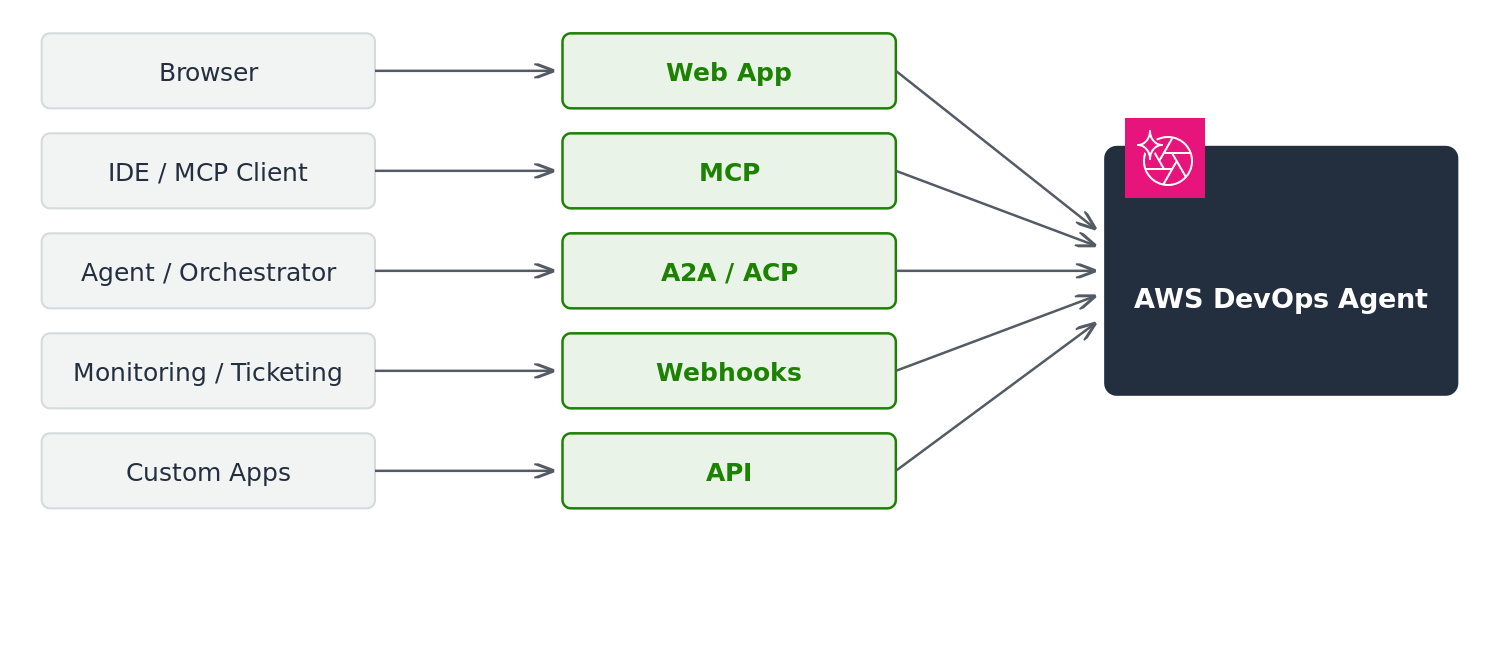
AWS DevOps Agent unterstützt mehrere Zugriffsmethoden: die Web-App-Konsole, Model Context Protocol (MCP) -Integration, Agent-to-Agent (A2A) -Integration, Agent Client Protocol (ACP) -Integration, Webhooks für ereignisgesteuerte Automatisierung und direkten API-Zugriff. Wählen Sie die Methode, die am besten zu Ihrem Arbeitsablauf und Ihren technischen Anforderungen passt.
Das folgende Diagramm veranschaulicht diese Zugriffsmethoden und wie sie eine Verbindung zum DevOps Agentendienst herstellen.
DevOps Web-App für Agenten
Die Web-App ist die primäre Oberfläche für DevOps Agent. Verwenden Sie den Konversations-Chat, um Vorfälle zu untersuchen, Ihre Infrastruktur abzufragen und Empfehlungen zu verwalten. Weitere Informationen finden Sie unter Was ist eine DevOps Agenten-Web-App?.
Integration des Model Context Protocol (MCP)
Sie können direkt von MCP-compatible Clients und IDEs wie Kiro, Claude Code und Cursor aus auf AWS DevOps Agentenfunktionen zugreifen. AWS DevOps Der Agent bietet einen dedizierten Remote-MCP-Endpunkt, zu dem Sie mithilfe eines Zugriffstokens oder AWS SigV4-Anmeldeinformationen eine Verbindung herstellen. Von Ihrer Entwicklungsumgebung aus können Sie Vorfälle untersuchen, Kosten optimieren, die Architektur überprüfen und die Topologie abbilden. Anweisungen zur Einrichtung, einschließlich des Kiro Power- und Claude Code-Plugins, finden Sie unter. Verbindung zum DevOps Agent-MCP-Server herstellen
Der AWS MCP-Server ist auch für direkten AWS API-Zugriff verfügbar und dient als Fallback, wenn der Remote-Server-Endpunkt nicht verfügbar ist.
Agent-to-Agent (A2A) -Integration
Sie können autonome AWS DevOps Agenten über einen dedizierten Remote-Endpunkt Agent-to-Agent (A2A) Version 1.0 mit dem Agenten verbinden, indem Sie ein Zugriffstoken oder AWS SigV4-Anmeldeinformationen verwenden. Agenten können Nachrichten senden, Antworten streamen und asynchrone Aufgaben für die Kommunikation zwischen Agenten verwalten. Anweisungen zur Einrichtung finden Sie unter. Integration mit dem DevOps Agent A2A-Server
Integration des Agent Client Protocol (ACP)
Sie können den AWS DevOps Agenten programmgesteuert mithilfe des Agent Client Protocol (ACP) aufrufen.
Webhooks
Webhooks ermöglichen es externen Systemen, automatisch Ermittlungen gegen AWS DevOps Agenten auszulösen. Externe Systeme wie Ticketing-Plattformen und Überwachungstools können HTTP-Anfragen senden, wenn Vorfälle auftreten. Weitere Informationen finden Sie unter DevOps Agent über Webhook aufrufen.
AWS DevOps Agenten-API
AWS DevOps Agent bietet APIs für den programmatischen Zugriff auf Agentenfunktionen. Sie können Agentenbereiche erstellen und verwalten, Untersuchungen auslösen und Ergebnisse abrufen. Weitere Informationen finden Sie in der AWS DevOps Agent-API-Referenz.
Weitere Informationen zu den regionalen Dienstendpunkten, die für API-Anfragen verwendet werden können, finden Sie unter Dienstendpunkte in. Unterstützte Regionen
