Die vorliegende Übersetzung wurde maschinell erstellt. Im Falle eines Konflikts oder eines Widerspruchs zwischen dieser übersetzten Fassung und der englischen Fassung (einschließlich infolge von Verzögerungen bei der Übersetzung) ist die englische Fassung maßgeblich.
Integration AWS DevOps Agent bei Amazon EventBridge
Sie können AWS DevOps Agent in Ihre ereignisgesteuerten Anwendungen integrieren, indem Sie Ereignisse verwenden, die während der Ermittlungs- und Schadensbegrenzungszyklen auftreten. AWS DevOps Der Agent sendet Ereignisse an Amazon, EventBridge wenn sich der Status einer Untersuchung oder einer Schadensbegrenzung ändert. Sie können dann EventBridge Regeln erstellen, die auf der Grundlage dieser Ereignisse Maßnahmen ergreifen.
Sie können beispielsweise Regeln erstellen, die die folgenden Aktionen ausführen:
Rufen Sie eine AWS Lambda-Funktion auf, um die Untersuchungsergebnisse zu verarbeiten, wenn eine Untersuchung abgeschlossen ist.
Senden Sie eine Amazon SNS-Benachrichtigung, wenn eine Untersuchung fehlschlägt oder das Zeitlimit überschritten wird.
Aktualisieren Sie ein Ticketsystem, wenn eine neue Untersuchung erstellt wird.
Starten Sie einen AWS Step Functions-Workflow, wenn eine Schadensbegrenzungsmaßnahme abgeschlossen ist.
Wie Routen EventBridge AWS DevOps Ereignisse für Agenten
AWS DevOps Der Agent sendet Ereignisse an den EventBridge Standard-Event-Bus. EventBridge bewertet dann die Ereignisse anhand der von Ihnen erstellten Regeln. Wenn ein Ereignis dem Ereignismuster einer Regel entspricht, wird das Ereignis an die angegebenen Ziele EventBridge gesendet.
Das folgende Diagramm zeigt, wie EventBridge AWS DevOps Agent-Ereignisse weitergeleitet werden.
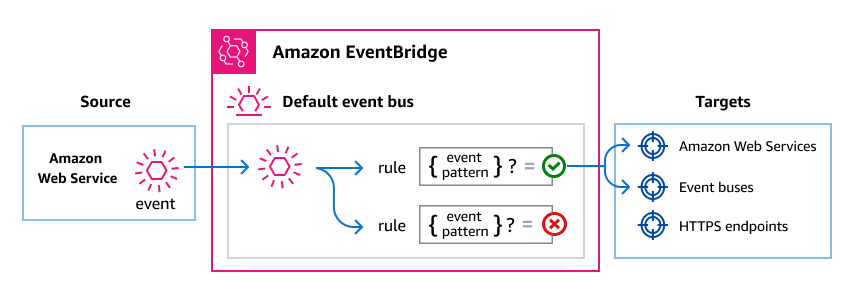
AWS DevOps Der Agent sendet ein Ereignis an den EventBridge Standardereignisbus, wenn sich der Status eines Ermittlungs- oder Mitigationszyklus ändert.
EventBridge wertet das Ereignis anhand der Regeln aus, die Sie erstellt haben.
Wenn das Ereignis dem Ereignismuster einer Regel entspricht, wird das Ereignis an die in der Regel angegebenen Ziele EventBridge gesendet.
AWS DevOps Ereignisse des Agenten
AWS DevOps Der Agent sendet die folgenden Ereignisse an EventBridge. Alle Ereignisse verwenden die Quelleaws.aidevops.
AWS DevOps Der Agent gibt diese Ereignisse für Untersuchungen aus, einschließlich der Abschwächungsphase einer Untersuchung. Andere Arten der Agentenarbeit, wie z. B. Evaluierungen zur Verhinderung von Vorfällen und benutzerdefinierte Aufrufe von Agenten, geben diese Ereignisse nicht aus.
Das time Feld jedes Ereignisses gibt den Zeitpunkt an, zu dem die Untersuchung oder die Risikominderung zuletzt aktualisiert wurde, nicht die Uhrzeit, zu der das Ereignis EventBridge eingegangen ist. Ein Feld ohne Wert wird weggelassen und detail nicht auf null gesetzt.
Unterstützte Ermittlungsereignisse
| detail-type | Description |
|---|---|
Investigation Created |
Eine Untersuchung wurde im Agentenbereich eingeleitet. |
Investigation Priority Updated |
Die Priorität einer Untersuchung wurde geändert. |
Investigation In Progress |
Im Rahmen einer Untersuchung wurde eine aktive Analyse eingeleitet. |
Investigation Completed |
Eine Untersuchung wurde mit Ergebnissen erfolgreich abgeschlossen. |
Investigation Failed |
Bei einer Untersuchung ist ein Fehler aufgetreten und sie konnte nicht abgeschlossen werden. |
Investigation Timed Out |
Eine Untersuchung hat die maximal zulässige Dauer überschritten. |
Investigation Cancelled |
Eine Untersuchung wurde vor Abschluss abgesagt. |
Investigation Pending Triage |
Eine Untersuchung muss geprüft werden, bevor die aktive Analyse beginnt. |
Investigation Linked |
Eine Untersuchung wurde mit einem ähnlichen Vorfall oder Ticket in Verbindung gebracht. |
Investigation Skipped |
Eine Untersuchung wurde übersprungen, weil sie den in einem Skill definierten Übersprungkriterien entsprach. Das Ereignis enthält nicht den Grund, warum die Untersuchung übersprungen wurde. |
Unterstützte Minderungsereignisse
| detail-type | Description |
|---|---|
Mitigation In Progress |
Eine Abhilfemaßnahme wurde gestartet. |
Mitigation Completed |
Eine Abhilfemaßnahme wurde erfolgreich abgeschlossen. |
Mitigation Failed |
Bei einer Minderungsmaßnahme ist ein Fehler aufgetreten und sie konnte nicht abgeschlossen werden. |
Mitigation Timed Out |
Eine Abhilfemaßnahme hat die maximal zulässige Dauer überschritten. |
Mitigation Cancelled |
Eine Abhilfemaßnahme wurde vor Abschluss abgebrochen. |
Detaillierte Feldbeschreibungen und Beispielereignisse finden Sie unterAWS DevOps Detailreferenz zu Agentenereignissen.
Übereinstimmende Ereignismuster erstellen AWS DevOps Ereignisse für Agenten
EventBridge Regeln verwenden Ereignismuster, um Ereignisse auszuwählen und sie an Ziele weiterzuleiten. Ein Ereignismuster entspricht der Struktur der Ereignisse, die es verarbeitet. Sie erstellen Ereignismuster, um AWS DevOps Agentenereignisse anhand der Ereignisfelder zu filtern.
Die folgenden Beispiele zeigen Ereignismuster für häufige Anwendungsfälle.
Ordnen Sie alle AWS DevOps Agenten-Ereignisse zu
Das folgende Ereignismuster entspricht allen Ereignissen von AWS DevOps Agent.
{
  "source": ["aws.aidevops"]
}
Findet nur Ermittlungsereignisse
Das folgende Ereignismuster verwendet eine Präfixübereinstimmung, um nur Ereignisse im Untersuchungszyklus auszuwählen.
{
  "source": ["aws.aidevops"],
  "detail-type": [{"prefix": "Investigation"}]
}
Ordnet nur Abschluss- und Fehlschlagsereignisse zu
Das folgende Ereignismuster gleicht Ereignisse für abgeschlossene oder fehlgeschlagene Untersuchungen und Abhilfemaßnahmen ab.
{
  "source": ["aws.aidevops"],
  "detail-type": [
    "Investigation Completed",
    "Investigation Failed",
    "Mitigation Completed",
    "Mitigation Failed"
  ]
}
Ordnen Sie Ereignisse für einen bestimmten Agentenbereich zu
Das folgende Ereignismuster entspricht Ereignissen aus einem bestimmten Agentenbereich.
{
  "source": ["aws.aidevops"],
  "detail": {
    "metadata": {
      "agent_space_id": ["your-agent-space-id"]
    }
  }
}
Weitere Informationen zu Ereignismustern finden Sie unter EventBridge Amazon-Ereignismuster im EventBridge Amazon-Benutzerhandbuch.
Eine Zusammenfassung der Untersuchung oder Abhilfemaßnahmen abrufen
Ein Completed Ereignis identifiziert die Zusammenfassung, die der Agent erstellt hat, sie enthält jedoch keinen zusammenfassenden Text. Die Zusammenfassung wird als Journaldatensatz gespeichert. Um sie zu lesen, rufen Sie die ListJournalRecords Operation mit Werten auf, die dem Ereignis entnommen wurden.
| Wert aus dem Ereignis | `ListJournalRecords` Parameter |
|---|---|
detail.metadata.agent_space_id |
agentSpaceId (Erforderlich) |
detail.metadata.execution_id |
executionId (Erforderlich) |
| Nicht bei der Veranstaltung | recordType— investigation_summary_md für eine Zusammenfassung der Untersuchung oder mitigation_summary_md für eine Zusammenfassung der Risikominderung verwenden |
ListJournalRecordsgibt eine Liste von JournalRecord Objekten zurück. Eine Ausführung kann mehr als einen zusammenfassenden Datensatz desselben Typs enthalten. Wählen Sie den Datensatz aus, dessen recordId Treffer detail.data.summary_record_id zutreffen, und lesen Sie dann den Datensatzcontent. AWS DevOps Der Agent hat keine Operation, die einen einzelnen Journaldatensatz nach ID zurückgibt.
Beachten Sie Folgendes, bevor Sie darauf aufbauensummary_record_id:
Das Feld ist nur vorhanden, wenn ein zusammenfassender Datensatz für die Ausführung geschrieben wurde. Ein
CompletedEreignis ohne dieses Feld bedeutet, dass für diese Ausführung keine Zusammenfassung verfügbar ist. Sie müssen also damit umgehen, dass das Ereignis ausbleibt.FailedTimed Out, undCancelledEreignisse beinhalten es nie.Um die Zusammenfassung abzurufen, benötigen Sie die
aidevops:ListJournalRecordsErlaubnis in dem Konto, in dem Ihr Event Consumer läuft.
Weitere Informationen zu Berechtigungen finden Sie unter DevOps IAM-Berechtigungen für Agenten.
Rufen Sie eine Zusammenfassung mit der AWS CLI ab
Der folgende Befehl listet die zusammenfassenden Ermittlungsdatensätze für eine Hinrichtung auf:
aws devops-agent list-journal-records \
  --agent-space-id e5f6g7h8-9012-34ab-cdef-example00000 \
  --execution-id b2c3d4e5-6789-01ab-cdef-example22222 \
  --record-type investigation_summary_md
Verarbeiten Sie eine abgeschlossene Untersuchung in AWS Lambda
Die folgende Python-Funktion zeigt eine Möglichkeit für ein Regelziel, diese Ereignisse zu verarbeiten. Es handelt sich um ein Beispiel, nicht um eine erforderliche Implementierung. EventBridge unterstützt andere Zieltypen, und Ihr Ziel entscheidet, was mit einem Ereignis geschehen soll. In diesem Beispiel wird die Zusammenfassung einer abgeschlossenen Untersuchung gelesen und ein Ereignis ignoriert, das keine Zusammenfassung enthält:
import boto3

devops_agent = boto3.client("devops-agent")

INVESTIGATION_SUMMARY = "investigation_summary_md"
MITIGATION_SUMMARY = "mitigation_summary_md"


def lambda_handler(event, context):
    detail = event["detail"]
    metadata = detail["metadata"]
    data = detail["data"]

    summary_record_id = data.get("summary_record_id")
    if not summary_record_id:
        # A completed task does not always produce a summary.
        return {"summary": None}

    record_type = (
        MITIGATION_SUMMARY
        if event["detail-type"].startswith("Mitigation")
        else INVESTIGATION_SUMMARY
    )

    paginator = devops_agent.get_paginator("list_journal_records")
    pages = paginator.paginate(
        agentSpaceId=metadata["agent_space_id"],
        executionId=metadata["execution_id"],
        recordType=record_type,
    )

    for page in pages:
        for record in page["records"]:
            if record["recordId"] == summary_record_id:
                return {"summary": record["content"]}

    return {"summary": None}
Wird verwendetdetail-type, um zu entscheiden, welcher Datensatztyp angefordert werden soll. Sowohl Untersuchungs- als auch Minderungsereignisse data.task_type werden als gemeldetINVESTIGATION, unterscheiden task_type sich also nicht voneinander.
Amazon-Genehmigungen EventBridge
AWS DevOps Der Agent benötigt keine zusätzlichen Berechtigungen, um Ereignisse an ihn weiterzuleiten EventBridge. Die Ereignisse werden automatisch an den Standard-Event-Bus gesendet.
Abhängig von den Zielen, die Sie für Ihre EventBridge Regeln konfigurieren, müssen Sie möglicherweise bestimmte Berechtigungen hinzufügen. Weitere Informationen zu den für Ziele erforderlichen Berechtigungen finden Sie EventBridge im Amazon-Benutzerhandbuch unter Verwenden ressourcenbasierter Richtlinien für Amazon EventBridge .
Zusätzliche Ressourcen EventBridge
Weitere Informationen zu EventBridge Konzepten und Konfiguration finden Sie in den folgenden Themen im EventBridge Amazon-Benutzerhandbuch:
