Die vorliegende Übersetzung wurde maschinell erstellt. Im Falle eines Konflikts oder eines Widerspruchs zwischen dieser übersetzten Fassung und der englischen Fassung (einschließlich infolge von Verzögerungen bei der Übersetzung) ist die englische Fassung maßgeblich.
Überprüfung Ihrer Appium-Serverprotokolle
Sobald Sie eine Appium-Sitzung gestartet haben, können Sie die Appium-Serverprotokolle live in der Device Farm Farm-Konsole anzeigen oder sie nach dem Ende der Fernzugriffssitzung herunterladen. Hier sind die Anweisungen dazu:
- Console
-
-
Öffnen Sie in der Device Farm Farm-Konsole die Fernzugriffssitzung für Ihr Gerät.
-
Starten Sie eine Appium-Endpunktsitzung mit dem Gerät von Ihrer lokalen IDE oder Appium Inspector aus
-
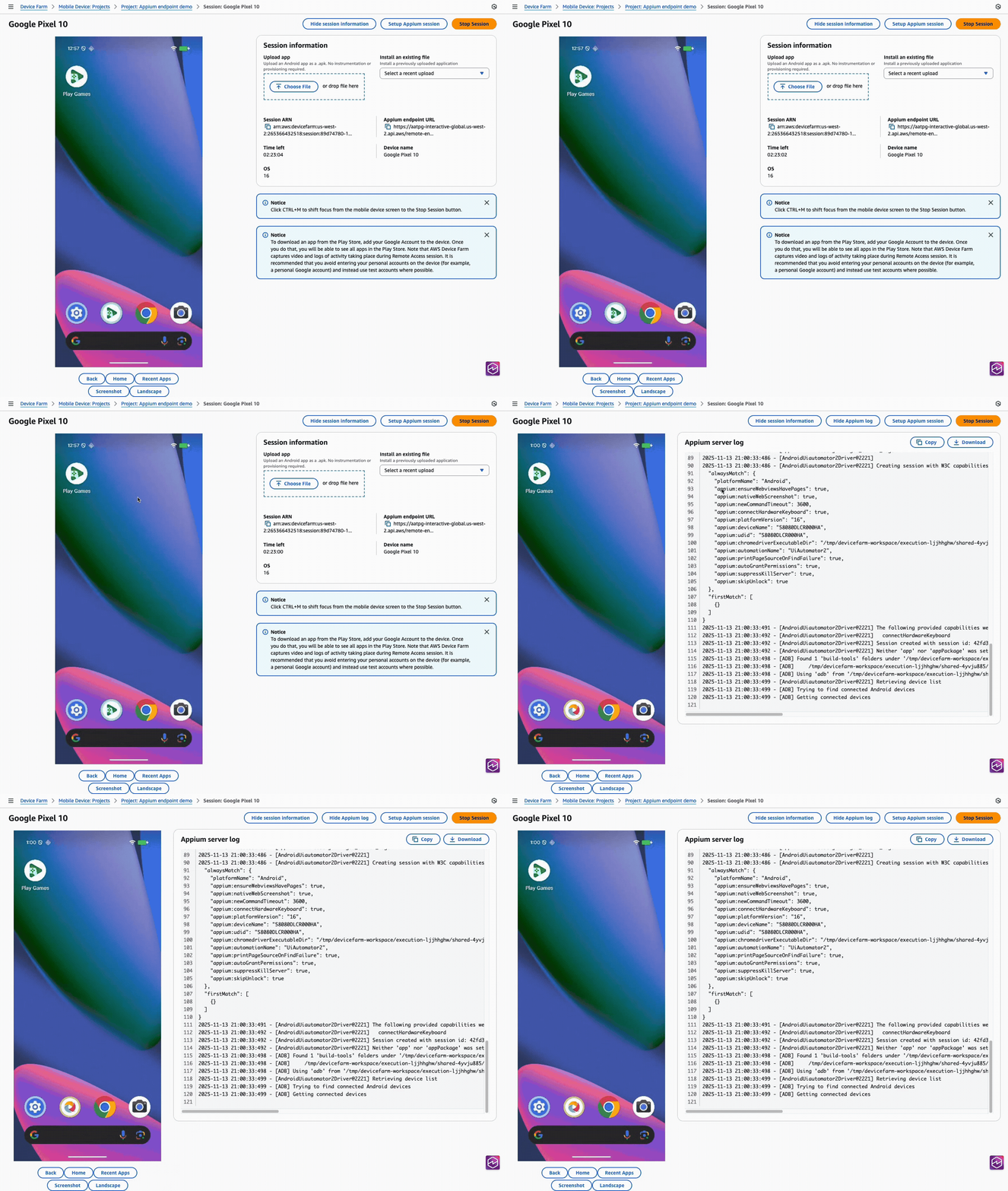
Anschließend wird das Appium-Serverprotokoll neben dem Gerät auf der Seite für die Fernzugriffssitzung angezeigt. Die „Sitzungsinformationen“ finden Sie unten auf der Seite unter dem Gerät:
-
- AWS CLI
-
Hinweis: In diesem Beispiel wird das Befehlszeilentool
verwendet curl, um das Protokoll von Device Farm abzurufen.Während oder nach der Sitzung können Sie die
ListArtifactsAPI von Device Farm verwenden, um das Appium-Serverprotokoll herunterzuladen.$aws devicefarm list-artifacts \ --type FILE \ --arn arn:aws:devicefarm:us-west-2:111122223333:session:12345678-1111-2222-333-456789abcdef/12345678-1111-2222-333-456789abcdef/00000Dadurch werden während der Sitzung Ausgaben wie die folgende angezeigt:
{
    "artifacts": [
        {
            "arn": "arn:aws:devicefarm:us-west-2:111122223333:artifact:12345678-1111-2222-333-456789abcdef/12345678-1111-2222-333-456789abcdef/00000",
            "name": "AppiumServerLogOutput",
            "type": "APPIUM_SERVER_LOG_OUTPUT",
            "extension": "",
            "url": "https://prod-us-west-2-results.s3.dualstack.us-west-2.amazonaws.com/111122223333/12345678..."
        }
    ]
}
Und das Folgende, nachdem die Sitzung abgeschlossen ist:
{ "artifacts": [ { "arn": "arn:aws:devicefarm:us-west-2:111122223333:artifact:12345678-1111-2222-333-456789abcdef/12345678-1111-2222-333-456789abcdef/00000", "name": "Appium Server Output", "type": "APPIUM_SERVER_OUTPUT", "extension": "log", "url": "https://prod-us-west-2-results.s3.dualstack.us-west-2.amazonaws.com/111122223333/12345678..." } ] }$curl "https://prod-us-west-2-results.s3.dualstack.us-west-2.amazonaws.com/111122223333/12345678..."Dadurch werden Ausgaben wie die folgende angezeigt:
info Appium Welcome to Appium v2.5.4 info Appium Non-default server args: info Appium { address: '127.0.0.1', info Appium allowInsecure: info Appium [ 'execute_driver_script', info Appium 'session_discovery', info Appium 'perf_record', info Appium 'adb_shell', info Appium 'chromedriver_autodownload', info Appium 'get_server_logs' ], info Appium keepAliveTimeout: 0, info Appium logNoColors: true, info Appium logTimestamp: true, info Appium longStacktrace: true, info Appium sessionOverride: true, info Appium strictCaps: true, info Appium useDrivers: [ 'uiautomator' ] } - Python
-
Hinweis: In diesem Beispiel werden das
requestsDrittanbieterpaket zum Herunterladen des Protokolls sowie das AWS SDK für Python verwendetboto3.Während oder nach der Sitzung können Sie die
ListArtifactsAPI von Device Farm verwenden, um die URL des Appium-Serverprotokolls abzurufen und sie dann herunterzuladen.import pathlib import requests import boto3 def download_appium_log(): session_arn = "arn:aws:devicefarm:us-west-2:111122223333:session:12345678-1111-2222-333-456789abcdef/12345678-1111-2222-333-456789abcdef/00000" client = boto3.client("devicefarm", region_name="us-west-2") # 1) List artifacts for the session (FILE artifacts), handling pagination artifacts = [] token = None while True: kwargs = {"arn": session_arn, "type": "FILE"} if token: kwargs["nextToken"] = token resp = client.list_artifacts(**kwargs) artifacts.extend(resp.get("artifacts", [])) token = resp.get("nextToken") if not token: break if not artifacts: raise RuntimeError("No artifacts found in this session") # Filter strictly to Appium server logs allowed = {"APPIUM_SERVER_OUTPUT", "APPIUM_SERVER_LOG_OUTPUT"} filtered = [a for a in artifacts if a.get("type") in allowed] if not filtered: raise RuntimeError("No Appium server log artifacts found (expected APPIUM_SERVER_OUTPUT or APPIUM_SERVER_LOG_OUTPUT)") # Prefer the final 'OUTPUT' log, else the live 'LOG_OUTPUT' chosen = (next((a for a in filtered if a.get("type") == "APPIUM_SERVER_OUTPUT"), None) or next((a for a in filtered if a.get("type") == "APPIUM_SERVER_LOG_OUTPUT"), None)) url = chosen["url"] ext = chosen.get("extension") or "log" out = pathlib.Path(f"./appium_server_log.{ext}") # 2) Download the artifact with requests.get(url, stream=True) as r: r.raise_for_status() with open(out, "wb") as fh: for chunk in r.iter_content(chunk_size=1024 * 1024): if chunk: fh.write(chunk) print(f"Saved Appium server log to: {out.resolve()}") download_appium_log()Dadurch werden Ausgaben wie die folgende angezeigt:
info Appium Welcome to Appium v2.5.4 info Appium Non-default server args: info Appium { address: '127.0.0.1', allowInsecure: [ 'execute_driver_script', ... ], useDrivers: [ 'uiautomator' ] } - Java
-
Hinweis: Dieses Beispiel verwendet das AWS SDK for Java v2 und
HttpClientzum Herunterladen des Protokolls und ist mit JDK-Versionen 11 und höher kompatibel.Während oder nach der Sitzung können Sie die
ListArtifactsAPI von Device Farm verwenden, um die URL des Appium-Serverprotokolls abzurufen und sie dann herunterzuladen.import java.io.IOException; import java.net.URI; import java.net.http.HttpClient; import java.net.http.HttpRequest; import java.net.http.HttpResponse; import java.nio.file.Path; import java.time.Duration; import java.util.ArrayList; import java.util.Comparator; import java.util.List; import software.amazon.awssdk.regions.Region; import software.amazon.awssdk.services.devicefarm.DeviceFarmClient; import software.amazon.awssdk.services.devicefarm.model.Artifact; import software.amazon.awssdk.services.devicefarm.model.ArtifactCategory; import software.amazon.awssdk.services.devicefarm.model.ListArtifactsRequest; import software.amazon.awssdk.services.devicefarm.model.ListArtifactsResponse; public class AppiumLogDownloader { public static void main(String[] args) throws Exception { String sessionArn = "arn:aws:devicefarm:us-west-2:111122223333:session:12345678-1111-2222-333-456789abcdef/12345678-1111-2222-333-456789abcdef/00000"; try (DeviceFarmClient client = DeviceFarmClient.builder() .region(Region.US_WEST_2) .build()) { // 1) List artifacts for the session (FILE artifacts) with pagination List<Artifact> all = new ArrayList<>(); String token = null; do { ListArtifactsRequest.Builder b = ListArtifactsRequest.builder() .arn(sessionArn) .type(ArtifactCategory.FILE); if (token != null) b.nextToken(token); ListArtifactsResponse page = client.listArtifacts(b.build()); all.addAll(page.artifacts()); token = page.nextToken(); } while (token != null && !token.isBlank()); // Filter strictly to Appium logs List<Artifact> filtered = all.stream() .filter(a -> { String t = a.typeAsString(); return "APPIUM_SERVER_OUTPUT".equals(t) || "APPIUM_SERVER_LOG_OUTPUT".equals(t); }) .toList(); if (filtered.isEmpty()) { throw new RuntimeException("No Appium server log artifacts found (expected APPIUM_SERVER_OUTPUT or APPIUM_SERVER_LOG_OUTPUT)."); } // Prefer OUTPUT; else LOG_OUTPUT Artifact chosen = filtered.stream() .filter(a -> "APPIUM_SERVER_OUTPUT".equals(a.typeAsString())) .findFirst() .orElseGet(() -> filtered.stream() .filter(a -> "APPIUM_SERVER_LOG_OUTPUT".equals(a.typeAsString())) .findFirst() .get()); String url = chosen.url(); String ext = (chosen.extension() == null || chosen.extension().isBlank()) ? "log" : chosen.extension(); Path out = Path.of("appium_server_log." + ext); // 2) Download the artifact with HttpClient HttpClient http = HttpClient.newBuilder() .connectTimeout(Duration.ofSeconds(10)) .build(); HttpRequest get = HttpRequest.newBuilder(URI.create(url)) .timeout(Duration.ofMinutes(5)) .GET() .build(); HttpResponse<Path> resp = http.send(get, HttpResponse.BodyHandlers.ofFile(out)); if (resp.statusCode() / 100 != 2) { throw new IOException("Failed to download log, HTTP " + resp.statusCode()); } System.out.println("Saved Appium server log to: " + out.toAbsolutePath()); } } }Dadurch werden Ausgaben wie die folgende angezeigt:
info Appium Welcome to Appium v2.5.4 info Appium Non-default server args: info Appium { address: '127.0.0.1', ..., useDrivers: [ 'uiautomator' ] } - JavaScript
-
Hinweis: In diesem Beispiel wird AWS SDK für JavaScript (v3) und Node 18+ verwendet
fetch, um das Protokoll herunterzuladen.Während oder nach der Sitzung können Sie die
ListArtifactsAPI von Device Farm verwenden, um die URL des Appium-Serverprotokolls abzurufen und sie dann herunterzuladen.import { DeviceFarmClient, ListArtifactsCommand } from "@aws-sdk/client-device-farm"; import { createWriteStream } from "fs"; import { pipeline } from "stream"; import { promisify } from "util"; const pipe = promisify(pipeline); const client = new DeviceFarmClient({ region: "us-west-2" }); const sessionArn = "arn:aws:devicefarm:us-west-2:111122223333:session:12345678-1111-2222-333-456789abcdef/12345678-1111-2222-333-456789abcdef/00000"; // 1) List artifacts for the session (FILE artifacts), handling pagination const artifacts = []; let nextToken; do { const page = await client.send(new ListArtifactsCommand({ arn: sessionArn, type: "FILE", nextToken })); artifacts.push(...(page.artifacts ?? [])); nextToken = page.nextToken; } while (nextToken); if (!artifacts.length) throw new Error("No artifacts found"); // Strict filter to Appium logs const filtered = (artifacts ?? []).filter(a => a.type === "APPIUM_SERVER_OUTPUT" || a.type === "APPIUM_SERVER_LOG_OUTPUT" ); if (!filtered.length) { throw new Error("No Appium server log artifacts found (expected APPIUM_SERVER_OUTPUT or APPIUM_SERVER_LOG_OUTPUT)."); } // Prefer OUTPUT; else LOG_OUTPUT const chosen = filtered.find(a => a.type === "APPIUM_SERVER_OUTPUT") ?? filtered.find(a => a.type === "APPIUM_SERVER_LOG_OUTPUT"); const url = chosen.url; const ext = chosen.extension || "log"; const outPath = `./appium_server_log.${ext}`; // 2) Download the artifact const resp = await fetch(url); if (!resp.ok) { throw new Error(`Failed to download log: ${resp.status} ${await resp.text().catch(()=>"")}`); } await pipe(resp.body, createWriteStream(outPath)); console.log("Saved Appium server log to:", outPath);Dadurch werden Ausgaben wie die folgende angezeigt:
info Appium Welcome to Appium v2.5.4 info Appium Non-default server args: info Appium { address: '127.0.0.1', allowInsecure: [ 'execute_driver_script', ... ], useDrivers: [ 'uiautomator' ] } - C#
-
Hinweis: In diesem Beispiel wird das AWS SDK for .NET und
HttpClientzum Herunterladen des Protokolls verwendet.Während oder nach der Sitzung können Sie die
ListArtifactsAPI von Device Farm verwenden, um die URL des Appium-Serverprotokolls abzurufen und sie dann herunterzuladen.using System; using System.Collections.Generic; using System.IO; using System.Net.Http; using System.Threading.Tasks; using System.Linq; using Amazon; using Amazon.DeviceFarm; using Amazon.DeviceFarm.Model; class AppiumLogDownloader { static async Task Main() { var sessionArn = "arn:aws:devicefarm:us-west-2:111122223333:session:12345678-1111-2222-333-456789abcdef/12345678-1111-2222-333-456789abcdef/00000"; using var client = new AmazonDeviceFarmClient(RegionEndpoint.USWest2); // 1) List artifacts for the session (FILE artifacts), handling pagination var all = new List<Artifact>(); string? token = null; do { var page = await client.ListArtifactsAsync(new ListArtifactsRequest { Arn = sessionArn, Type = ArtifactCategory.FILE, NextToken = token }); if (page.Artifacts != null) all.AddRange(page.Artifacts); token = page.NextToken; } while (!string.IsNullOrEmpty(token)); if (all.Count == 0) throw new Exception("No artifacts found"); // Strict filter to Appium logs var filtered = all.Where(a => a.Type == "APPIUM_SERVER_OUTPUT" || a.Type == "APPIUM_SERVER_LOG_OUTPUT").ToList(); if (filtered.Count == 0) throw new Exception("No Appium server log artifacts found (expected APPIUM_SERVER_OUTPUT or APPIUM_SERVER_LOG_OUTPUT)."); // Prefer OUTPUT; else LOG_OUTPUT var chosen = filtered.FirstOrDefault(a => a.Type == "APPIUM_SERVER_OUTPUT") ?? filtered.First(a => a.Type == "APPIUM_SERVER_LOG_OUTPUT"); var url = chosen.Url; var ext = string.IsNullOrWhiteSpace(chosen.Extension) ? "log" : chosen.Extension; var outPath = $"./appium_server_log.{ext}"; // 2) Download the artifact using var http = new HttpClient(); using var resp = await http.GetAsync(url, HttpCompletionOption.ResponseHeadersRead); resp.EnsureSuccessStatusCode(); await using (var fs = File.Create(outPath)) { await resp.Content.CopyToAsync(fs); } Console.WriteLine($"Saved Appium server log to: {Path.GetFullPath(outPath)}"); } }Dadurch werden Ausgaben wie die folgende angezeigt:
info Appium Welcome to Appium v2.5.4 info Appium Non-default server args: info Appium { address: '127.0.0.1', ..., useDrivers: [ 'uiautomator' ] } - Ruby
-
Hinweis: In diesem Beispiel wird das AWS SDK for Ruby und
Net::HTTPzum Herunterladen des Protokolls verwendet.Während oder nach der Sitzung können Sie die
ListArtifactsAPI von Device Farm verwenden, um die URL des Appium-Serverprotokolls abzurufen und sie dann herunterzuladen.require "aws-sdk-devicefarm" require "net/http" require "uri" client = Aws::DeviceFarm::Client.new(region: "us-west-2") session_arn = "arn:aws:devicefarm:us-west-2:111122223333:session:12345678-1111-2222-333-456789abcdef/12345678-1111-2222-333-456789abcdef/00000" # 1) List artifacts for the session (FILE artifacts), handling pagination artifacts = [] token = nil loop do page = client.list_artifacts(arn: session_arn, type: "FILE", next_token: token) artifacts.concat(page.artifacts || []) token = page.next_token break if token.nil? || token.empty? end raise "No artifacts found" if artifacts.empty? # Strict filter to Appium logs filtered = (artifacts || []).select { |a| ["APPIUM_SERVER_OUTPUT", "APPIUM_SERVER_LOG_OUTPUT"].include?(a.type) } raise "No Appium server log artifacts found (expected APPIUM_SERVER_OUTPUT or APPIUM_SERVER_LOG_OUTPUT)." if filtered.empty? # Prefer OUTPUT; else LOG_OUTPUT chosen = filtered.find { |a| a.type == "APPIUM_SERVER_OUTPUT" } || filtered.find { |a| a.type == "APPIUM_SERVER_LOG_OUTPUT" } url = chosen.url ext = (chosen.extension && !chosen.extension.empty?) ? chosen.extension : "log" out_path = "./appium_server_log.#{ext}" # 2) Download the artifact uri = URI.parse(url) Net::HTTP.start(uri.host, uri.port, use_ssl: (uri.scheme == "https")) do |http| req = Net::HTTP::Get.new(uri) http.request(req) do |resp| raise "Failed GET: #{resp.code} #{resp.body}" unless resp.code.to_i / 100 == 2 File.open(out_path, "wb") { |f| resp.read_body { |chunk| f.write(chunk) } } end end puts "Saved Appium server log to: #{File.expand_path(out_path)}"Dadurch werden Ausgaben wie die folgende angezeigt:
info Appium Welcome to Appium v2.5.4
info Appium Non-default server args:
info Appium { address: '127.0.0.1', allowInsecure: [ 'execute_driver_script', ... ], useDrivers: [ 'uiautomator' ] }
