Die vorliegende Übersetzung wurde maschinell erstellt. Im Falle eines Konflikts oder eines Widerspruchs zwischen dieser übersetzten Fassung und der englischen Fassung (einschließlich infolge von Verzögerungen bei der Übersetzung) ist die englische Fassung maßgeblich.
Schritt 1: Erstellen einer Tabelle in DynamoDB
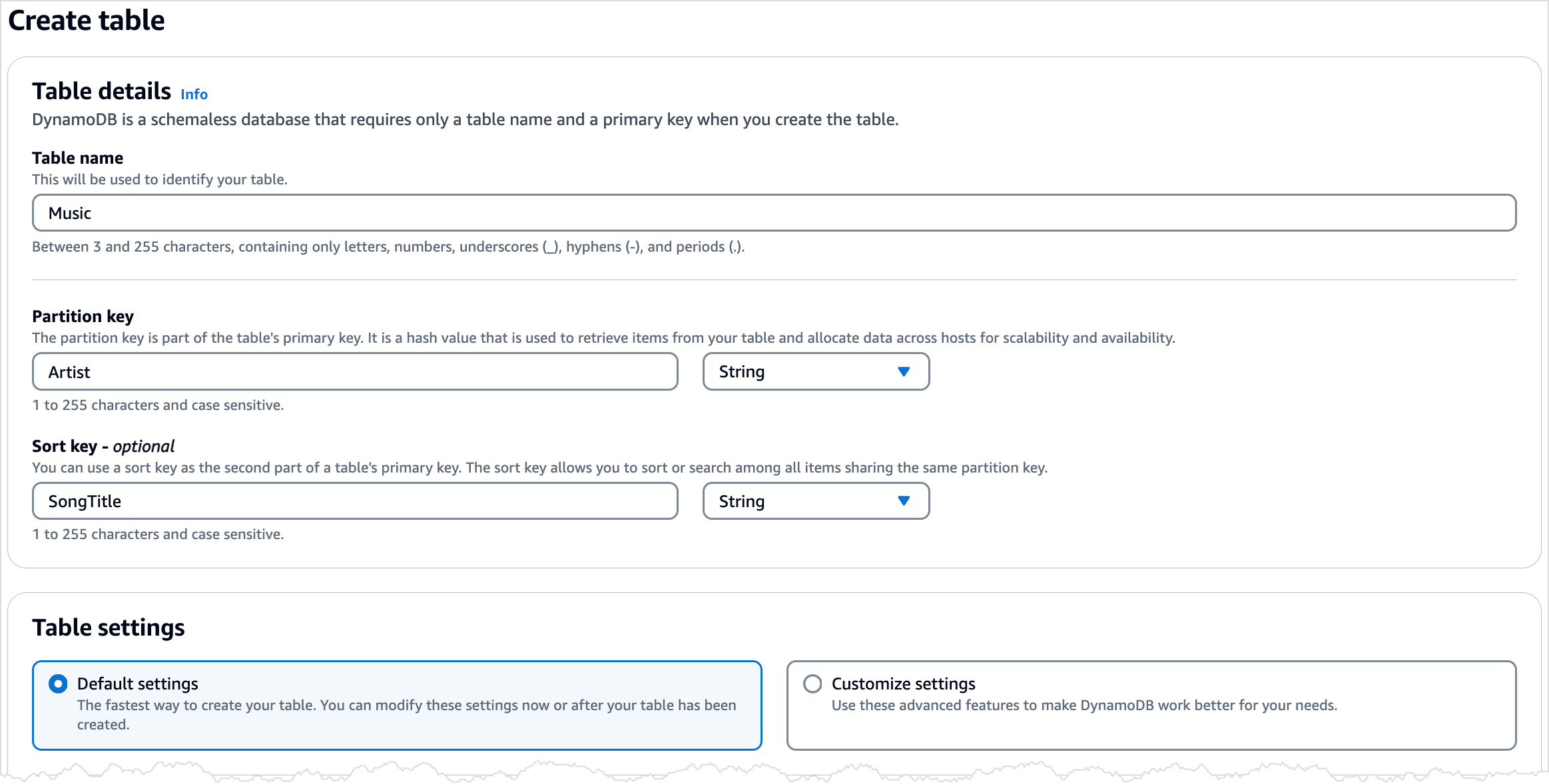
In diesem Schritt erstellen Sie eine Music-Tabelle im Amazon DynamoDB. In dieser Tabelle befinden sich die folgenden Details:
-
Partitionsschlüssel:
Artist -
Sortierschlüssel:
SongTitle
Weitere Informationen über Tabellen-Operationen finden Sie unter Arbeiten mit Tabellen und Daten in DynamoDB.
Anmerkung
Bevor Sie beginnen, sollten Sie sicherstellen, dass Sie die in Voraussetzungen beschriebenen Schritte befolgt haben.
So erstellen Sie eine neue Music-Tabelle mithilfe der DynamoDB-Konsole:
Melden Sie sich bei der an AWS-Managementkonsole und öffnen Sie die DynamoDB-Konsole unter. https://console.aws.amazon.com/dynamodb/
-
Wählen Sie im linken Navigationsbereich Tables (Tabellen) aus.
-
Wählen Sie Create table (Tabelle erstellen) aus.
-
Geben Sie die Tabellendetails wie folgt ein:
-
Geben Sie unter Tabellenname
Musicein. -
Geben Sie unter Partitionsschlüssel den Wert
Artistein. -
Geben Sie unter Sortierschlüssel den Wert
SongTitleein.
-
-
Behalten Sie unter Tabelleneinstellungen die Standardauswahl Standardeinstellungen bei.
-
Klicken Sie auf Tabelle erstellen, um die Tabelle zu erstellen.
-
Sobald die Tabelle den Status
ACTIVEaufweist, empfehlen wir, für die Tabelle die Option Zeitpunktbezogene Backups für DynamoDB zu aktivieren, indem Sie die folgenden Schritte ausführen:-
Klicken Sie auf den Tabellennamen, um die Tabelle zu öffnen.
-
Wählen Sie Backups aus.
-
Wählen Sie im Bereich Point-in-time Wiederherstellung (PITR) die Option Bearbeiten aus.
-
Wählen Sie auf der Seite Einstellungen für die zeitpunktbezogene Wiederherstellung bearbeiten die Option Zeitpunktbezogene Wiederherstellung aktivieren aus.
-
Wählen Sie Änderungen speichern aus.
-
Das folgende AWS CLI Beispiel erstellt eine neue Music Tabelle mitcreate-table.
Linux
aws dynamodb create-table \
    --table-name Music \
    --attribute-definitions \
        AttributeName=Artist,AttributeType=S \
        AttributeName=SongTitle,AttributeType=S \
    --key-schema AttributeName=Artist,KeyType=HASH AttributeName=SongTitle,KeyType=RANGE \
    --billing-mode PAY_PER_REQUEST \
    --table-class STANDARD
Windows CMD
aws dynamodb create-table ^
    --table-name Music ^
    --attribute-definitions ^
        AttributeName=Artist,AttributeType=S ^
        AttributeName=SongTitle,AttributeType=S ^
    --key-schema AttributeName=Artist,KeyType=HASH AttributeName=SongTitle,KeyType=RANGE ^
    --billing-mode PAY_PER_REQUEST ^
    --table-class STANDARD
Bei Verwenden von create-table wird das folgende Beispielergebnis zurückgegeben.
{
    "TableDescription": {
        "AttributeDefinitions": [
            {
                "AttributeName": "Artist",
                "AttributeType": "S"
            },
            {
                "AttributeName": "SongTitle",
                "AttributeType": "S"
            }
        ],
        "TableName": "Music",
        "KeySchema": [
            {
                "AttributeName": "Artist",
                "KeyType": "HASH"
            },
            {
                "AttributeName": "SongTitle",
                "KeyType": "RANGE"
            }
        ],
        "TableStatus": "CREATING",
        "CreationDateTime": "2023-03-29T12:11:43.379000-04:00",
        "ProvisionedThroughput": {
            "NumberOfDecreasesToday": 0,
            "ReadCapacityUnits": 5,
            "WriteCapacityUnits": 5
        },
        "TableSizeBytes": 0,
        "ItemCount": 0,
        "TableArn": "arn:aws:dynamodb:us-east-1:111122223333:table/Music",
        "TableId": "60abf404-1839-4917-a89b-a8b0ab2a1b87",
        "TableClassSummary": {
            "TableClass": "STANDARD"
        }
    }
}
}
Beachten Sie, dass für das Feld TableStatus der Wert CREATING festgelegt ist.
Um zu überprüfen, dass DynamoDB die Erstellung der Music-Tabelle abgeschlossen hat, verwenden Sie den Befehl describe-table.
Linux
aws dynamodb describe-table --table-name Music | grep TableStatus
Windows CMD
aws dynamodb describe-table --table-name Music | findstr TableStatus
Dieser Befehl gibt das folgende Ergebnis zurück. Wenn DynamoDB die Erstellung der Tabelle abgeschlossen hat, wird der Wert TableStatus des Felds auf ACTIVE festgelegt.
"TableStatus": "ACTIVE",
Sobald die Tabelle den Status ACTIVE aufweist, sollten Sie Zeitpunktbezogene Backups für DynamoDB für die Tabelle aktivieren, indem Sie den folgenden Befehl ausführen:
Linux
aws dynamodb update-continuous-backups \
    --table-name Music \
    --point-in-time-recovery-specification \
        PointInTimeRecoveryEnabled=true
Windows CMD
aws dynamodb update-continuous-backups --table-name Music --point-in-time-recovery-specification PointInTimeRecoveryEnabled=true
Dieser Befehl gibt das folgende Ergebnis zurück.
{
    "ContinuousBackupsDescription": {
        "ContinuousBackupsStatus": "ENABLED",
        "PointInTimeRecoveryDescription": {
            "PointInTimeRecoveryStatus": "ENABLED",
            "EarliestRestorableDateTime": "2023-03-29T12:18:19-04:00",
            "LatestRestorableDateTime": "2023-03-29T12:18:19-04:00"
        }
    }
}
Anmerkung
Das Aktivieren kontinuierlicher Backups mit zeitpunktbezogener Wiederherstellung ist mit Kosten verbunden. Weitere Informationen zu Preisen finden Sie unter Amazon DynamoDB – Preise
In den folgenden Codebeispielen wird gezeigt, wie eine DynamoDB-Tabelle mit einem AWS -SDK erstellt wird.
- .NET
-
- SDK für .NET (v4)
-
Anmerkung
Es gibt noch mehr dazu GitHub. Hier finden Sie das vollständige Beispiel und erfahren, wie Sie das AWS -Code-Beispiel-
einrichten und ausführen. /// <summary> /// Creates a new Amazon DynamoDB table and then waits for the new /// table to become active. /// </summary> /// <param name="tableName">The name of the table to create.</param> /// <returns>A Boolean value indicating the success of the operation.</returns> public async Task<bool> CreateMovieTableAsync(string tableName) { try { var response = await _amazonDynamoDB.CreateTableAsync(new CreateTableRequest { TableName = tableName, AttributeDefinitions = new List<AttributeDefinition>() { new AttributeDefinition { AttributeName = "title", AttributeType = ScalarAttributeType.S, }, new AttributeDefinition { AttributeName = "year", AttributeType = ScalarAttributeType.N, }, }, KeySchema = new List<KeySchemaElement>() { new KeySchemaElement { AttributeName = "year", KeyType = KeyType.HASH, }, new KeySchemaElement { AttributeName = "title", KeyType = KeyType.RANGE, }, }, BillingMode = BillingMode.PAY_PER_REQUEST, }); // Wait until the table is ACTIVE and then report success. Console.Write("Waiting for table to become active..."); var request = new DescribeTableRequest { TableName = response.TableDescription.TableName, }; TableStatus status; int sleepDuration = 2000; do { Thread.Sleep(sleepDuration); var describeTableResponse = await _amazonDynamoDB.DescribeTableAsync(request); status = describeTableResponse.Table.TableStatus; Console.Write("."); } while (status != "ACTIVE"); return status == TableStatus.ACTIVE; } catch (ResourceInUseException ex) { Console.WriteLine($"Table {tableName} already exists. {ex.Message}"); throw; } catch (AmazonDynamoDBException ex) { Console.WriteLine($"An Amazon DynamoDB error occurred while creating table {tableName}. {ex.Message}"); throw; } catch (Exception ex) { Console.WriteLine($"An error occurred while creating table {tableName}. {ex.Message}"); throw; } }-
Einzelheiten zur API finden Sie CreateTablein der AWS SDK für .NET API-Referenz.
-
- Bash
-
- AWS CLI mit Bash-Skript
-
Anmerkung
Es gibt noch mehr dazu. GitHub Hier finden Sie das vollständige Beispiel und erfahren, wie Sie das AWS -Code-Beispiel-
einrichten und ausführen. ############################################################################### # function dynamodb_create_table # # This function creates an Amazon DynamoDB table. # # Parameters: # -n table_name -- The name of the table to create. # -a attribute_definitions -- JSON file path of a list of attributes and their types. # -k key_schema -- JSON file path of a list of attributes and their key types. # # Returns: # 0 - If successful. # 1 - If it fails. ############################################################################### function dynamodb_create_table() { local table_name attribute_definitions key_schema response local option OPTARG # Required to use getopts command in a function. ####################################### # Function usage explanation ####################################### function usage() { echo "function dynamodb_create_table" echo "Creates an Amazon DynamoDB table with on-demand billing." echo " -n table_name -- The name of the table to create." echo " -a attribute_definitions -- JSON file path of a list of attributes and their types." echo " -k key_schema -- JSON file path of a list of attributes and their key types." echo "" } # Retrieve the calling parameters. while getopts "n:a:k:h" option; do case "${option}" in n) table_name="${OPTARG}" ;; a) attribute_definitions="${OPTARG}" ;; k) key_schema="${OPTARG}" ;; h) usage return 0 ;; \?) echo "Invalid parameter" usage return 1 ;; esac done export OPTIND=1 if [[ -z "$table_name" ]]; then errecho "ERROR: You must provide a table name with the -n parameter." usage return 1 fi if [[ -z "$attribute_definitions" ]]; then errecho "ERROR: You must provide an attribute definitions json file path the -a parameter." usage return 1 fi if [[ -z "$key_schema" ]]; then errecho "ERROR: You must provide a key schema json file path the -k parameter." usage return 1 fi iecho "Parameters:\n" iecho " table_name: $table_name" iecho " attribute_definitions: $attribute_definitions" iecho " key_schema: $key_schema" iecho "" response=$(aws dynamodb create-table \ --table-name "$table_name" \ --attribute-definitions file://"$attribute_definitions" \ --billing-mode PAY_PER_REQUEST \ --key-schema file://"$key_schema" ) local error_code=${?} if [[ $error_code -ne 0 ]]; then aws_cli_error_log $error_code errecho "ERROR: AWS reports create-table operation failed.$response" return 1 fi return 0 }Die in diesem Beispiel verwendeten Hilfsfunktionen.
############################################################################### # function iecho # # This function enables the script to display the specified text only if # the global variable $VERBOSE is set to true. ############################################################################### function iecho() { if [[ $VERBOSE == true ]]; then echo "$@" fi } ############################################################################### # function errecho # # This function outputs everything sent to it to STDERR (standard error output). ############################################################################### function errecho() { printf "%s\n" "$*" 1>&2 } ############################################################################## # function aws_cli_error_log() # # This function is used to log the error messages from the AWS CLI. # # See https://docs.aws.amazon.com/cli/latest/topic/return-codes.html#cli-aws-help-return-codes. # # The function expects the following argument: # $1 - The error code returned by the AWS CLI. # # Returns: # 0: - Success. # ############################################################################## function aws_cli_error_log() { local err_code=$1 errecho "Error code : $err_code" if [ "$err_code" == 1 ]; then errecho " One or more S3 transfers failed." elif [ "$err_code" == 2 ]; then errecho " Command line failed to parse." elif [ "$err_code" == 130 ]; then errecho " Process received SIGINT." elif [ "$err_code" == 252 ]; then errecho " Command syntax invalid." elif [ "$err_code" == 253 ]; then errecho " The system environment or configuration was invalid." elif [ "$err_code" == 254 ]; then errecho " The service returned an error." elif [ "$err_code" == 255 ]; then errecho " 255 is a catch-all error." fi return 0 }-
Einzelheiten zur API finden Sie CreateTablein der AWS CLI Befehlsreferenz.
-
- C++
-
- SDK für C++
-
Anmerkung
Es gibt noch mehr dazu GitHub. Hier finden Sie das vollständige Beispiel und erfahren, wie Sie das AWS -Code-Beispiel-
einrichten und ausführen. //! Create an Amazon DynamoDB table. /*! \sa createTable() \param tableName: Name for the DynamoDB table. \param primaryKey: Primary key for the DynamoDB table. \param clientConfiguration: AWS client configuration. \return bool: Function succeeded. */ bool AwsDoc::DynamoDB::createTable(const Aws::String &tableName, const Aws::String &primaryKey, const Aws::Client::ClientConfiguration &clientConfiguration) { Aws::DynamoDB::DynamoDBClient dynamoClient(clientConfiguration); std::cout << "Creating table " << tableName << " with a simple primary key: \"" << primaryKey << "\"." << std::endl; Aws::DynamoDB::Model::CreateTableRequest request; Aws::DynamoDB::Model::AttributeDefinition hashKey; hashKey.SetAttributeName(primaryKey); hashKey.SetAttributeType(Aws::DynamoDB::Model::ScalarAttributeType::S); request.AddAttributeDefinitions(hashKey); Aws::DynamoDB::Model::KeySchemaElement keySchemaElement; keySchemaElement.WithAttributeName(primaryKey).WithKeyType( Aws::DynamoDB::Model::KeyType::HASH); request.AddKeySchema(keySchemaElement); Aws::DynamoDB::Model::ProvisionedThroughput throughput; throughput.WithReadCapacityUnits(5).WithWriteCapacityUnits(5); request.SetProvisionedThroughput(throughput); request.SetTableName(tableName); const Aws::DynamoDB::Model::CreateTableOutcome &outcome = dynamoClient.CreateTable( request); if (outcome.IsSuccess()) { std::cout << "Table \"" << outcome.GetResult().GetTableDescription().GetTableName() << " created!" << std::endl; } else { std::cerr << "Failed to create table: " << outcome.GetError().GetMessage() << std::endl; return false; } return waitTableActive(tableName, dynamoClient); }Code, der darauf wartet, dass die Tabelle aktiv wird.
//! Query a newly created DynamoDB table until it is active. /*! \sa waitTableActive() \param waitTableActive: The DynamoDB table's name. \param dynamoClient: A DynamoDB client. \return bool: Function succeeded. */ bool AwsDoc::DynamoDB::waitTableActive(const Aws::String &tableName, const Aws::DynamoDB::DynamoDBClient &dynamoClient) { // Repeatedly call DescribeTable until table is ACTIVE. const int MAX_QUERIES = 20; Aws::DynamoDB::Model::DescribeTableRequest request; request.SetTableName(tableName); int count = 0; while (count < MAX_QUERIES) { const Aws::DynamoDB::Model::DescribeTableOutcome &result = dynamoClient.DescribeTable( request); if (result.IsSuccess()) { Aws::DynamoDB::Model::TableStatus status = result.GetResult().GetTable().GetTableStatus(); if (Aws::DynamoDB::Model::TableStatus::ACTIVE != status) { std::this_thread::sleep_for(std::chrono::seconds(1)); } else { return true; } } else { std::cerr << "Error DynamoDB::waitTableActive " << result.GetError().GetMessage() << std::endl; return false; } count++; } return false; }-
Einzelheiten zur API finden Sie CreateTablein der AWS SDK für C++ API-Referenz.
-
- CLI
-
- AWS CLI
-
Beispiel 1: So erstellen Sie eine Tabelle mit Tags
Im folgenden Beispiel für
create-tablewerden die angegebenen Attribute und das angegebene Schlüsselschema verwendet, um eine Tabelle mit dem NamenMusicCollectionzu erstellen. Diese Tabelle verwendet den bereitgestellten Durchsatz und wird im Ruhezustand mit dem standardmäßigen AWS eigenen CMK verschlüsselt. Der Befehl weist der Tabelle außerdem ein Tag mit dem SchlüsselOwnerund dem WertblueTeamzu.aws dynamodb create-table \ --table-nameMusicCollection\ --attribute-definitionsAttributeName=Artist,AttributeType=SAttributeName=SongTitle,AttributeType=S\ --key-schemaAttributeName=Artist,KeyType=HASHAttributeName=SongTitle,KeyType=RANGE\ --provisioned-throughputReadCapacityUnits=5,WriteCapacityUnits=5\ --tagsKey=Owner,Value=blueTeamAusgabe:
{
    "TableDescription": {
        "AttributeDefinitions": [
            {
                "AttributeName": "Artist",
                "AttributeType": "S"
            },
            {
                "AttributeName": "SongTitle",
                "AttributeType": "S"
            }
        ],
        "ProvisionedThroughput": {
            "NumberOfDecreasesToday": 0,
            "WriteCapacityUnits": 5,
            "ReadCapacityUnits": 5
        },
        "TableSizeBytes": 0,
        "TableName": "MusicCollection",
        "TableStatus": "CREATING",
        "KeySchema": [
            {
                "KeyType": "HASH",
                "AttributeName": "Artist"
            },
            {
                "KeyType": "RANGE",
                "AttributeName": "SongTitle"
            }
        ],
        "ItemCount": 0,
        "CreationDateTime": "2020-05-26T16:04:41.627000-07:00",
        "TableArn": "arn:aws:dynamodb:us-west-2:123456789012:table/MusicCollection",
        "TableId": "a1b2c3d4-5678-90ab-cdef-EXAMPLE11111"
    }
}
Weitere Informationen finden Sie unter Grundlegende Operationen für Tabellen im Entwicklerhandbuch zu Amazon DynamoDB.
Beispiel 2: So erstellen Sie eine Tabelle im Modus On-Demand
Im folgenden Beispiel wird mit dem On-Demand-Modus anstelle des bereitgestellten Durchsatzmodus eine Tabelle mit dem Namen
MusicCollectionerstellt. Dies ist nützlich für Tabellen mit unvorhersehbaren Workloads.aws dynamodb create-table \ --table-nameMusicCollection\ --attribute-definitionsAttributeName=Artist,AttributeType=SAttributeName=SongTitle,AttributeType=S\ --key-schemaAttributeName=Artist,KeyType=HASHAttributeName=SongTitle,KeyType=RANGE\ --billing-modePAY_PER_REQUESTAusgabe:
{
    "TableDescription": {
        "AttributeDefinitions": [
            {
                "AttributeName": "Artist",
                "AttributeType": "S"
            },
            {
                "AttributeName": "SongTitle",
                "AttributeType": "S"
            }
        ],
        "TableName": "MusicCollection",
        "KeySchema": [
            {
                "AttributeName": "Artist",
                "KeyType": "HASH"
            },
            {
                "AttributeName": "SongTitle",
                "KeyType": "RANGE"
            }
        ],
        "TableStatus": "CREATING",
        "CreationDateTime": "2020-05-27T11:44:10.807000-07:00",
        "ProvisionedThroughput": {
            "NumberOfDecreasesToday": 0,
            "ReadCapacityUnits": 0,
            "WriteCapacityUnits": 0
        },
        "TableSizeBytes": 0,
        "ItemCount": 0,
        "TableArn": "arn:aws:dynamodb:us-west-2:123456789012:table/MusicCollection",
        "TableId": "a1b2c3d4-5678-90ab-cdef-EXAMPLE11111",
        "BillingModeSummary": {
            "BillingMode": "PAY_PER_REQUEST"
        }
    }
}
Weitere Informationen finden Sie unter Grundlegende Operationen für Tabellen im Entwicklerhandbuch zu Amazon DynamoDB.
Beispiel 3: So erstellen Sie eine Tabelle und verschlüsseln sie mit einem kundenseitig verwalteten Schlüssel (Customer Managed Key; CMK).
Im folgenden Beispiel wird eine Tabelle mit dem Namen
MusicCollectionerstellt und mithilfe eines kundenseitig verwalteten Schlüssels (Customer Managed Key; CMK) verschlüsselt.aws dynamodb create-table \ --table-nameMusicCollection\ --attribute-definitionsAttributeName=Artist,AttributeType=SAttributeName=SongTitle,AttributeType=S\ --key-schemaAttributeName=Artist,KeyType=HASHAttributeName=SongTitle,KeyType=RANGE\ --provisioned-throughputReadCapacityUnits=5,WriteCapacityUnits=5\ --sse-specificationEnabled=true,SSEType=KMS,KMSMasterKeyId=abcd1234-abcd-1234-a123-ab1234a1b234Ausgabe:
{
    "TableDescription": {
        "AttributeDefinitions": [
            {
                "AttributeName": "Artist",
                "AttributeType": "S"
            },
            {
                "AttributeName": "SongTitle",
                "AttributeType": "S"
            }
        ],
        "TableName": "MusicCollection",
        "KeySchema": [
            {
                "AttributeName": "Artist",
                "KeyType": "HASH"
            },
            {
                "AttributeName": "SongTitle",
                "KeyType": "RANGE"
            }
        ],
        "TableStatus": "CREATING",
        "CreationDateTime": "2020-05-27T11:12:16.431000-07:00",
        "ProvisionedThroughput": {
            "NumberOfDecreasesToday": 0,
            "ReadCapacityUnits": 5,
            "WriteCapacityUnits": 5
        },
        "TableSizeBytes": 0,
        "ItemCount": 0,
        "TableArn": "arn:aws:dynamodb:us-west-2:123456789012:table/MusicCollection",
        "TableId": "a1b2c3d4-5678-90ab-cdef-EXAMPLE11111",
        "SSEDescription": {
            "Status": "ENABLED",
            "SSEType": "KMS",
            "KMSMasterKeyArn": "arn:aws:kms:us-west-2:123456789012:key/abcd1234-abcd-1234-a123-ab1234a1b234"
        }
    }
}
Weitere Informationen finden Sie unter Grundlegende Operationen für Tabellen im Entwicklerhandbuch zu Amazon DynamoDB.
Bespiel 4: So erstellen Sie eine Tabelle mit einem lokalen sekundären Index
Im folgenden Beispiel werden die angegebenen Attribute und das angegebene Schlüsselschema verwendet, um eine Tabelle namens
MusicCollectionmit dem lokalen sekundären IndexAlbumTitleIndexzu erstellen.aws dynamodb create-table \ --table-nameMusicCollection\ --attribute-definitionsAttributeName=Artist,AttributeType=SAttributeName=SongTitle,AttributeType=SAttributeName=AlbumTitle,AttributeType=S\ --key-schemaAttributeName=Artist,KeyType=HASHAttributeName=SongTitle,KeyType=RANGE\ --provisioned-throughputReadCapacityUnits=10,WriteCapacityUnits=5\ --local-secondary-indexes \ "[ { \"IndexName\": \"AlbumTitleIndex\", \"KeySchema\": [ {\"AttributeName\": \"Artist\",\"KeyType\":\"HASH\"}, {\"AttributeName\": \"AlbumTitle\",\"KeyType\":\"RANGE\"} ], \"Projection\": { \"ProjectionType\": \"INCLUDE\", \"NonKeyAttributes\": [\"Genre\", \"Year\"] } } ]"Ausgabe:
{
    "TableDescription": {
        "AttributeDefinitions": [
            {
                "AttributeName": "AlbumTitle",
                "AttributeType": "S"
            },
            {
                "AttributeName": "Artist",
                "AttributeType": "S"
            },
            {
                "AttributeName": "SongTitle",
                "AttributeType": "S"
            }
        ],
        "TableName": "MusicCollection",
        "KeySchema": [
            {
                "AttributeName": "Artist",
                "KeyType": "HASH"
            },
            {
                "AttributeName": "SongTitle",
                "KeyType": "RANGE"
            }
        ],
        "TableStatus": "CREATING",
        "CreationDateTime": "2020-05-26T15:59:49.473000-07:00",
        "ProvisionedThroughput": {
            "NumberOfDecreasesToday": 0,
            "ReadCapacityUnits": 10,
            "WriteCapacityUnits": 5
        },
        "TableSizeBytes": 0,
        "ItemCount": 0,
        "TableArn": "arn:aws:dynamodb:us-west-2:123456789012:table/MusicCollection",
        "TableId": "a1b2c3d4-5678-90ab-cdef-EXAMPLE11111",
        "LocalSecondaryIndexes": [
            {
                "IndexName": "AlbumTitleIndex",
                "KeySchema": [
                    {
                        "AttributeName": "Artist",
                        "KeyType": "HASH"
                    },
                    {
                        "AttributeName": "AlbumTitle",
                        "KeyType": "RANGE"
                    }
                ],
                "Projection": {
                    "ProjectionType": "INCLUDE",
                    "NonKeyAttributes": [
                        "Genre",
                        "Year"
                    ]
                },
                "IndexSizeBytes": 0,
                "ItemCount": 0,
                "IndexArn": "arn:aws:dynamodb:us-west-2:123456789012:table/MusicCollection/index/AlbumTitleIndex"
            }
        ]
    }
}
Weitere Informationen finden Sie unter Grundlegende Operationen für Tabellen im Entwicklerhandbuch zu Amazon DynamoDB.
Beispiel 5: So erstellen Sie eine Tabelle mit einem globalen sekundären Index
Im folgenden Beispiel wird eine Tabelle mit dem Namen
GameScoresmit einem globalen sekundären Index namensGameTitleIndexerstellt. Die Basistabelle hat einen Partitionsschlüssel vonUserIdund einen Sortierschlüssel vonGameTitle, mit dem Sie effizient die beste Punktzahl eines einzelnen Benutzers für ein bestimmtes Spiel finden können, während die GSI einen Partitionsschlüssel vonGameTitleund einen Sortierschlüssel vonTopScorehat, mit dem Sie finden Sie schnell die höchste Gesamtpunktzahl für ein bestimmtes Spiel.aws dynamodb create-table \ --table-nameGameScores\ --attribute-definitionsAttributeName=UserId,AttributeType=SAttributeName=GameTitle,AttributeType=SAttributeName=TopScore,AttributeType=N\ --key-schemaAttributeName=UserId,KeyType=HASH\AttributeName=GameTitle,KeyType=RANGE\ --provisioned-throughputReadCapacityUnits=10,WriteCapacityUnits=5\ --global-secondary-indexes \ "[ { \"IndexName\": \"GameTitleIndex\", \"KeySchema\": [ {\"AttributeName\":\"GameTitle\",\"KeyType\":\"HASH\"}, {\"AttributeName\":\"TopScore\",\"KeyType\":\"RANGE\"} ], \"Projection\": { \"ProjectionType\":\"INCLUDE\", \"NonKeyAttributes\":[\"UserId\"] }, \"ProvisionedThroughput\": { \"ReadCapacityUnits\": 10, \"WriteCapacityUnits\": 5 } } ]"Ausgabe:
{
    "TableDescription": {
        "AttributeDefinitions": [
            {
                "AttributeName": "GameTitle",
                "AttributeType": "S"
            },
            {
                "AttributeName": "TopScore",
                "AttributeType": "N"
            },
            {
                "AttributeName": "UserId",
                "AttributeType": "S"
            }
        ],
        "TableName": "GameScores",
        "KeySchema": [
            {
                "AttributeName": "UserId",
                "KeyType": "HASH"
            },
            {
                "AttributeName": "GameTitle",
                "KeyType": "RANGE"
            }
        ],
        "TableStatus": "CREATING",
        "CreationDateTime": "2020-05-26T17:28:15.602000-07:00",
        "ProvisionedThroughput": {
            "NumberOfDecreasesToday": 0,
            "ReadCapacityUnits": 10,
            "WriteCapacityUnits": 5
        },
        "TableSizeBytes": 0,
        "ItemCount": 0,
        "TableArn": "arn:aws:dynamodb:us-west-2:123456789012:table/GameScores",
        "TableId": "a1b2c3d4-5678-90ab-cdef-EXAMPLE11111",
        "GlobalSecondaryIndexes": [
            {
                "IndexName": "GameTitleIndex",
                "KeySchema": [
                    {
                        "AttributeName": "GameTitle",
                        "KeyType": "HASH"
                    },
                    {
                        "AttributeName": "TopScore",
                        "KeyType": "RANGE"
                    }
                ],
                "Projection": {
                    "ProjectionType": "INCLUDE",
                    "NonKeyAttributes": [
                        "UserId"
                    ]
                },
                "IndexStatus": "CREATING",
                "ProvisionedThroughput": {
                    "NumberOfDecreasesToday": 0,
                    "ReadCapacityUnits": 10,
                    "WriteCapacityUnits": 5
                },
                "IndexSizeBytes": 0,
                "ItemCount": 0,
                "IndexArn": "arn:aws:dynamodb:us-west-2:123456789012:table/GameScores/index/GameTitleIndex"
            }
        ]
    }
}
Weitere Informationen finden Sie unter Grundlegende Operationen für Tabellen im Entwicklerhandbuch zu Amazon DynamoDB.
Beispiel 6: So erstellen Sie eine Tabelle mit mehreren globalen sekundären Indizes gleichzeitig
Im folgenden Beispiel wird eine Tabelle namens
GameScoresmit zwei globalen sekundären Indizes erstellt. Die GSI-Schemas werden über eine Datei und nicht über die Befehlszeile übergeben.aws dynamodb create-table \ --table-nameGameScores\ --attribute-definitionsAttributeName=UserId,AttributeType=SAttributeName=GameTitle,AttributeType=SAttributeName=TopScore,AttributeType=NAttributeName=Date,AttributeType=S\ --key-schemaAttributeName=UserId,KeyType=HASHAttributeName=GameTitle,KeyType=RANGE\ --provisioned-throughputReadCapacityUnits=10,WriteCapacityUnits=5\ --global-secondary-indexesfile://gsi.jsonInhalt von
gsi.json:[ { "IndexName": "GameTitleIndex", "KeySchema": [ { "AttributeName": "GameTitle", "KeyType": "HASH" }, { "AttributeName": "TopScore", "KeyType": "RANGE" } ], "Projection": { "ProjectionType": "ALL" }, "ProvisionedThroughput": { "ReadCapacityUnits": 10, "WriteCapacityUnits": 5 } }, { "IndexName": "GameDateIndex", "KeySchema": [ { "AttributeName": "GameTitle", "KeyType": "HASH" }, { "AttributeName": "Date", "KeyType": "RANGE" } ], "Projection": { "ProjectionType": "ALL" }, "ProvisionedThroughput": { "ReadCapacityUnits": 5, "WriteCapacityUnits": 5 } } ]Ausgabe:
{
    "TableDescription": {
        "AttributeDefinitions": [
            {
                "AttributeName": "Date",
                "AttributeType": "S"
            },
            {
                "AttributeName": "GameTitle",
                "AttributeType": "S"
            },
            {
                "AttributeName": "TopScore",
                "AttributeType": "N"
            },
            {
                "AttributeName": "UserId",
                "AttributeType": "S"
            }
        ],
        "TableName": "GameScores",
        "KeySchema": [
            {
                "AttributeName": "UserId",
                "KeyType": "HASH"
            },
            {
                "AttributeName": "GameTitle",
                "KeyType": "RANGE"
            }
        ],
        "TableStatus": "CREATING",
        "CreationDateTime": "2020-08-04T16:40:55.524000-07:00",
        "ProvisionedThroughput": {
            "NumberOfDecreasesToday": 0,
            "ReadCapacityUnits": 10,
            "WriteCapacityUnits": 5
        },
        "TableSizeBytes": 0,
        "ItemCount": 0,
        "TableArn": "arn:aws:dynamodb:us-west-2:123456789012:table/GameScores",
        "TableId": "a1b2c3d4-5678-90ab-cdef-EXAMPLE11111",
        "GlobalSecondaryIndexes": [
            {
                "IndexName": "GameTitleIndex",
                "KeySchema": [
                    {
                        "AttributeName": "GameTitle",
                        "KeyType": "HASH"
                    },
                    {
                        "AttributeName": "TopScore",
                        "KeyType": "RANGE"
                    }
                ],
                "Projection": {
                    "ProjectionType": "ALL"
                },
                "IndexStatus": "CREATING",
                "ProvisionedThroughput": {
                    "NumberOfDecreasesToday": 0,
                    "ReadCapacityUnits": 10,
                    "WriteCapacityUnits": 5
                },
                "IndexSizeBytes": 0,
                "ItemCount": 0,
                "IndexArn": "arn:aws:dynamodb:us-west-2:123456789012:table/GameScores/index/GameTitleIndex"
            },
            {
                "IndexName": "GameDateIndex",
                "KeySchema": [
                    {
                        "AttributeName": "GameTitle",
                        "KeyType": "HASH"
                    },
                    {
                        "AttributeName": "Date",
                        "KeyType": "RANGE"
                    }
                ],
                "Projection": {
                    "ProjectionType": "ALL"
                },
                "IndexStatus": "CREATING",
                "ProvisionedThroughput": {
                    "NumberOfDecreasesToday": 0,
                    "ReadCapacityUnits": 5,
                    "WriteCapacityUnits": 5
                },
                "IndexSizeBytes": 0,
                "ItemCount": 0,
                "IndexArn": "arn:aws:dynamodb:us-west-2:123456789012:table/GameScores/index/GameDateIndex"
            }
        ]
    }
}
Weitere Informationen finden Sie unter Grundlegende Operationen für Tabellen im Entwicklerhandbuch zu Amazon DynamoDB.
Beispiel 7: So erstellen Sie eine Tabelle mit aktivierten Streams
Im folgenden Beispiel wird die Tabelle
GameScoresmit aktiviertem DynamoDB Streams aufgerufen. Sowohl neue als auch alte Images von jedem Element werden in den Stream geschrieben.aws dynamodb create-table \ --table-nameGameScores\ --attribute-definitionsAttributeName=UserId,AttributeType=SAttributeName=GameTitle,AttributeType=S\ --key-schemaAttributeName=UserId,KeyType=HASHAttributeName=GameTitle,KeyType=RANGE\ --provisioned-throughputReadCapacityUnits=10,WriteCapacityUnits=5\ --stream-specificationStreamEnabled=TRUE,StreamViewType=NEW_AND_OLD_IMAGESAusgabe:
{
    "TableDescription": {
        "AttributeDefinitions": [
            {
                "AttributeName": "GameTitle",
                "AttributeType": "S"
            },
            {
                "AttributeName": "UserId",
                "AttributeType": "S"
            }
        ],
        "TableName": "GameScores",
        "KeySchema": [
            {
                "AttributeName": "UserId",
                "KeyType": "HASH"
            },
            {
                "AttributeName": "GameTitle",
                "KeyType": "RANGE"
            }
        ],
        "TableStatus": "CREATING",
        "CreationDateTime": "2020-05-27T10:49:34.056000-07:00",
        "ProvisionedThroughput": {
            "NumberOfDecreasesToday": 0,
            "ReadCapacityUnits": 10,
            "WriteCapacityUnits": 5
        },
        "TableSizeBytes": 0,
        "ItemCount": 0,
        "TableArn": "arn:aws:dynamodb:us-west-2:123456789012:table/GameScores",
        "TableId": "a1b2c3d4-5678-90ab-cdef-EXAMPLE11111",
        "StreamSpecification": {
            "StreamEnabled": true,
            "StreamViewType": "NEW_AND_OLD_IMAGES"
        },
        "LatestStreamLabel": "2020-05-27T17:49:34.056",
        "LatestStreamArn": "arn:aws:dynamodb:us-west-2:123456789012:table/GameScores/stream/2020-05-27T17:49:34.056"
    }
}
Weitere Informationen finden Sie unter Grundlegende Operationen für Tabellen im Entwicklerhandbuch zu Amazon DynamoDB.
Beispiel 8: Um eine Tabelle mit aktiviertem Keys-Only Stream zu erstellen
Im folgenden Beispiel wird die Tabelle
GameScoresmit aktiviertem DynamoDB Streams aufgerufen. Nur die Schlüsselattribute von geänderten Elementen werden in den Stream geschrieben.aws dynamodb create-table \ --table-nameGameScores\ --attribute-definitionsAttributeName=UserId,AttributeType=SAttributeName=GameTitle,AttributeType=S\ --key-schemaAttributeName=UserId,KeyType=HASHAttributeName=GameTitle,KeyType=RANGE\ --provisioned-throughputReadCapacityUnits=10,WriteCapacityUnits=5\ --stream-specificationStreamEnabled=TRUE,StreamViewType=KEYS_ONLYAusgabe:
{
    "TableDescription": {
        "AttributeDefinitions": [
            {
                "AttributeName": "GameTitle",
                "AttributeType": "S"
            },
            {
                "AttributeName": "UserId",
                "AttributeType": "S"
            }
        ],
        "TableName": "GameScores",
        "KeySchema": [
            {
                "AttributeName": "UserId",
                "KeyType": "HASH"
            },
            {
                "AttributeName": "GameTitle",
                "KeyType": "RANGE"
            }
        ],
        "TableStatus": "CREATING",
        "CreationDateTime": "2023-05-25T18:45:34.140000+00:00",
        "ProvisionedThroughput": {
            "NumberOfDecreasesToday": 0,
            "ReadCapacityUnits": 10,
            "WriteCapacityUnits": 5
        },
        "TableSizeBytes": 0,
        "ItemCount": 0,
        "TableArn": "arn:aws:dynamodb:us-west-2:123456789012:table/GameScores",
        "TableId": "a1b2c3d4-5678-90ab-cdef-EXAMPLE11111",
        "StreamSpecification": {
            "StreamEnabled": true,
            "StreamViewType": "KEYS_ONLY"
        },
        "LatestStreamLabel": "2023-05-25T18:45:34.140",
        "LatestStreamArn": "arn:aws:dynamodb:us-west-2:123456789012:table/GameScores/stream/2023-05-25T18:45:34.140",
        "DeletionProtectionEnabled": false
    }
}
Weitere Informationen finden Sie unter Ändern der Datenerfassung für DynamoDB Streams im Entwicklerhandbuch zu Amazon DynamoDB.
Beispiel 9: So erstellen Sie eine Tabelle mit der Klasse Standard Infrequent Access
Im folgenden Beispiel wird eine Tabelle mit dem Namen Standard-Infrequent Access (DynamoDB Standard-IA) erstellt
GameScoresund ihr zugewiesen. Diese Tabellenklasse ist dafür optimiert, dass Speicher der Hauptkostenfaktor ist.aws dynamodb create-table \ --table-nameGameScores\ --attribute-definitionsAttributeName=UserId,AttributeType=SAttributeName=GameTitle,AttributeType=S\ --key-schemaAttributeName=UserId,KeyType=HASHAttributeName=GameTitle,KeyType=RANGE\ --provisioned-throughputReadCapacityUnits=10,WriteCapacityUnits=5\ --table-classSTANDARD_INFREQUENT_ACCESSAusgabe:
{
    "TableDescription": {
        "AttributeDefinitions": [
            {
                "AttributeName": "GameTitle",
                "AttributeType": "S"
            },
            {
                "AttributeName": "UserId",
                "AttributeType": "S"
            }
        ],
        "TableName": "GameScores",
        "KeySchema": [
            {
                "AttributeName": "UserId",
                "KeyType": "HASH"
            },
            {
                "AttributeName": "GameTitle",
                "KeyType": "RANGE"
            }
        ],
        "TableStatus": "CREATING",
        "CreationDateTime": "2023-05-25T18:33:07.581000+00:00",
        "ProvisionedThroughput": {
            "NumberOfDecreasesToday": 0,
            "ReadCapacityUnits": 10,
            "WriteCapacityUnits": 5
        },
        "TableSizeBytes": 0,
        "ItemCount": 0,
        "TableArn": "arn:aws:dynamodb:us-west-2:123456789012:table/GameScores",
        "TableId": "a1b2c3d4-5678-90ab-cdef-EXAMPLE11111",
        "TableClassSummary": {
            "TableClass": "STANDARD_INFREQUENT_ACCESS"
        },
        "DeletionProtectionEnabled": false
    }
}
Weitere Informationen finden Sie unter Tabellenklassen im Entwicklerhandbuch zu Amazon DynamoDB.
Beispiel 10: So erstellen Sie eine Tabelle mit aktiviertem Löschschutz
Im folgenden Beispiel wird eine Tabelle mit dem Namen
GameScoreserstellt und der Löschschutz aktiviert.aws dynamodb create-table \ --table-nameGameScores\ --attribute-definitionsAttributeName=UserId,AttributeType=SAttributeName=GameTitle,AttributeType=S\ --key-schemaAttributeName=UserId,KeyType=HASHAttributeName=GameTitle,KeyType=RANGE\ --provisioned-throughputReadCapacityUnits=10,WriteCapacityUnits=5\ --deletion-protection-enabledAusgabe:
{
    "TableDescription": {
        "AttributeDefinitions": [
            {
                "AttributeName": "GameTitle",
                "AttributeType": "S"
            },
            {
                "AttributeName": "UserId",
                "AttributeType": "S"
            }
        ],
        "TableName": "GameScores",
        "KeySchema": [
            {
                "AttributeName": "UserId",
                "KeyType": "HASH"
            },
            {
                "AttributeName": "GameTitle",
                "KeyType": "RANGE"
            }
        ],
        "TableStatus": "CREATING",
        "CreationDateTime": "2023-05-25T23:02:17.093000+00:00",
        "ProvisionedThroughput": {
            "NumberOfDecreasesToday": 0,
            "ReadCapacityUnits": 10,
            "WriteCapacityUnits": 5
        },
        "TableSizeBytes": 0,
        "ItemCount": 0,
        "TableArn": "arn:aws:dynamodb:us-west-2:123456789012:table/GameScores",
        "TableId": "a1b2c3d4-5678-90ab-cdef-EXAMPLE11111",
        "DeletionProtectionEnabled": true
    }
}
Weitere Informationen finden Sie unter Verwenden des Löschschutzes im Entwicklerhandbuch zu Amazon DynamoDB.
-
Einzelheiten zur API finden Sie unter Befehlsreferenz CreateTable
.AWS CLI
-
- Go
-
- SDK für Go V2
-
Anmerkung
Es gibt noch mehr dazu GitHub. Hier finden Sie das vollständige Beispiel und erfahren, wie Sie das AWS -Code-Beispiel-
einrichten und ausführen. import ( "context" "errors" "log" "time" "github.com/aws/aws-sdk-go-v2/aws" "github.com/aws/aws-sdk-go-v2/feature/dynamodb/attributevalue" "github.com/aws/aws-sdk-go-v2/feature/dynamodb/expression" "github.com/aws/aws-sdk-go-v2/service/dynamodb" "github.com/aws/aws-sdk-go-v2/service/dynamodb/types" ) // TableBasics encapsulates the Amazon DynamoDB service actions used in the examples. // It contains a DynamoDB service client that is used to act on the specified table. type TableBasics struct { DynamoDbClient *dynamodb.Client TableName string } // CreateMovieTable creates a DynamoDB table with a composite primary key defined as // a string sort key named `title`, and a numeric partition key named `year`. // This function uses NewTableExistsWaiter to wait for the table to be created by // DynamoDB before it returns. func (basics TableBasics) CreateMovieTable(ctx context.Context) (*types.TableDescription, error) { var tableDesc *types.TableDescription table, err := basics.DynamoDbClient.CreateTable(ctx, &dynamodb.CreateTableInput{ AttributeDefinitions: []types.AttributeDefinition{{ AttributeName: aws.String("year"), AttributeType: types.ScalarAttributeTypeN, }, { AttributeName: aws.String("title"), AttributeType: types.ScalarAttributeTypeS, }}, KeySchema: []types.KeySchemaElement{{ AttributeName: aws.String("year"), KeyType: types.KeyTypeHash, }, { AttributeName: aws.String("title"), KeyType: types.KeyTypeRange, }}, TableName: aws.String(basics.TableName), BillingMode: types.BillingModePayPerRequest, }) if err != nil { log.Printf("Couldn't create table %v. Here's why: %v\n", basics.TableName, err) } else { waiter := dynamodb.NewTableExistsWaiter(basics.DynamoDbClient) err = waiter.Wait(ctx, &dynamodb.DescribeTableInput{ TableName: aws.String(basics.TableName)}, 5*time.Minute) if err != nil { log.Printf("Wait for table exists failed. Here's why: %v\n", err) } tableDesc = table.TableDescription log.Printf("Ccreating table test") } return tableDesc, err }-
Einzelheiten zur API finden Sie CreateTable
in der AWS SDK für Go API-Referenz.
-
- Java
-
- SDK für Java 2.x
-
Anmerkung
Es gibt noch mehr dazu GitHub. Hier finden Sie das vollständige Beispiel und erfahren, wie Sie das AWS -Code-Beispiel-
einrichten und ausführen. import software.amazon.awssdk.core.waiters.WaiterResponse; import software.amazon.awssdk.regions.Region; import software.amazon.awssdk.services.dynamodb.DynamoDbClient; import software.amazon.awssdk.services.dynamodb.model.AttributeDefinition; import software.amazon.awssdk.services.dynamodb.model.BillingMode; import software.amazon.awssdk.services.dynamodb.model.CreateTableRequest; import software.amazon.awssdk.services.dynamodb.model.CreateTableResponse; import software.amazon.awssdk.services.dynamodb.model.DescribeTableRequest; import software.amazon.awssdk.services.dynamodb.model.DescribeTableResponse; import software.amazon.awssdk.services.dynamodb.model.DynamoDbException; import software.amazon.awssdk.services.dynamodb.model.KeySchemaElement; import software.amazon.awssdk.services.dynamodb.model.KeyType; import software.amazon.awssdk.services.dynamodb.model.OnDemandThroughput; import software.amazon.awssdk.services.dynamodb.model.ProvisionedThroughput; import software.amazon.awssdk.services.dynamodb.model.ScalarAttributeType; import software.amazon.awssdk.services.dynamodb.waiters.DynamoDbWaiter; /** * Before running this Java V2 code example, set up your development * environment, including your credentials. * <p> * For more information, see the following documentation topic: * <p> * https://docs.aws.amazon.com/sdk-for-java/latest/developer-guide/get-started.html */ public class CreateTable { public static void main(String[] args) { final String usage = """ Usage: <tableName> <key> Where: tableName - The Amazon DynamoDB table to create (for example, Music3). key - The key for the Amazon DynamoDB table (for example, Artist). """; if (args.length != 2) { System.out.println(usage); System.exit(1); } String tableName = args[0]; String key = args[1]; System.out.println("Creating an Amazon DynamoDB table " + tableName + " with a simple primary key: " + key); Region region = Region.US_EAST_1; DynamoDbClient ddb = DynamoDbClient.builder() .region(region) .build(); String result = createTable(ddb, tableName, key); System.out.println("New table is " + result); ddb.close(); } public static String createTable(DynamoDbClient ddb, String tableName, String key) { DynamoDbWaiter dbWaiter = ddb.waiter(); CreateTableRequest request = CreateTableRequest.builder() .attributeDefinitions(AttributeDefinition.builder() .attributeName(key) .attributeType(ScalarAttributeType.S) .build()) .keySchema(KeySchemaElement.builder() .attributeName(key) .keyType(KeyType.HASH) .build()) .billingMode(BillingMode.PAY_PER_REQUEST) // DynamoDB automatically scales based on traffic. .tableName(tableName) .build(); String newTable; try { CreateTableResponse response = ddb.createTable(request); DescribeTableRequest tableRequest = DescribeTableRequest.builder() .tableName(tableName) .build(); // Wait until the Amazon DynamoDB table is created. WaiterResponse<DescribeTableResponse> waiterResponse = dbWaiter.waitUntilTableExists(tableRequest); waiterResponse.matched().response().ifPresent(System.out::println); newTable = response.tableDescription().tableName(); return newTable; } catch (DynamoDbException e) { System.err.println(e.getMessage()); System.exit(1); } return ""; } }-
Einzelheiten zur API finden Sie CreateTablein der AWS SDK for Java 2.x API-Referenz.
-
- JavaScript
-
- SDK für JavaScript (v3)
-
Anmerkung
Es gibt noch mehr dazu GitHub. Hier finden Sie das vollständige Beispiel und erfahren, wie Sie das AWS -Code-Beispiel-
einrichten und ausführen. import { CreateTableCommand, DynamoDBClient } from "@aws-sdk/client-dynamodb"; const client = new DynamoDBClient({}); export const main = async () => { const command = new CreateTableCommand({ TableName: "EspressoDrinks", // For more information about data types, // see https://docs.aws.amazon.com/amazondynamodb/latest/developerguide/HowItWorks.NamingRulesDataTypes.html#HowItWorks.DataTypes and // https://docs.aws.amazon.com/amazondynamodb/latest/developerguide/Programming.LowLevelAPI.html#Programming.LowLevelAPI.DataTypeDescriptors AttributeDefinitions: [ { AttributeName: "DrinkName", AttributeType: "S", }, ], KeySchema: [ { AttributeName: "DrinkName", KeyType: "HASH", }, ], BillingMode: "PAY_PER_REQUEST", }); const response = await client.send(command); console.log(response); return response; };-
Weitere Informationen finden Sie im AWS SDK für JavaScript -Entwicklerhandbuch.
-
Einzelheiten zur API finden Sie CreateTablein der AWS SDK für JavaScript API-Referenz.
-
- SDK für JavaScript (v2)
-
Anmerkung
Es gibt noch mehr dazu GitHub. Hier finden Sie das vollständige Beispiel und erfahren, wie Sie das AWS -Code-Beispiel-
einrichten und ausführen. // Load the AWS SDK for Node.js var AWS = require("aws-sdk"); // Set the region AWS.config.update({ region: "REGION" }); // Create the DynamoDB service object var ddb = new AWS.DynamoDB({ apiVersion: "2012-08-10" }); var params = { AttributeDefinitions: [ { AttributeName: "CUSTOMER_ID", AttributeType: "N", }, { AttributeName: "CUSTOMER_NAME", AttributeType: "S", }, ], KeySchema: [ { AttributeName: "CUSTOMER_ID", KeyType: "HASH", }, { AttributeName: "CUSTOMER_NAME", KeyType: "RANGE", }, ], ProvisionedThroughput: { ReadCapacityUnits: 1, WriteCapacityUnits: 1, }, TableName: "CUSTOMER_LIST", StreamSpecification: { StreamEnabled: false, }, }; // Call DynamoDB to create the table ddb.createTable(params, function (err, data) { if (err) { console.log("Error", err); } else { console.log("Table Created", data); } });-
Weitere Informationen finden Sie im AWS SDK für JavaScript -Entwicklerhandbuch.
-
Einzelheiten zur API finden Sie CreateTablein der AWS SDK für JavaScript API-Referenz.
-
- Kotlin
-
- SDK für Kotlin
-
Anmerkung
Es gibt noch mehr dazu GitHub. Hier finden Sie das vollständige Beispiel und erfahren, wie Sie das AWS -Code-Beispiel-
einrichten und ausführen. suspend fun createNewTable( tableNameVal: String, key: String, ): String? { val attDef = AttributeDefinition { attributeName = key attributeType = ScalarAttributeType.S } val keySchemaVal = KeySchemaElement { attributeName = key keyType = KeyType.Hash } val request = CreateTableRequest { attributeDefinitions = listOf(attDef) keySchema = listOf(keySchemaVal) billingMode = BillingMode.PayPerRequest tableName = tableNameVal } DynamoDbClient.fromEnvironment { region = "us-east-1" }.use { ddb -> var tableArn: String val response = ddb.createTable(request) ddb.waitUntilTableExists { // suspend call tableName = tableNameVal } tableArn = response.tableDescription!!.tableArn.toString() println("Table $tableArn is ready") return tableArn } }-
Einzelheiten zur API finden Sie CreateTable
in der API-Referenz zum AWS SDK für Kotlin.
-
- PHP
-
- SDK für PHP
-
Anmerkung
Es gibt noch mehr dazu. GitHub Hier finden Sie das vollständige Beispiel und erfahren, wie Sie das AWS -Code-Beispiel-
einrichten und ausführen. Erstellen Sie eine -Tabelle.
$tableName = "ddb_demo_table_$uuid"; $service->createTable( $tableName, [ new DynamoDBAttribute('year', 'N', 'HASH'), new DynamoDBAttribute('title', 'S', 'RANGE') ] ); public function createTable(string $tableName, array $attributes) { $keySchema = []; $attributeDefinitions = []; foreach ($attributes as $attribute) { if (is_a($attribute, DynamoDBAttribute::class)) { $keySchema[] = ['AttributeName' => $attribute->AttributeName, 'KeyType' => $attribute->KeyType]; $attributeDefinitions[] = ['AttributeName' => $attribute->AttributeName, 'AttributeType' => $attribute->AttributeType]; } } $this->dynamoDbClient->createTable([ 'TableName' => $tableName, 'KeySchema' => $keySchema, 'AttributeDefinitions' => $attributeDefinitions, 'ProvisionedThroughput' => ['ReadCapacityUnits' => 10, 'WriteCapacityUnits' => 10], ]); }-
Einzelheiten zur API finden Sie CreateTablein der AWS SDK für PHP API-Referenz.
-
- PowerShell
-
- Tools für PowerShell V4
-
Beispiel 1: In diesem Beispiel wird eine Tabelle mit dem Namen Thread erstellt, deren Primärschlüssel aus 'ForumName' (Schlüsseltyp-Hash) und 'Subject' (Schlüsseltypbereich) besteht. Das zur Erstellung der Tabelle verwendete Schema kann wie gezeigt an jedes Cmdlet übergeben oder mit dem Parameter „-Schema“ angegeben werden.
$schema = New-DDBTableSchema
$schema | Add-DDBKeySchema -KeyName "ForumName" -KeyDataType "S"
$schema | Add-DDBKeySchema -KeyName "Subject" -KeyType RANGE -KeyDataType "S"
$schema | New-DDBTable -TableName "Thread" -ReadCapacity 10 -WriteCapacity 5
Ausgabe:
AttributeDefinitions   : {ForumName, Subject}
TableName              : Thread
KeySchema              : {ForumName, Subject}
TableStatus            : CREATING
CreationDateTime       : 10/28/2013 4:39:49 PM
ProvisionedThroughput  : Amazon.DynamoDBv2.Model.ProvisionedThroughputDescription
TableSizeBytes         : 0
ItemCount              : 0
LocalSecondaryIndexes  : {}
Beispiel 2: In diesem Beispiel wird eine Tabelle mit dem Namen Thread erstellt, deren Primärschlüssel aus 'ForumName' (Schlüsseltyp-Hash) und 'Subject' (Schlüsseltypbereich) besteht. Ein lokaler sekundärer Index wird ebenfalls definiert. Der Schlüssel des lokalen sekundären Indexes wird automatisch anhand des primären Hashschlüssels in der Tabelle (ForumName) festgelegt. Das zur Erstellung der Tabelle verwendete Schema kann wie gezeigt an jedes Cmdlet übergeben oder mit dem Parameter „-Schema“ angegeben werden.
$schema = New-DDBTableSchema
$schema | Add-DDBKeySchema -KeyName "ForumName" -KeyDataType "S"
$schema | Add-DDBKeySchema -KeyName "Subject" -KeyDataType "S"
$schema | Add-DDBIndexSchema -IndexName "LastPostIndex" -RangeKeyName "LastPostDateTime" -RangeKeyDataType "S" -ProjectionType "keys_only"
$schema | New-DDBTable -TableName "Thread" -ReadCapacity 10 -WriteCapacity 5
Ausgabe:
AttributeDefinitions   : {ForumName, LastPostDateTime, Subject}
TableName              : Thread
KeySchema              : {ForumName, Subject}
TableStatus            : CREATING
CreationDateTime       : 10/28/2013 4:39:49 PM
ProvisionedThroughput  : Amazon.DynamoDBv2.Model.ProvisionedThroughputDescription
TableSizeBytes         : 0
ItemCount              : 0
LocalSecondaryIndexes  : {LastPostIndex}
Beispiel 3: Dieses Beispiel zeigt, wie eine einzelne Pipeline verwendet wird, um eine Tabelle mit dem Namen Thread zu erstellen, deren Primärschlüssel aus 'ForumName' (Schlüsseltyp Hash) und 'Subject' (Schlüsseltypbereich) und einem lokalen sekundären Index besteht. Add-DDBKeySchema Und Add-DDBIndexSchema erstellen Sie ein neues TableSchema Objekt für Sie, falls keines über die Pipeline oder den Parameter -Schema bereitgestellt wird.
New-DDBTableSchema |
  Add-DDBKeySchema -KeyName "ForumName" -KeyDataType "S" |
  Add-DDBKeySchema -KeyName "Subject" -KeyDataType "S" |
  Add-DDBIndexSchema -IndexName "LastPostIndex" `
                     -RangeKeyName "LastPostDateTime" `
                     -RangeKeyDataType "S" `
                     -ProjectionType "keys_only" |
  New-DDBTable -TableName "Thread" -ReadCapacity 10 -WriteCapacity 5
Ausgabe:
AttributeDefinitions : {ForumName, LastPostDateTime, Subject} TableName : Thread KeySchema : {ForumName, Subject} TableStatus : CREATING CreationDateTime : 10/28/2013 4:39:49 PM ProvisionedThroughput : Amazon.DynamoDBv2.Model.ProvisionedThroughputDescription TableSizeBytes : 0 ItemCount : 0 LocalSecondaryIndexes : {LastPostIndex}-
Einzelheiten zur API finden Sie unter CreateTable AWS -Tools für PowerShellCmdlet-Referenz (V4).
-
- Tools für V5 PowerShell
-
Beispiel 1: In diesem Beispiel wird eine Tabelle mit dem Namen Thread erstellt, deren Primärschlüssel aus 'ForumName' (Schlüsseltyp-Hash) und 'Subject' (Schlüsseltypbereich) besteht. Das zur Erstellung der Tabelle verwendete Schema kann wie gezeigt an jedes Cmdlet übergeben oder mit dem Parameter „-Schema“ angegeben werden.
$schema = New-DDBTableSchema
$schema | Add-DDBKeySchema -KeyName "ForumName" -KeyDataType "S"
$schema | Add-DDBKeySchema -KeyName "Subject" -KeyType RANGE -KeyDataType "S"
$schema | New-DDBTable -TableName "Thread" -ReadCapacity 10 -WriteCapacity 5
Ausgabe:
AttributeDefinitions   : {ForumName, Subject}
TableName              : Thread
KeySchema              : {ForumName, Subject}
TableStatus            : CREATING
CreationDateTime       : 10/28/2013 4:39:49 PM
ProvisionedThroughput  : Amazon.DynamoDBv2.Model.ProvisionedThroughputDescription
TableSizeBytes         : 0
ItemCount              : 0
LocalSecondaryIndexes  : {}
Beispiel 2: In diesem Beispiel wird eine Tabelle mit dem Namen Thread erstellt, deren Primärschlüssel aus 'ForumName' (Schlüsseltyp-Hash) und 'Subject' (Schlüsseltypbereich) besteht. Ein lokaler sekundärer Index wird ebenfalls definiert. Der Schlüssel des lokalen sekundären Indexes wird automatisch anhand des primären Hashschlüssels in der Tabelle (ForumName) festgelegt. Das zur Erstellung der Tabelle verwendete Schema kann wie gezeigt an jedes Cmdlet übergeben oder mit dem Parameter „-Schema“ angegeben werden.
$schema = New-DDBTableSchema
$schema | Add-DDBKeySchema -KeyName "ForumName" -KeyDataType "S"
$schema | Add-DDBKeySchema -KeyName "Subject" -KeyDataType "S"
$schema | Add-DDBIndexSchema -IndexName "LastPostIndex" -RangeKeyName "LastPostDateTime" -RangeKeyDataType "S" -ProjectionType "keys_only"
$schema | New-DDBTable -TableName "Thread" -ReadCapacity 10 -WriteCapacity 5
Ausgabe:
AttributeDefinitions   : {ForumName, LastPostDateTime, Subject}
TableName              : Thread
KeySchema              : {ForumName, Subject}
TableStatus            : CREATING
CreationDateTime       : 10/28/2013 4:39:49 PM
ProvisionedThroughput  : Amazon.DynamoDBv2.Model.ProvisionedThroughputDescription
TableSizeBytes         : 0
ItemCount              : 0
LocalSecondaryIndexes  : {LastPostIndex}
Beispiel 3: Dieses Beispiel zeigt, wie eine einzelne Pipeline verwendet wird, um eine Tabelle mit dem Namen Thread zu erstellen, deren Primärschlüssel aus 'ForumName' (Schlüsseltyp Hash) und 'Subject' (Schlüsseltypbereich) und einem lokalen sekundären Index besteht. Add-DDBKeySchema Und Add-DDBIndexSchema erstellen Sie ein neues TableSchema Objekt für Sie, falls keines über die Pipeline oder den Parameter -Schema bereitgestellt wird.
New-DDBTableSchema |
  Add-DDBKeySchema -KeyName "ForumName" -KeyDataType "S" |
  Add-DDBKeySchema -KeyName "Subject" -KeyDataType "S" |
  Add-DDBIndexSchema -IndexName "LastPostIndex" `
                     -RangeKeyName "LastPostDateTime" `
                     -RangeKeyDataType "S" `
                     -ProjectionType "keys_only" |
  New-DDBTable -TableName "Thread" -ReadCapacity 10 -WriteCapacity 5
Ausgabe:
AttributeDefinitions : {ForumName, LastPostDateTime, Subject} TableName : Thread KeySchema : {ForumName, Subject} TableStatus : CREATING CreationDateTime : 10/28/2013 4:39:49 PM ProvisionedThroughput : Amazon.DynamoDBv2.Model.ProvisionedThroughputDescription TableSizeBytes : 0 ItemCount : 0 LocalSecondaryIndexes : {LastPostIndex}-
Einzelheiten zur API finden Sie unter CreateTable AWS -Tools für PowerShellCmdlet-Referenz (V5).
-
- Python
-
- SDK für Python (Boto3)
-
Anmerkung
Es gibt noch mehr dazu. GitHub Hier finden Sie das vollständige Beispiel und erfahren, wie Sie das AWS -Code-Beispiel-
einrichten und ausführen. Erstellen Sie eine Tabelle zum Speichern von Filmdaten.
class Movies: """Encapsulates an Amazon DynamoDB table of movie data. Example data structure for a movie record in this table: { "year": 1999, "title": "For Love of the Game", "info": { "directors": ["Sam Raimi"], "release_date": "1999-09-15T00:00:00Z", "rating": 6.3, "plot": "A washed up pitcher flashes through his career.", "rank": 4987, "running_time_secs": 8220, "actors": [ "Kevin Costner", "Kelly Preston", "John C. Reilly" ] } } """ def __init__(self, dyn_resource): """ :param dyn_resource: A Boto3 DynamoDB resource. """ self.dyn_resource = dyn_resource # The table variable is set during the scenario in the call to # 'exists' if the table exists. Otherwise, it is set by 'create_table'. self.table = None def create_table(self, table_name): """ Creates an Amazon DynamoDB table that can be used to store movie data. The table uses the release year of the movie as the partition key and the title as the sort key. :param table_name: The name of the table to create. :return: The newly created table. """ try: self.table = self.dyn_resource.create_table( TableName=table_name, KeySchema=[ {"AttributeName": "year", "KeyType": "HASH"}, # Partition key {"AttributeName": "title", "KeyType": "RANGE"}, # Sort key ], AttributeDefinitions=[ {"AttributeName": "year", "AttributeType": "N"}, {"AttributeName": "title", "AttributeType": "S"}, ], BillingMode='PAY_PER_REQUEST', ) self.table.wait_until_exists() except ClientError as err: logger.error( "Couldn't create table %s. Here's why: %s: %s", table_name, err.response["Error"]["Code"], err.response["Error"]["Message"], ) raise else: return self.table-
Einzelheiten zur API finden Sie CreateTablein AWS SDK for Python (Boto3) API Reference.
-
- Ruby
-
- SDK für Ruby
-
Anmerkung
Es gibt noch mehr dazu. GitHub Hier finden Sie das vollständige Beispiel und erfahren, wie Sie das AWS -Code-Beispiel-
einrichten und ausführen. # Encapsulates an Amazon DynamoDB table of movie data. class Scaffold attr_reader :dynamo_resource, :table_name, :table def initialize(table_name) client = Aws::DynamoDB::Client.new(region: 'us-east-1') @dynamo_resource = Aws::DynamoDB::Resource.new(client: client) @table_name = table_name @table = nil @logger = Logger.new($stdout) @logger.level = Logger::DEBUG end # Creates an Amazon DynamoDB table that can be used to store movie data. # The table uses the release year of the movie as the partition key and the # title as the sort key. # # @param table_name [String] The name of the table to create. # @return [Aws::DynamoDB::Table] The newly created table. def create_table(table_name) @table = @dynamo_resource.create_table( table_name: table_name, key_schema: [ { attribute_name: 'year', key_type: 'HASH' }, # Partition key { attribute_name: 'title', key_type: 'RANGE' } # Sort key ], attribute_definitions: [ { attribute_name: 'year', attribute_type: 'N' }, { attribute_name: 'title', attribute_type: 'S' } ], billing_mode: 'PAY_PER_REQUEST' ) @dynamo_resource.client.wait_until(:table_exists, table_name: table_name) @table rescue Aws::DynamoDB::Errors::ServiceError => e @logger.error("Failed create table #{table_name}:\n#{e.code}: #{e.message}") raise end-
Einzelheiten zur API finden Sie CreateTablein der AWS SDK für Ruby API-Referenz.
-
- Rust
-
- SDK für Rust
-
Anmerkung
Es gibt noch mehr dazu GitHub. Hier finden Sie das vollständige Beispiel und erfahren, wie Sie das AWS -Code-Beispiel-
einrichten und ausführen. pub async fn create_table( client: &Client, table: &str, key: &str, ) -> Result<CreateTableOutput, Error> { let a_name: String = key.into(); let table_name: String = table.into(); let ad = AttributeDefinition::builder() .attribute_name(&a_name) .attribute_type(ScalarAttributeType::S) .build() .map_err(Error::BuildError)?; let ks = KeySchemaElement::builder() .attribute_name(&a_name) .key_type(KeyType::Hash) .build() .map_err(Error::BuildError)?; let create_table_response = client .create_table() .table_name(table_name) .key_schema(ks) .attribute_definitions(ad) .billing_mode(BillingMode::PayPerRequest) .send() .await; match create_table_response { Ok(out) => { println!("Added table {} with key {}", table, key); Ok(out) } Err(e) => { eprintln!("Got an error creating table:"); eprintln!("{}", e); Err(Error::unhandled(e)) } } }-
Einzelheiten zur API finden Sie CreateTable
in der API-Referenz zum AWS SDK für Rust.
-
- SAP ABAP
-
- SDK für SAP ABAP
-
Anmerkung
Es gibt noch mehr dazu. GitHub Hier finden Sie das vollständige Beispiel und erfahren, wie Sie das AWS -Code-Beispiel-
einrichten und ausführen. TRY. DATA(lt_keyschema) = VALUE /aws1/cl_dynkeyschemaelement=>tt_keyschema( ( NEW /aws1/cl_dynkeyschemaelement( iv_attributename = 'year' iv_keytype = 'HASH' ) ) ( NEW /aws1/cl_dynkeyschemaelement( iv_attributename = 'title' iv_keytype = 'RANGE' ) ) ). DATA(lt_attributedefinitions) = VALUE /aws1/cl_dynattributedefn=>tt_attributedefinitions( ( NEW /aws1/cl_dynattributedefn( iv_attributename = 'year' iv_attributetype = 'N' ) ) ( NEW /aws1/cl_dynattributedefn( iv_attributename = 'title' iv_attributetype = 'S' ) ) ). " Adjust read/write capacities as desired. DATA(lo_dynprovthroughput) = NEW /aws1/cl_dynprovthroughput( iv_readcapacityunits = 5 iv_writecapacityunits = 5 ). oo_result = lo_dyn->createtable( it_keyschema = lt_keyschema iv_tablename = iv_table_name it_attributedefinitions = lt_attributedefinitions io_provisionedthroughput = lo_dynprovthroughput ). " Table creation can take some time. Wait till table exists before returning. lo_dyn->get_waiter( )->tableexists( iv_max_wait_time = 200 iv_tablename = iv_table_name ). MESSAGE 'DynamoDB Table' && iv_table_name && 'created.' TYPE 'I'. " This exception can happen if the table already exists. CATCH /aws1/cx_dynresourceinuseex INTO DATA(lo_resourceinuseex). DATA(lv_error) = |"{ lo_resourceinuseex->av_err_code }" - { lo_resourceinuseex->av_err_msg }|. MESSAGE lv_error TYPE 'E'. ENDTRY.-
Einzelheiten zur API finden Sie CreateTablein der API-Referenz zum AWS SDK für SAP ABAP.
-
- Swift
-
- SDK für Swift
-
Anmerkung
Es gibt noch mehr dazu GitHub. Hier finden Sie das vollständige Beispiel und erfahren, wie Sie das AWS -Code-Beispiel-
einrichten und ausführen. import AWSDynamoDB /// /// Create a movie table in the Amazon DynamoDB data store. /// private func createTable() async throws { do { guard let client = self.ddbClient else { throw MoviesError.UninitializedClient } let input = CreateTableInput( attributeDefinitions: [ DynamoDBClientTypes.AttributeDefinition(attributeName: "year", attributeType: .n), DynamoDBClientTypes.AttributeDefinition(attributeName: "title", attributeType: .s) ], billingMode: DynamoDBClientTypes.BillingMode.payPerRequest, keySchema: [ DynamoDBClientTypes.KeySchemaElement(attributeName: "year", keyType: .hash), DynamoDBClientTypes.KeySchemaElement(attributeName: "title", keyType: .range) ], tableName: self.tableName ) let output = try await client.createTable(input: input) if output.tableDescription == nil { throw MoviesError.TableNotFound } } catch { print("ERROR: createTable:", dump(error)) throw error } }-
Einzelheiten zur API finden Sie CreateTable
in der API-Referenz zum AWS SDK für Swift.
-
Weitere DynamoDB-Beispiele finden Sie unter Codebeispiele für DynamoDB mit AWS SDKs.
Fahren Sie nach dem Erstellen der neuen Tabelle mit Schritt 2: Schreiben von Daten in eine DynamoDB-Tabelle fort.
