View a markdown version of this page

Collaborating on an Amazon DCV session - Amazon DCV

Collaborating on an Amazon DCV session

Amazon DCV users can collaborate on the same session, enabling screen and mouse sharing. Users can join authorized sessions while session owners can disconnect users from any session collaboration. To take advantage of this feature, users must join the same session identified by the same session ID.

Note

When collaborating on Amazon DCV sessions, the multiple monitor function is disabled.

Important

For users to collaborate on the same session, the active permissions applied to the session need to be updated to include the display parameter. Administrator privileges are required to edit the permissions file. For more information, see Configuring Amazon DCV authorization.

To collaborate on a Amazon DCV session, do one of the following depending on your client.
Windows
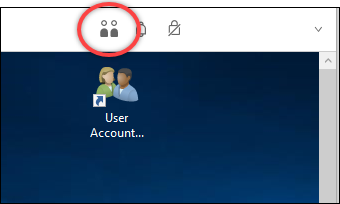
  1. Choose the Collaborators icon on the toolbar.

    Collaborators icon on the DCV client

    A Collaborators Window will open showing all of the connected Amazon DCV sessions available.

  2. Select a session to join.

  3. To disconnect a collaborator, choose Disconnect next to their name.

    This option is only available for session owners.

    Collaborating user sessions
macOS
  1. Choose the Session toolbar button.

  2. The Collaborators section lists all connected users with their username and number of connections.

    Collaborators section in the Session toolbar, showing connected users with a disconnect button next to each name.
  3. To disconnect a collaborator, choose the disconnect button next to their name. If you're the session owner, you can also choose Disconnect All to remove all other connections.

Linux
  1. Choose the Collaborators icon on the toolbar.

    The Collaborators list shows all connected users.

  2. To disconnect a collaborator, choose Disconnect next to their name. If you're the session owner, you can also choose Disconnect All to remove all other connections.

Note

Disconnect All is available only to session owners when two or more distinct collaborators are connected.