Search for quick responses to customers in the Contact Control Panel (CCP)
Use any of the following methods to search for quick responses:
-
Use
/#{search term}to search for the quick response. For example, enter/#in the box used to compose messages to bring up the quick response you want. -
Choose the star (
 ) icon in the rich text toolbar.
Note
-
The star icon only appears when contact is initiated.
-
To see the star icon in CCP, you must have at least 1 activated quick response associated with the current agent routing profile.
The following image shows a quick response found by entering a shortcut
(/#G1).
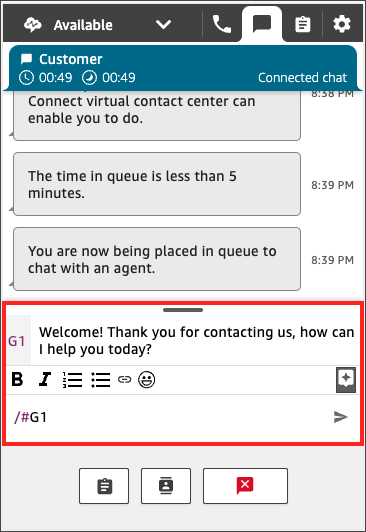
You can also search for quick responses by typing /#{ in the message input field. With this syntax, you can quickly find responses without needing to remember short codes.search term}
For information about creating, importing, and managing quick responses, including required permissions, see Create quick responses for use with chat and email contacts in Connect Customer.
