Scenario and deployment approaches in Connect Customer
Connect Customer offers self-service configuration and enables dynamic, personal, and natural customer engagement at any scale with a variety of migration and integration options. In this section, we explain the following scenarios and deployment approaches to consider when designing a workload for Connect Customer:
-
Traditional contact center
-
Inbound
-
Outbound
-
Hybrid contact center
-
Legacy contact center migration
-
Virtual desktop infrastructure (VDI)
Traditional contact center
The traditional contact center requires a significant telephony, media, networking, database, and compute infrastructure footprint that can span multiple vendors and data center locations to service contacts. Each individual solution and vendor have unique hardware, software, networking, and architectural requirements that have to be met while resolving versioning, compatibility, and licensing conflicts.
It is common to have separate vendors and infrastructure requirements for local and remote agent hardware and VPN connectivity, Text-To-Speech (TTS), Automatic Call Distribution (ACD), Interactive Voice Response (IVR), voice audio and data, physical desk phones, voice recording, voice transcriptions, chat, reporting, database, Computer Telephony Integration (CTI), Automatic Speech Recognition (ASR), and Natural Language Understanding (NLP). Your contact center architecture and infrastructure becomes more complicated when you consider multi-stage development, quality assurance, and test environments.

A typical Connect Customer deployment solves or reduces many of the challenges associated with versioning, compatibility, licensing, contact center telephony infrastructure, and maintenance. It gives you the flexibility to create instances in new locations in minutes and migrate components individually, or in parallel, to best meet your individual business objectives. You can use flows for your IVR/ACD, have voice and data delivered through a supported web browser to your agent’s softphone, port your existing phone numbers, redirect softphone audio to an existing desk phone, invoke an Amazon Lex bot natively within your flow for ASR and NLP, and use the same flow for chat and voice. You can use Connect Customer conversational analytics to automatically generate voice transcriptions, perform key word identification and sentiment analysis, and categorize contacts. For agent CTI data and real-time voice streaming, you can use Connect Customer Agent Event Streams and Kinesis Video Streams. You can also create multi-stage development, quality assurance, and test environments at no additional cost and only pay for what you use.
Inbound
Inbound is a contact center term used to describe a communication request initiated by a contact to the center. Contacts can reach your Connect Customer instance for inbound self-service or to speak with a live agent in a variety of ways, including voice and chat. Voice contacts go through the PSTN and are routed to the Connect Customer Instance telephony entry point through the phone number claimed in your instance. You can reserve a phone number with Connect Customer directly, port your existing phone number, or forward voice contacts to Connect Customer. Connect Customer can provide local and toll-free numbers in all Regions where the service is supported.

When a phone call is placed to a number claimed in or ported to your Connect Customer instance, the flow associated with the called number will be invoked. You can define the flow using flow blocks that can be configured with no coding knowledge required. The flow determines how the contact should be processed and routed, optionally prompting the contact for additional information to assist in routing decisions, storing those attributes to the contact details, and, if necessary, routing that contact to an agent with all of the call details and transcripts gathered along the way. Through the flow, you can invoke AWS Lambda functions to query customer information, call other AWS services like Amazon Pinpoint to send SMS text messages, and use native AWS service integrations including Amazon Lex for NLU/NLP and Kinesis Video Streams for real-time streaming of voice calls.
If an inbound contact needs to reach an agent, the contact is put into a queue and routed to an agent when they change their status to Available, according to your routing configuration. When the available agent’s contact is accepted manually or through auto-accept configuration, Connect Customer connects the contact with the agent.

When an inbound contact comes from a browser or mobile app request for a chat session, the request is routed to a web service or Amazon API Gateway endpoint that calls the Connect Customer chat API to invoke the flow configured in your request. You can use the same flows for chat and voice, where the experience is managed and routed dynamically, based on the logic defined in the flow.
Outbound
With Connect Customer, you can programmatically make outbound contact attempts to
local and international endpoints, reduce agent set-up time between contacts, and
improve agent productivity. By using the Connect Customer Streams
Outbound campaigns are typically driven by contact data exported from CRMs and separated into contact lists. Those contacts are prioritized and either delivered to the agents to initiate after a period of preview or programmatically contacted using the Connect Customer Outbound API, driven by your flow logic, and connecting to agents as needed. Typical outbound contact center use cases include fraud and service alerts, collections, and appointment confirmations.
To place an outbound call to a customer and run the specified flow, use the following AWS CLI command. The destination phone number must be in E.164 format. You must specify either a source phone number or a queue. If you don't specify a queue, the outbound contact uses the queue defined in that flow.
In the following command, replace
instance-idcontact-flow-idaws-region--source-phone-number parameter is optional if you specify a queue
in the flow.
aws connect start-outbound-voice-contact \
    --instance-id "instance-id" \
    --contact-flow-id "contact-flow-id" \
    --destination-phone-number "+15551234567" \
    --source-phone-number "+15557654321" \
    --region "aws-region"
On success, the command returns the ContactId of the new contact:
{
    "ContactId": "00000000-0000-0000-0000-000000000000"
}
Hybrid
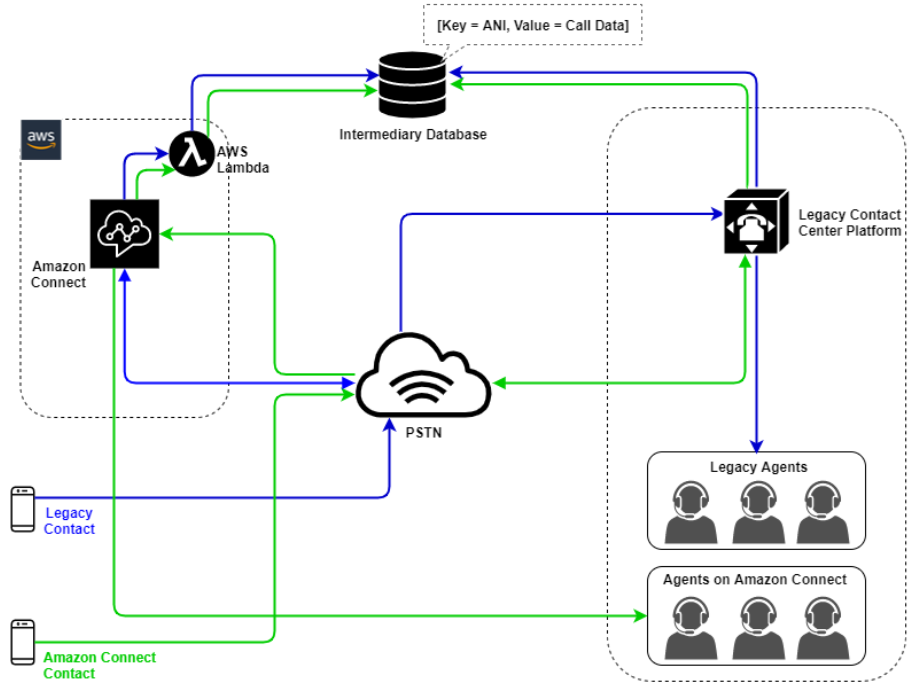
If you have requirements to transfer contacts between Connect Customer and legacy contact center technologies, you can use a Hybrid model architecture to pass contact data with the transfer. For example, a sales business unit on a legacy contact center platform might need to transfer a call to the service business unit that’s been migrated to Connect Customer. Without a Hybrid architecture, call details will be lost and might require the contact to repeat information. This could increase handle times and might result in contact calling again for the same purpose.
Hybrid architectures require you to claim as many phone numbers as your expected maximum concurrent contacts and an intermediary state database accessible by both Connect Customer and your legacy contact center platform. When a transfer is required to the other platform, you will use one of these phone numbers as a unique identifier, flag it as in-use in your intermediary database, insert your contact details, and use that number as your ANI or DNIS when you transfer the contact. When the contact is received by the other contact center platform, you will query the intermediary database for the contact details based on the unique ANI or DNIS you used. Hybrid architectures are typically used as an interim migration step because of the additional cost and complexity associated.
IVR-only
You might choose to use Connect Customer to drive the contact’s IVR experience while your agent population remains on your legacy contact center platform. With this approach, you can use Connect Customer flows to drive self-service and routing logic, and, if necessary, transfer the contact to the target agent or agent queue on your legacy contact center platform.

In this diagram, the contact dials a phone number claimed in your Connect Customer instance for service. If they need to be transferred to an agent on your legacy contact center platform, an AWS Lambda function is invoked to query an available unique phone number, flag it as in-use, and write relevant contact details to an intermediary database. The contact is then transferred to the legacy contact center platform with the phone number returned from the Lambda function. The legacy contact center will then perform a query on the intermediary database for the contact details, route accordingly, and reset the contact data in the intermediary database, allowing the phone number to be used again.
Agent-only
With this approach, your legacy contact center IVR drives the contact’s IVR self-serve and routing logic, and, if necessary, transfers the contact to Connect Customer to route to your agent population.

In this diagram, the contact dials a phone number claimed with your legacy contact center platform. If they need to be transferred to an agent on Connect Customer, the legacy contact center platform will query an available unique phone number, flag it as in-use, and write relevant contact details to an intermediary database. The contact will then be transferred to Connect Customerwith the phone number returned by the legacy contact center’s query. Connect Customer will then query the contact details from the intermediary database using AWS Lambda, route accordingly, and reset the contact data in the intermediary database, allowing the phone number to be used again.
Mixed
In this scenario, you might have your IVR and agents operating in parallel on Connect Customer and your legacy contact center platform to allow for site, agent group, or line-of-business migrations.
Legacy contact center migration
When you are evaluating Connect Customer for new or existing workloads, there are several strategies you can consider. For situations that require contact details to be included when contacts are transferred between Connect Customer and your legacy contact center solution, a Hybrid model architecture will be required until the migration is complete. With the approaches described in this section, you can move specific lines of business in phases, manage training and support, and mitigate risks associated with change.
New workload
You might decrease risk associated with changes to existing business units and increase flexibility and digital innovation potential by adopting a net new workload on Connect Customer. Net new workloads that do not require the Hybrid model architecture are less complex, are not affected by change in business process or agent routine, and have a faster time to market. Adopting a net new workload helps you take advantage of usage-based, pay-as-you-go pricing. Your contact center resources are available to create a new experience for their end users, test and implement it to evaluate the platform, gain confidence, and build the skills and operational mechanisms to prepare for larger migration across existing workloads.
IVR First
You might choose to use Connect Customer to drive the contact’s IVR experience while your agent population remains on your legacy contact center platform. With this approach, you can use Connect Customer Flows to drive self-service and routing logic, and, if necessary, transfer the contact to the target agent or agent queue on your legacy contact center platform.
IVR Last
With this approach, your legacy contact center IVR drives the contact’s IVR self-serve and routing logic, and, if necessary, transfers the contact to Connect Customer to route to your agent population.
Line of business segmentation
If your lines of business have separate IVRs or don’t require contact transfers to legacy contact center platforms, you might want to consider a line of business migration approach. For example, selecting your service desk for internal support as your first line of business to migrate. After migrating your service desk IVR and agent population to Connect Customer, you might choose to forward your existing contact to Connect Customer, porting the endpoint after testing and business validation is completed.
Site or agent group segmentation
If your contact center has a global footprint, services contacts from multiple countries, or is managed independently by a respective geography or location, you might want to consider a migration approach based on a physical site or geography of agents. Each agent population or geography can have its own unique requirements and considerations that might not apply globally. Approaching your migration this way will allow each site or agent group to gain the skills they need to continue to operate independently before moving onto the next.
Virtual desktop infrastructure (VDI)
While you can use the Connect Customer Contact Control Panel (CCP) within Virtual Desktop Infrastructure (VDI) environments, it will add another layer of complexity to your solution that warrants separate POC efforts and performance testing to optimize. The configuration/support/optimization is best handled by your VDI support team and the following deployment models are the most commonly implemented.
VDI client with local browser access
You can build a custom CCP with the Connect Customer Streams

Citrix VDI with Connect Customer audio optimization
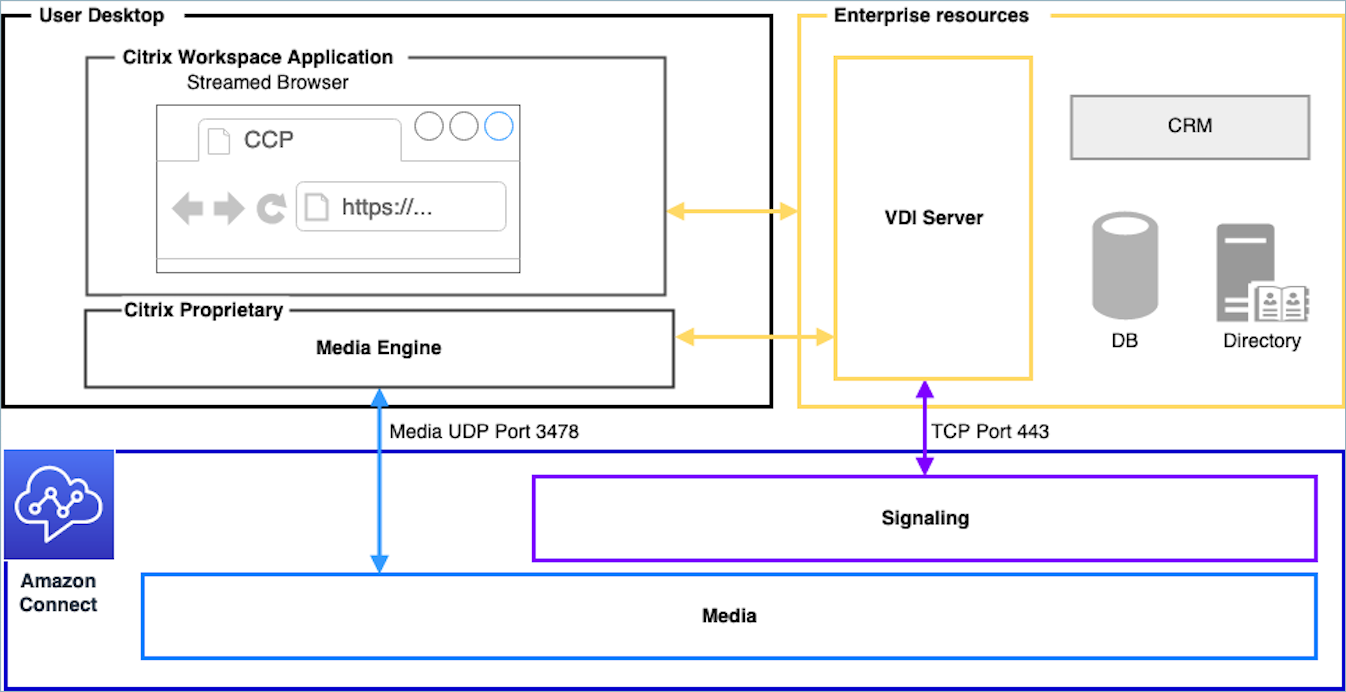
If you use Citrix Virtual Desktop Infrastructure (VDI) environment, you can build a custom CCP with the Connect Customer RTC JavaScript library which integrates with Citrix United Communications SDK (ucsdk) and automatically redirects the media from your local desktop to Connect Customer. This enables your agents to use Citrix VDI client applications, such as Citrix Workspaces, to connect to their custom agent applications or custom CCPs. This removes the need to develop and manage a separate agent application, like dual-CCPs, for audio media redirection for their Citrix environments. The following diagram describes that approach:
Note
This solution requires you to allow WebRTC signaling traffic between your VDI server and Connect Customer, and the media connection between the agent’s desktop and Connect Customer. For more information, see the Set up your network to use the Connect Customer Contact Control Panel (CCP) documentation.
Amazon WorkSpaces VDI with Connect Customer audio optimization
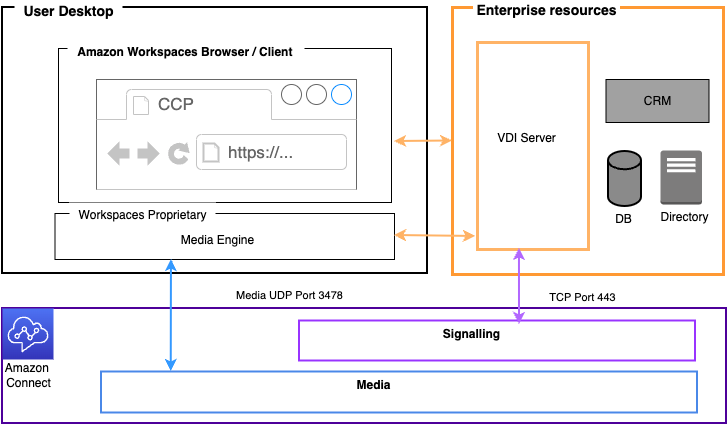
By using Amazon WorkSpaces, a Virtual Desktop Infrastructure (VDI) environment, you have the capability to create a customized Contact Control Panel (CCP) by using the Connect Customer Real-Time Communications (RTC) JavaScript library. This library seamlessly integrates with the Amazon WorkSpaces SDK, enabling automatic media redirection from your local desktop to Connect Customer. This eliminates the need to develop and manage a separate agent application, such as dual-CCPs, specifically for audio media redirection within their WorkSpaces environments. The following diagram illustrates this approach.
Omnissa VDI with Connect Customer audio optimization
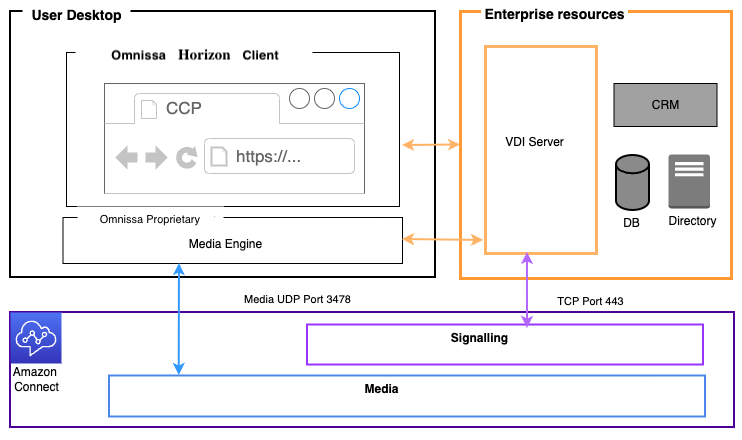
The Omnissa Virtual Desktop Infrastructure (VDI) solution enables a streamlined integration with Connect Customer through the implementation of a custom Contact Control Panel (CCP).
By using the Connect Customer RTC JavaScript library in conjunction with Omnissa's Horizon WebRTC SDK, audio processing is optimized by redirecting media streams directly from the agent's local endpoint to Connect Customer. This architecture eliminates the traditional challenges of audio routing through virtual desktops, providing agents with a superior voice experience while using their Omnissa VDI environment. The solution removes the complexity of managing separate audio redirection applications, offering a single, unified interface for agent interactions. The following diagram illustrates this architectural approach.
Azure Virtual Desktop and Windows 365 VDI with Connect Customer audio optimization
If your agents use Azure Virtual Desktop (AVD) or Windows 365 Cloud PC, you can optimize Connect Customer audio with Microsoft Multimedia Redirection (MMR). This approach does not require a platform-specific SDK in your CCP. The MMR browser extension transparently redirects the standard WebRTC media from the session host to the agent's local device, where it connects directly to Connect Customer. The agent's local device processes audio instead of the session host, which reduces network hops and improves audio quality. The following diagram illustrates this approach.

VDI client without local browser access
Sometimes the VDI client does not have access to a local browser. In this scenario, you can create a single CCP instance with media run from the VDI server allowing access to enterprise resources. For this deployment model UDP audio is usually enabled on the VDI OS. This deployment model requires extensive testing to calibrate the different VDI server parameters to optimize quality of experience:

