Evaluate agent performance in Connect Customer using generative AI
Note
Powered by Amazon Bedrock: AWS implements automated abuse detections. Because generative AI features in conversational analytics are built on Amazon Bedrock, users can take full advantage of the controls implemented in Amazon Bedrock to enforce safety, security, and the responsible use of artificial intelligence (AI).
Managers can specify their evaluation criteria in natural language, and use generative AI for automating evaluations of up to 100% of customer interactions. With generative AI, you can automate evaluations of additional agent behaviors (for example, was the agent able to resolve the customer's issue?), enabling managers to comprehensively monitor and improve regulatory compliance, agent adherence to quality standards and sensitive data collection, while reducing the time spent on evaluating agent performance. Along with answers, you are also provided with context and justification, and references to specific points in the transcript that you can use to provide agent coaching.
You can use generative AI to assist managers with filling evaluations or use it to automatically fill and submitting evaluations. For more information about setting up automated evaluations, see Step 6: Enable automated evaluations.
Evaluations questions are answered using generative AI by interpreting the question title and evaluation criteria specified within the instructions to evaluators associated with each question, and using these to analyze the conversation transcript. For more information, see Step 2: Add sections and questions.
Process to automate evaluations using generative AI
The following is the overview of the automation process:
-
Get a high-level understanding of which of the evaluation questions should be answered with generative AI by reading Guidelines to improve generative AI accuracy.
-
Assign permissions to select users within your quality management team to use Ask AI assistant. These users will start seeing the Ask AI button next to each question, while performing evaluations and can use that to get answer recommendations. These users can provide feedback on which questions are receiving accurate answers using generative AI. For more information, see Assign security profile permissions for performance evaluations and coaching.
-
To improve accuracy, you can provide additional evaluation criteria within instructions to evaluators. For more information, see Guidelines to improve generative AI accuracy.
-
After you have a good understanding of which questions can be accurately answered with generative AI, you can do a broader rollout by pre-configuring on the evaluation form, whether a question will receive an automated answer using generative AI.
-
After you have set up automation, any user performing evaluations using the evaluation form will get automated generative AI answers to the pre-configured questions (without requiring additional permissions). For more information, see Step 6: Enable automated evaluations.
-
You can set up automation such that an evaluator first reviews the generative AI answers before submission or you can automatically fill and submit evaluations.
Note
AI-generated evaluations are not 100% accurate. Before acting on AI outputs (such as providing rewards, agent coaching, and so on), we recommend that you review a sample of evaluations. This helps confirm the performance trends that AI provides. You can override AI-filled evaluations and make any corrections before sharing them with the agent or using them for performance reviews. We also recommend keeping a manual evaluation process in place. This helps you catch any drift between AI-filled evaluations and manager-filled evaluations over time.
Limitations of generative AI-powered performance evaluations
Transcription accuracy affects the accuracy of generative AI-powered evaluations. Conversational analytics cannot accurately transcribe conversations that include more than one language. It also cannot accurately transcribe conversations in which multiple parties speak at the same time. Examples include conference calls, warm transfers, and calls where an agent adds a third party. Both scenarios lower the accuracy of generative AI-powered performance evaluations.
You can use rules to filter out conversations where you expect these scenarios to occur, such as conversations in specific queues. For more information, see Create a rule in conversational analytics that submits an automated evaluation.
Use Ask AI to get generative AI answer recommendations
-
Log into Connect Customer with a user account that has permissions to perform evaluations and ask AI assistant.
-
Choose the Ask AI button below a question to receive a generative AI-powered recommendation for the answer, along with context and justification (reference points from the transcript that were used to provide answers).
-
The answer is automatically selected based on the generative AI recommendation, but you can change it.
-
You can get generative AI-powered recommendations by choosing Ask AI for up to 10 questions per contact. For more information, see Conversational analytics service quotas.
-
-
You can choose the time associated with a transcript reference to be directed to the point in the conversation

Provide additional criteria for answering evaluation form questions using generative AI
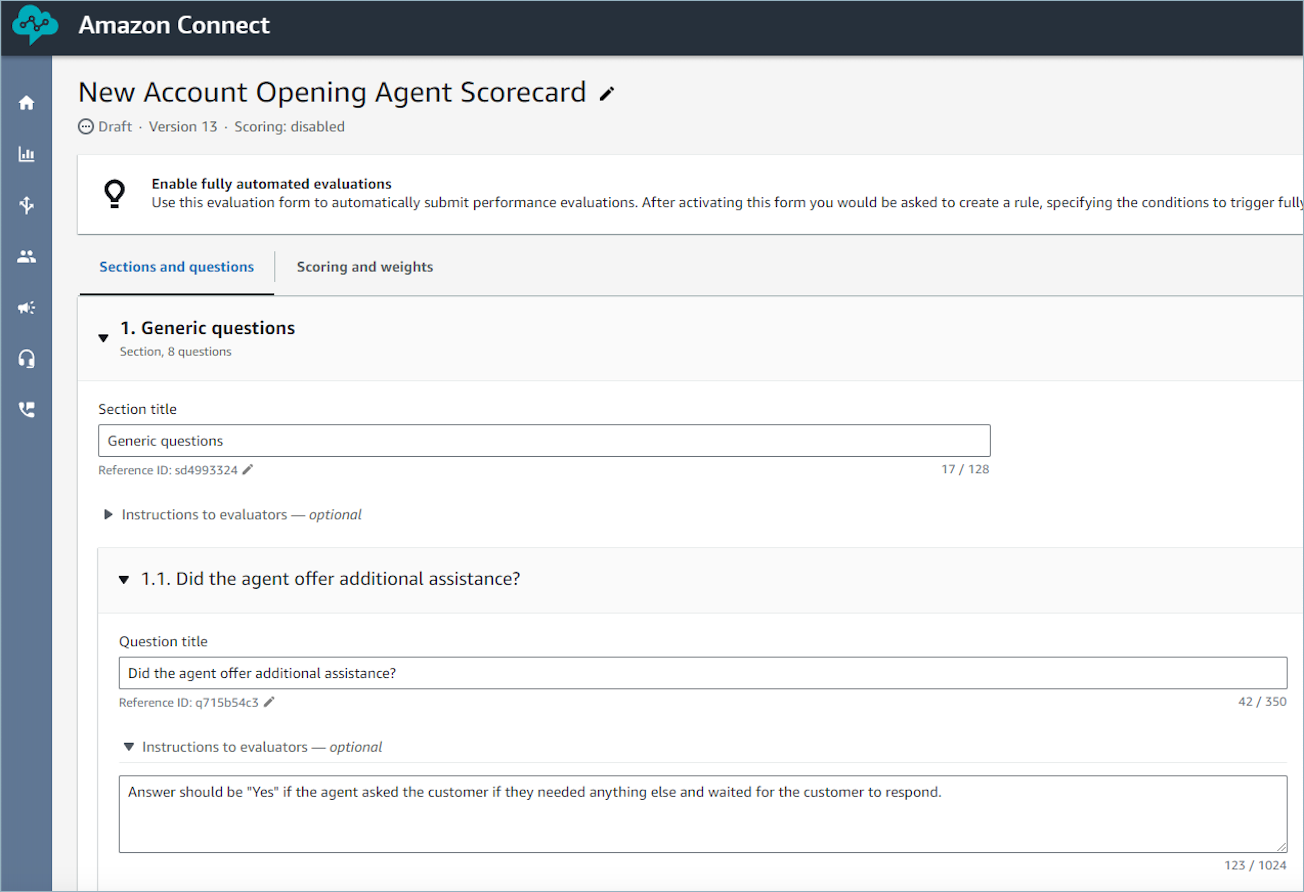
While configuring an evaluation form, you can provide criteria for answering questions within the instructions to evaluators associated with each evaluation form question. Apart from driving consistency in evaluations by evaluators, these instructions are also used to provide generative AI-powered evaluations.
AI answer mapping and scoring
If AI is not able to identify which of the provided answer options is appropriate, then it selects Not Applicable, even if the question is not optional. When this happens, the question is excluded from scoring and the weights are redistributed to the other questions. To avoid this, clearly explain each answer option in the Instructions to evaluators for the question. For more information, see Guidelines to improve generative AI accuracy.
Set up automated evaluations using generative AI on the evaluation form
You can pre-configure on an evaluation form whether a question will be automatically answered using generative AI. Then, if you start an evaluation using the evaluation form on the Connect Customer UI, answers to these questions will get automatically filled using generative AI (without requiring you to choose Ask AI). You can also use generative AI to automatically fill and submit evaluations. For automatically submitted evaluations, you can use generative AI to answer up to 10 questions per contact (see Conversational analytics service quotas). This limit does not apply to automation using contact categories or metrics (for example, longest hold duration).
To learn more about setting up automated evaluations using generative AI, see Guidelines to improve generative AI accuracy.
Set up generative AI-powered evaluations in non-English languages
By default, if you do not set the language of an evaluation form, the generative AI model automatically detects the language of your evaluation form questions and tries to provide answers in the same language, if the AI model understands that language. By default, generative AI answer justifications are typically provided in English.
To consistently receive both AI-generated answers and answer justifications in your preferred language, you can set the language of an evaluation form, choosing from English, Spanish, Portuguese, French, German, Italian, Chinese, Japanese, Korean, and Malay. By explicitly setting the language of an evaluation, you can also perform cross-language evaluations, where generative AI fills an evaluation form in English, even when the conversation transcript is in another language, say Spanish. This enables multilingual contact centers to use a standardized evaluation framework across languages.
To set the language of the evaluation form:
-
Select the Additional settings tab while creating or updating an evaluation form.
-
Choose Form language from the dropdown.
-
Ensure your form's questions, instructions and answer choices are in the same language as the selected Form language, for optimal AI performance.

Guidelines to improve generative AI accuracy
Selecting questions to be answered by generative AI
Dos
-
Use generative AI to answer questions that only require the conversation transcript. Examples are questions on soft skills, questions that check for call flow, or compliance statements, among others.
-
Split complex questions into multiple simpler ones. For example, instead of "Did the agent exhibit active listening?", ask two questions: "Did the agent understand the customer's problem the first time, without the customer needing to repeat themselves?" and "Did the agent summarize the issue after the customer explained it?".
-
Use conditionally enabled questions to enable or disable questions that are only applicable in certain situations. For example, you might have one question, "Did the customer buy a product during the conversation?", and a subsequent conditionally enabled question, "Did the agent provide mandatory fee disclosures before completing the sale?". For more details, see Step 4: Conditionally enable questions.
Don'ts
-
Don't use generative AI to answer questions that need information outside the conversation transcript. Generative AI cannot analyze screen recordings, access your internal or third-party systems such as CRM applications, or evaluate conversations across multiple contacts.
-
Don't use generative AI to evaluate quantifiable activities such as "Was the customer put on excessive hold?" or "Was the customer frequently interrupted?". Instead, set the question type to Number and use metrics such as the longest hold duration or the number of interruptions. For more details, see Step 6: Enable automated evaluations.
-
Don't automate questions that assess interactions between multiple parties (another agent, a partner institution, or a second customer). conversational analytics is aware of only two participants at a given time. For example, avoid a question like "If another person other than the primary account holder joined the conversation, did the agent first confirm with the primary account holder before proceeding?".
-
Don't ask questions that depend on tone of voice. Generative AI cannot determine the agent's or customer's tone.
-
Don't use generative AI for highly subjective questions, such as "Was the agent attentive during the call?".
Improving phrasing of questions and associated instructions
Dos
-
Word questions as complete sentences. Instead of "ID validation", ask "Did the agent attempt to validate the customer's identity?".
-
Add detailed evaluation criteria in the Instructions to evaluators for the question. For "Did the agent try to validate the customer's identity?", add the instruction: Answer is Yes if the agent asked for the customer's membership number and postal code before addressing their questions. Answer is No otherwise.
-
Define business-specific terms the question depends on. If the agent must name a department in the greeting, list example department names in the instructions.
-
Use "agent" and "customer" consistently. Avoid variations like "colleague", "representative", or "associate", and "member", "caller", or "subscriber".
-
Make it clear who is being evaluated. "Did the agent avoid the usage of profanity?" can be read as asking whether profanity occurred anywhere, returning "No" even when only the customer used it. Ask "Did the agent use profanity?" instead.
-
Phrase questions positively. Use "Did the agent greet the customer?" rather than "Did the agent skip the greeting?". Phrasing questions positively provides better AI-evaluation reasoning and references.
-
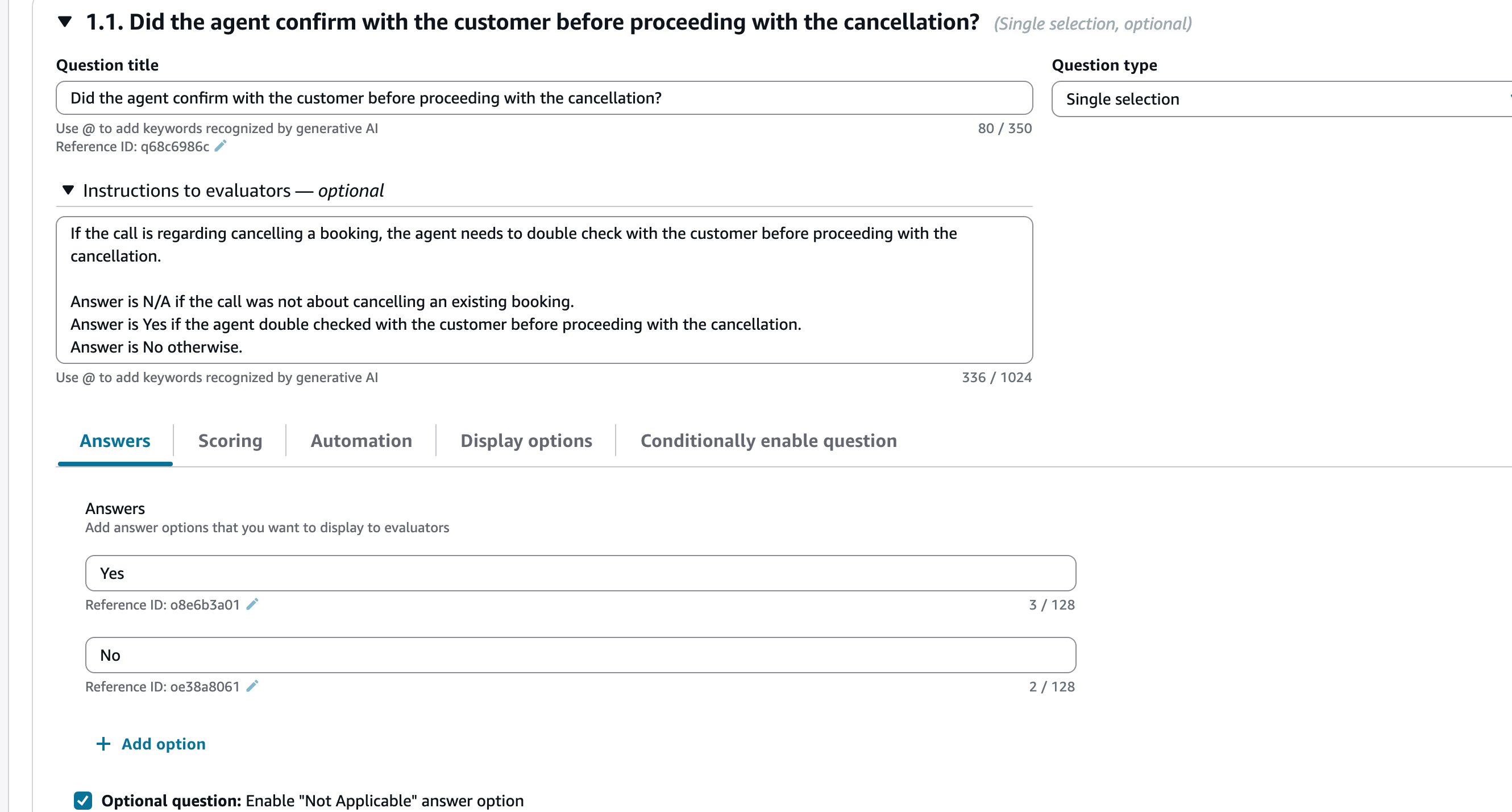
Specify when the answer is Not Applicable (N/A). For example: The answer is N/A if the call resulted in a transfer.
-
In the Instructions to evaluators, explain when AI should select each answer option. For "Did the agent give a resolution timeframe?", add the instruction: Answer is Yes if the agent gave a resolution timeframe, No otherwise. Not explaining each option might result in AI selecting Not Applicable, even if the question is not optional.
-
Clarify whether all or any of the specified agent behaviors is required. "The agent must ask the customer's name and phone number" fails if the agent asked for the name but not the phone number.
-
Include examples for non-standard scenarios, not just the standard call flow. If you expect the agent to say "It typically takes 3 to 5 business days" on a standard call, you should also include callback phrasing like "I'll call you back within 30 minutes with an update". Standard-flow-only examples lead to inconsistent answers on callbacks, escalations, and transfers.
-
Give auto-fail questions the most attention, since one failing answer affects the whole form's evaluation score. Cover edge cases and non-standard scenarios. For more on scoring, see Step 5: Assign scores and ranges to answers.
Don'ts
-
Don't use double quotes unless you need exact wording. If the instruction checks for
"Have a nice day", the AI won't match Have a nice afternoon. Write instead:The agent wished the customer a nice day. -
Don't use acronyms. Spell out the full term, for example "CFPB", so the AI can interpret it correctly.
-
Don't use proper nouns likely to be misspelled in the transcript. A product name like Klarity Pay might be transcribed differently, preventing a match.
-
Don't use vague questions. Instead of "Did the agent use appropriate language?", ask "Did the agent use profanity?".
-
Don't use long verbatim scripts. Checking for
"Thank you for calling
                                ABC Bank. How may I assist you?"
rarely matches, since minor transcription differences break the full script.
Improving answer options
Dos
-
Use simple, short answer options, such as Yes, No, and Partial.
-
Enable the Optional question setting when a question might not apply. This lets evaluators skip the question or mark it Not Applicable.
Don'ts
-
Don't use spelling errors or special characters in answer options, as they can reduce the accuracy of generative AI answers.
-
Don't use too many answer options. For "How was the customer experience?", a long list like Great, Good, OK, Poor, Very Poor, and Horrible reduces accuracy. Use a smaller set of distinct options instead.
-
Don't use long text in answer options, since the generative AI model might reproduce it incorrectly.
Example implementation following guidelines
The following example shows a generative AI-answered question that follows these guidelines. The question title is a complete sentence, the instructions to evaluators define each answer option and explain the Not Applicable scenario, and the answer options are short.