Apply hierarchy-based access control to dashboards and reports in Connect Customer
You can use agent hierarchies to control who has access to view specific agents and their performance related metrics in dashboards and reports.
With hierarchy-based access control, you can configure granular access to users based on the agent hierarchy that is assigned to a user. You can configure hierarchy-based access controls by using the API/SDK or the Connect Customer admin website.
The only resource that supports hierarchy-based access control is agents. This authorization model works with tag-based access control, so you can restrict access to users, allowing them to see only other agents who belong to the same hierarchy group and who have specific tags associated to them.
Topics
How to enable hierarchy-based access control for reports and dashboards
To enable granular access control for a given user based on the hierarchy they belong to, you configure the user as an access controlled resource. To do this, you have the following two options:
-
Enforce hierarchy-based access control based on the user's hierarchy
This option makes sure that the user being given access can only manage agents that belong to this hierarchy. For example, enabling this configuration for a given user enables them to manage other agents that either belong to their hierarchy group or a child hierarchy group.
-
Enforce hierarchy-based access control based on a specific/custom user hierarchy
This option makes sure that the user being given access can only manage agents that belong to the hierarchy defined in the security profile. For example, enabling this configuration for a given user enables them to manage other users that either belong to the hierarchy group specified in the security profile or a child hierarchy group.

Assign security profiles permissions to access dashboards, reports, and resources
The user will need one of the following permissions to view the reports and dashboards:
-
Analytics and Optimization - Access metrics - Access: If you choose this option, access is granted to Real-time metrics, Historical metrics reports, Dashboards, and Agent activity audit.
OR
-
Analytics and Optimization - Real-time metrics - Access
OR
-
Analytics and Optimization - Historical metrics - Access
OR
-
Analytics and Optimization - Dashboards - Access
OR
-
Analytics and Optimization - Agent Activity Audit - Access
OR
-
Analytics and Optimization - Login/Logout report - View

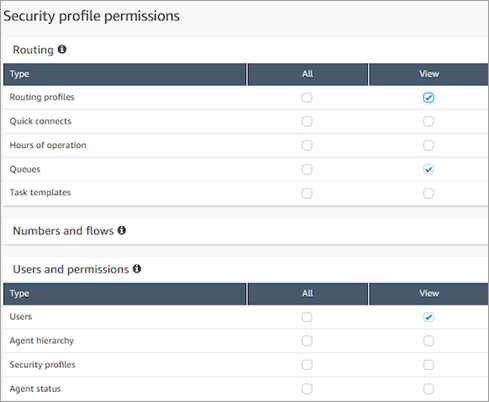
Additionally, the user will need permissions to access resources. The following image shows an example of security profile permissions that grant users the ability to view routing profiles, queues, and Connect Customer user accounts. Routing profiles - View, Queues - View, and Users - View are selected.
Limitations
The following limitations apply when you use hierarchy-based access controls in reports and dashboards:
-
Access to view Agent Queues is disabled.
-
There are additional things to consider if tag-based access control is being applied simultaneously with hierarchy-based access control:
-
If tag-based access control is enabled along with hierarchy-based access control, the limitations imposed by tag-based access will still be there.
-
When both tag-based and hierarchy-based access controls are in place, the system enforces each control method independently. This means that users must meet the requirements of both control types to gain access to resources.
-
When one security profile has tag-based access control and the other has hierarchy-based access control, we will restrict access on both tag and hierarchy as though tag-based access control and hierarchy-based access control are on a single security profile.
-
If two security profiles have hierarchy-based access control and one of the profiles has tag-based access control, the applicable tags will be enforced for resources in both hierarchies.
-
If two security profiles have tag-based access control and one of the profiles has hierarchy-based access control, then the hierarchy filter will be applied to resources with either tags.
-
If both security profiles have unique configurations for tag-based and hierarchy-based access control, we cannot enforce hierarchy-based access control effectively. This could allow users to access more data than intended in certain scenarios. In such cases, we recommend not granting access to Real-time and Historical reports for users with this type of access control setup, or just use hierarchy-based or tag-based controls to restrict users access.
-
If you have hierarchy-based access controls enabled in your Security Profile, the Agent performance summary widget on the dashboards will display a summary of metrics for the agent hierarchy you have access to.
-
