Notify supervisors and agents about performance evaluations
You can create rules that automatically send emails or tasks to supervisors and agents based on evaluation results.
-
Supervisor notifications can drive timely coaching based on performance evaluations. For example, you can notify supervisors if an agent receives an evaluation score below a certain threshold.
-
Agent notifications can be used to prompt agents to review and acknowledge their evaluations.
Contents
Step 1: Define rule conditions for evaluation forms
-
On the navigation menu, choose Analytics and optimization, Rules.
-
Select Create a rule, Evaluation forms.
-
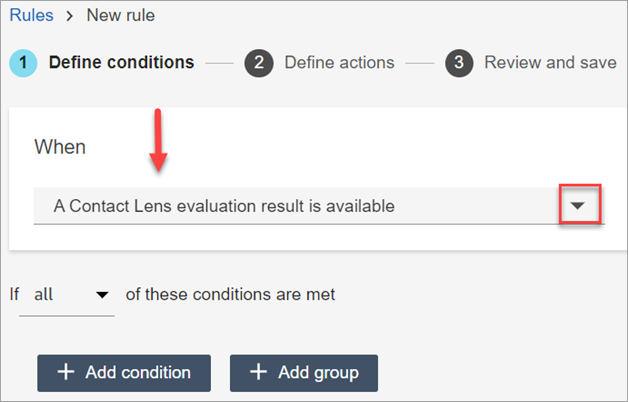
Under When, use the dropdown list to choose A conversational analytics evaluation result is available, as shown in the following image.
-
Choose Add condition.

You can combine criteria from a set of conditions to build very specific conversational analytics rules. The following are some of the available conditions:
-
Evaluation - Form score: Build rules that run when the score for a specific evaluation form is met.
-
Evaluation - Section score: Build rules that run when the score for a specific section is met.
-
Evaluation - Question answer: Build rules that run when the score for a specific question and answer is met.
-
Evaluation - Results available: Build rules that run on any evaluation submissions.
-
Agent hierarchy: Build rules that run on a specific agent hierarchy. Agent hierarchies might represent geographical locations, departments, products, or teams.
To see list of agent hierarchies so you can add them to rules, you need Agent hierarchy - View permissions in your security profile.
-
Agent: Build rules that run on a subset of agents. For example, receive notifications on agents belonging to your team.
To see agent names so you can add them to rules, you need Users - View permissions in your security profile.
-
Queues: Build rules that run on a subset of queues. Often organizations use queues to indicate a line of business, topic, or domain. For example, you could build rules specifically for the evaluations of those agents assigned to sales queues.
To see the queue names so you can add them to rules, you need Queues - View permissions in your security profile.
-
Contact attributes: Build rules that run on the values of custom contact attributes. For example, you can build rules for agent evaluations for a particular line of business or for specific customers, such as based on their membership level, their current country of residence, or if they have an outstanding order.
-
Contact segment attributes: You can identify contacts within rules using custom contact segment attributes with values populated from other systems or using custom logic. You can define an attribute and set its value in flows. Custom segment attributes are only present on that specific contact ID, and not the entire contact chain. For example, you can build a rule that identifies that the customer closed their account during the conversation.
To see the list of contact segment attributes to add to a rule, you need Predefined attributes - View permission.
-
-
Choose Next.
Step 2: Define rule actions
-
Choose Add action. You can choose the following actions:

-
Choose Next.
-
Review and make any edits, then choose Save.
-
After you add rules, they are applied to new evaluation submissions that occur after the rule was added. You cannot apply rules to past, stored evaluations.
Example rule with multiple conditions
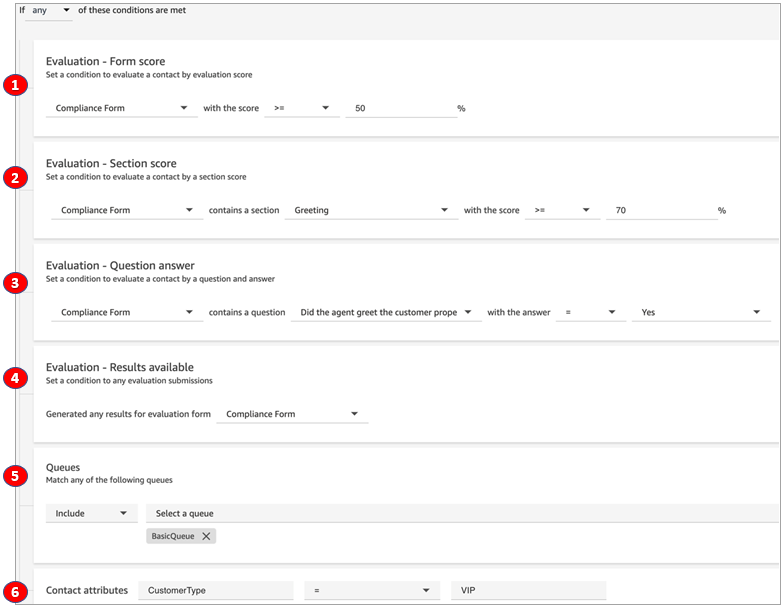
The following image shows a sample rule with six conditions. If any of these conditions are met, the action is triggered.
-
Evaluation - Form score: Does the Compliance Form have a score greater than or equal to 50%?
-
Evaluation - Section score: In a Compliance Form, does the Greeting section have a score greater than or equal to 70%?
-
Evaluation - Question score: Does the Compliance Form question Did the agent greet the customer properly equal Yes?
-
Evaluation - Results available: Have any results been generated for the Compliance Form?
-
Queues: Is this for the BasicQueue?
-
Contact attributes: Does CustomerType equal VIP?
