Flow block in Connect Customer: Check call progress
This topic defines the flow block for engaging with the output provided by an answering machine, and providing the appropriate branches to route the contact.
Description
-
Engages with the output provided by an answering machine, and provides branches to route the contact accordingly.
-
It supports the following branches:
-
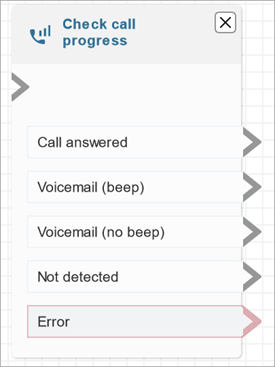
Call answered: The call has been answered by a person.
-
Voicemail (beep): Connect Customer identifies that the call ended in a voicemail and it detects a beep.
-
Voicemail (no beep):
-
Connect Customer identifies that the call ended in a voicemail but it doesn't detect a beep.
-
Connect Customer identifies that the call ended in a voicemail, but the beep is unknown.
-
-
Not detected: Could not detect whether there is voicemail. This happens when Connect Customer is unable to make a positive determination of whether a call was answered by a live voice or an answering machine. Typical situations that land in this state include long silences or excessive background noise.
-
Error: If any errors are encountered due to Connect Customer not running correctly after media has been established on the call, this is the path that will be taken by the flow. Media is established when the call is either answered by a live voice or by an answering machine. If the call is rejected by the network or encounters a system error while placing the outbound call, the flow is not run.
-
-
This block functions only for certain call types. For more information, see Supported call types.
Supported call types
This block is supported for the following call types:
-
Outbound campaigns — Calls placed through Connect Customer outbound campaigns.
-
Customer-first callbacks — Callbacks where the customer is connected first before the agent.
For other call types, the contact routes to the Error branch.
Supported channels
The following table lists how this block routes a contact who is using the specified channel.
| Channel | Supported? |
|---|---|
Voice |
Yes |
Chat |
No - Error branch |
Task |
No - Error branch |
No - Error branch |
Flow types
You can use this block in the following flow types:
-
All flow types
Note
Although you can place this block in any flow type, it functions only for the call types listed in Supported call types.
Properties
The following image shows the Properties page of the Check call progress block.

Configured block
The following image shows an example of what this block looks like when it is configured. It has branches for Call answered, Voicemail (beep), Voicemail (no beep), Not detected, and Error.