Configured tables in AWS Clean Rooms
A configured table is a reference to an existing table in a data source. It contains an analysis rule that determines how the data can be queried in AWS Clean Rooms and can include a data access budget to control table usage. Configured tables can be associated to one or more collaborations.
With AWS Clean Rooms, you can perform aggregation analysis on event data, such as number of purchases compared to number of purchases. You can also perform list analysis on event data, such as enriching overlapping customer data from segment data to CRM data. You can also perform custom queries and set differential privacy on event data, such as viewership data and segment attributes. For any of these analysis types, you can set data access budgets to monitor and control how much of your data is accessed through queries.
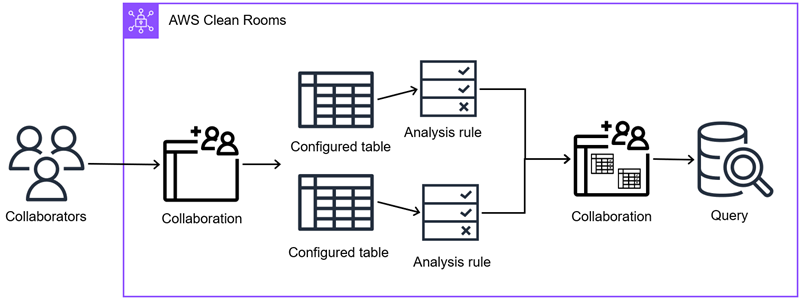
First, you create a collaboration in AWS Clean Rooms and add the AWS accounts you want to invite, or join a collaboration you're invited to by creating a membership. Next, you and the other member in the collaboration create configured tables. You both add an analysis rule to the configured tables (aggregation, list, or custom) and optionally set data access budgets. Then, you associate the configured tables to the collaboration. Finally, the member who can query runs a query across the two data tables, consuming the data access budget as queries are executed.
The following diagram summarizes how to work with event data in AWS Clean Rooms.
Topics
