# Working with items and attributes in DynamoDB
In Amazon DynamoDB, an *item* is a collection of attributes. Each attribute has a name and a value. An attribute value can be a scalar, a set, or a document type. For more information, see [Amazon DynamoDB: How it works](HowItWorks.md).
DynamoDB provides four operations for basic create, read, update, and delete (CRUD) functionality. All these operations are atomic.
+ `PutItem` — Create an item.
+ `GetItem` — Read an item.
+ `UpdateItem` — Update an item.
+ `DeleteItem` — Delete an item.
Each of these operations requires that you specify the primary key of the item that you want to work with. For example, to read an item using `GetItem`, you must specify the partition key and sort key (if applicable) for that item.
In addition to the four basic CRUD operations, DynamoDB also provides the following:
+ `BatchGetItem` — Read up to 100 items from one or more tables.
+ `BatchWriteItem` — Create or delete up to 25 items in one or more tables.
These batch operations combine multiple CRUD operations into a single request. In addition, the batch operations read and write items in parallel to minimize response latencies.
This section describes how to use these operations and includes related topics, such as conditional updates and atomic counters. This section also includes example code that uses the AWS SDKs.
**Topics**
+ [DynamoDB item sizes and formats](CapacityUnitCalculations.md)
+ [Reading an item](#WorkingWithItems.ReadingData)
+ [Writing an item](#WorkingWithItems.WritingData)
+ [Return values](#WorkingWithItems.ReturnValues)
+ [Batch operations](#WorkingWithItems.BatchOperations)
+ [Atomic counters](#WorkingWithItems.AtomicCounters)
+ [Conditional writes](#WorkingWithItems.ConditionalUpdate)
+ [Using expressions in DynamoDB](Expressions.md)
+ [Using time to live (TTL) in DynamoDB](TTL.md)
+ [Querying tables in DynamoDB](Query.md)
+ [Scanning tables in DynamoDB](Scan.md)
+ [PartiQL - a SQL-compatible query language for Amazon DynamoDB](ql-reference.md)
+ [Working with items: Java](JavaDocumentAPIItemCRUD.md)
+ [Working with items: .NET](LowLevelDotNetItemCRUD.md)
## Reading an item
To read an item from a DynamoDB table, use the `GetItem` operation. You must provide the name of the table, along with the primary key of the item you want.
**Example**
The following AWS CLI example shows how to read an item from the `ProductCatalog` table.
```
aws dynamodb get-item \
--table-name ProductCatalog \
--key '{"Id":{"N":"1"}}'
```
**Note**
With `GetItem`, you must specify the *entire* primary key, not just part of it. For example, if a table has a composite primary key (partition key and sort key), you must supply a value for the partition key and a value for the sort key.
A `GetItem` request performs an eventually consistent read by default. You can use the `ConsistentRead` parameter to request a strongly consistent read instead. (This consumes additional read capacity units, but it returns the most up-to-date version of the item.)
`GetItem` returns all of the item's attributes. You can use a *projection expression* to return only some of the attributes. For more information, see [Using projection expressions in DynamoDB](Expressions.ProjectionExpressions.md).
To return the number of read capacity units consumed by `GetItem`, set the `ReturnConsumedCapacity` parameter to `TOTAL`.
**Example**
The following AWS Command Line Interface (AWS CLI) example shows some of the optional `GetItem` parameters.
```
aws dynamodb get-item \
--table-name ProductCatalog \
--key '{"Id":{"N":"1"}}' \
--consistent-read \
--projection-expression "Description, Price, RelatedItems" \
--return-consumed-capacity TOTAL
```
## Writing an item
To create, update, or delete an item in a DynamoDB table, use one of the following operations:
+ `PutItem`
+ `UpdateItem`
+ `DeleteItem`
For each of these operations, you must specify the entire primary key, not just part of it. For example, if a table has a composite primary key (partition key and sort key), you must provide a value for the partition key and a value for the sort key.
To return the number of write capacity units consumed by any of these operations, set the `ReturnConsumedCapacity` parameter to one of the following:
+ `TOTAL` — Returns the total number of write capacity units consumed.
+ `INDEXES` — Returns the total number of write capacity units consumed, with subtotals for the table and any secondary indexes that were affected by the operation.
+ `NONE` — No write capacity details are returned. (This is the default.)
### PutItem
`PutItem` creates a new item. If an item with the same key already exists in the table, it is replaced with the new item.
**Example**
Write a new item to the `Thread` table. The primary key for `Thread` consists of `ForumName` (partition key) and `Subject` (sort key).
```
aws dynamodb put-item \
--table-name Thread \
--item file://item.json
```
The arguments for `--item` are stored in the `item.json` file.
```
{
"ForumName": {"S": "Amazon DynamoDB"},
"Subject": {"S": "New discussion thread"},
"Message": {"S": "First post in this thread"},
"LastPostedBy": {"S": "fred@example.com"},
"LastPostDateTime": {"S": "201603190422"}
}
```
### UpdateItem
If an item with the specified key does not exist, `UpdateItem` creates a new item. Otherwise, it modifies an existing item's attributes.
You use an *update expression* to specify the attributes that you want to modify and their new values. For more information, see [Using update expressions in DynamoDB](Expressions.UpdateExpressions.md).
Within the update expression, you use expression attribute values as placeholders for the actual values. For more information, see [Using expression attribute values in DynamoDB](Expressions.ExpressionAttributeValues.md).
**Example**
Modify various attributes in the `Thread` item. The optional `ReturnValues` parameter shows the item as it appears after the update. For more information, see [Return values](#WorkingWithItems.ReturnValues).
```
aws dynamodb update-item \
--table-name Thread \
--key file://key.json \
--update-expression "SET Answered = :zero, Replies = :zero, LastPostedBy = :lastpostedby" \
--expression-attribute-values file://expression-attribute-values.json \
--return-values ALL_NEW
```
The arguments for `--key` are stored in the `key.json` file.
```
{
"ForumName": {"S": "Amazon DynamoDB"},
"Subject": {"S": "New discussion thread"}
}
```
The arguments for `--expression-attribute-values` are stored in the `expression-attribute-values.json` file.
```
{
":zero": {"N":"0"},
":lastpostedby": {"S":"barney@example.com"}
}
```
### DeleteItem
`DeleteItem` deletes the item with the specified key.
**Example**
The following AWS CLI example shows how to delete the `Thread` item.
```
aws dynamodb delete-item \
--table-name Thread \
--key file://key.json
```
## Return values
In some cases, you might want DynamoDB to return certain attribute values as they appeared before or after you modified them. The `PutItem`, `UpdateItem`, and `DeleteItem` operations have a `ReturnValues` parameter that you can use to return the attribute values before or after they are modified.
The default value for `ReturnValues` is `NONE`, meaning that DynamoDB does not return any information about attributes that were modified.
The following are the other valid settings for `ReturnValues`, organized by DynamoDB API operation.
### PutItem
+ `ReturnValues`: `ALL_OLD`
+ If you overwrite an existing item, `ALL_OLD` returns the entire item as it appeared before the overwrite.
+ If you write a nonexistent item, `ALL_OLD` has no effect.
### UpdateItem
The most common usage for `UpdateItem` is to update an existing item. However, `UpdateItem` actually performs an *upsert*, meaning that it automatically creates the item if it doesn't already exist.
+ `ReturnValues`: `ALL_OLD`
+ If you update an existing item, `ALL_OLD` returns the entire item as it appeared before the update.
+ If you update a nonexistent item (upsert), `ALL_OLD` has no effect.
+ `ReturnValues`: `ALL_NEW`
+ If you update an existing item, `ALL_NEW` returns the entire item as it appeared after the update.
+ If you update a nonexistent item (upsert), `ALL_NEW` returns the entire item.
+ `ReturnValues`: `UPDATED_OLD`
+ If you update an existing item, `UPDATED_OLD` returns only the updated attributes, as they appeared before the update.
+ If you update a nonexistent item (upsert), `UPDATED_OLD` has no effect.
+ `ReturnValues`: `UPDATED_NEW`
+ If you update an existing item, `UPDATED_NEW` returns only the affected attributes, as they appeared after the update.
+ If you update a nonexistent item (upsert), `UPDATED_NEW` returns only the updated attributes, as they appear after the update.
### DeleteItem
+ `ReturnValues`: `ALL_OLD`
+ If you delete an existing item, `ALL_OLD` returns the entire item as it appeared before you deleted it.
+ If you delete a nonexistent item, `ALL_OLD` doesn't return any data.
## Batch operations
For applications that need to read or write multiple items, DynamoDB provides the `BatchGetItem` and `BatchWriteItem` operations. Using these operations can reduce the number of network round trips from your application to DynamoDB. In addition, DynamoDB performs the individual read or write operations in parallel. Your applications benefit from this parallelism without having to manage concurrency or threading.
The batch operations are essentially wrappers around multiple read or write requests. For example, if a `BatchGetItem` request contains five items, DynamoDB performs five `GetItem` operations on your behalf. Similarly, if a `BatchWriteItem` request contains two put requests and four delete requests, DynamoDB performs two `PutItem` and four `DeleteItem` requests.
In general, a batch operation does not fail unless *all* the requests in the batch fail. For example, suppose that you perform a `BatchGetItem` operation, but one of the individual `GetItem` requests in the batch fails. In this case, `BatchGetItem` returns the keys and data from the `GetItem` request that failed. The other `GetItem` requests in the batch are not affected.
### BatchGetItem
A single `BatchGetItem` operation can contain up to 100 individual `GetItem` requests and can retrieve up to 16 MB of data. In addition, a `BatchGetItem` operation can retrieve items from multiple tables.
**Example**
Retrieve two items from the `Thread` table, using a projection expression to return only some of the attributes.
```
aws dynamodb batch-get-item \
--request-items file://request-items.json
```
The arguments for `--request-items` are stored in the `request-items.json` file.
```
{
"Thread": {
"Keys": [
{
"ForumName":{"S": "Amazon DynamoDB"},
"Subject":{"S": "DynamoDB Thread 1"}
},
{
"ForumName":{"S": "Amazon S3"},
"Subject":{"S": "S3 Thread 1"}
}
],
"ProjectionExpression":"ForumName, Subject, LastPostedDateTime, Replies"
}
}
```
### BatchWriteItem
The `BatchWriteItem` operation can contain up to 25 individual `PutItem` and `DeleteItem` requests and can write up to 16 MB of data. (The maximum size of an individual item is 400 KB.) In addition, a `BatchWriteItem` operation can put or delete items in multiple tables.
**Note**
`BatchWriteItem` does not support `UpdateItem` requests.
**Example**
Write two items to the `ProductCatalog` table.
```
aws dynamodb batch-write-item \
--request-items file://request-items.json
```
The arguments for `--request-items` are stored in the `request-items.json` file.
```
{
"ProductCatalog": [
{
"PutRequest": {
"Item": {
"Id": { "N": "601" },
"Description": { "S": "Snowboard" },
"QuantityOnHand": { "N": "5" },
"Price": { "N": "100" }
}
}
},
{
"PutRequest": {
"Item": {
"Id": { "N": "602" },
"Description": { "S": "Snow shovel" }
}
}
}
]
}
```
## Atomic counters
You can use the `UpdateItem` operation to implement an *atomic counter*—a numeric attribute that is incremented, unconditionally, without interfering with other write requests. (All write requests are applied in the order in which they were received.) With an atomic counter, the updates are not idempotent. In other words, the numeric value increments or decrements each time you call `UpdateItem`. If the increment value used to update the atomic counter is positive, then it can cause overcounting. If the increment value is negative, then it can cause undercounting.
You might use an atomic counter to track the number of visitors to a website. In this case, your application would increment a numeric value, regardless of its current value. If an `UpdateItem` operation fails, the application could simply retry the operation. This would risk updating the counter twice, but you could probably tolerate a slight overcounting or undercounting of website visitors.
An atomic counter would not be appropriate where overcounting or undercounting can't be tolerated (for example, in a banking application). In this case, it is safer to use a conditional update instead of an atomic counter.
For more information, see [Incrementing and decrementing numeric attributes](Expressions.UpdateExpressions.md#Expressions.UpdateExpressions.SET.IncrementAndDecrement).
**Example**
The following AWS CLI example increments the `Price` of a product by 5. For this example, the item was known to exist before the counter is updated. Because `UpdateItem` is not idempotent, the `Price` increases every time you run this code.
```
aws dynamodb update-item \
--table-name ProductCatalog \
--key '{"Id": { "N": "601" }}' \
--update-expression "SET Price = Price + :incr" \
--expression-attribute-values '{":incr":{"N":"5"}}' \
--return-values UPDATED_NEW
```
## Conditional writes
By default, the DynamoDB write operations (`PutItem`, `DeleteItem`) are *unconditional*: Each operation overwrites an existing item that has the specified primary key.
DynamoDB optionally supports conditional writes for these operations. A conditional write succeeds only if the item attributes meet one or more expected conditions. Otherwise, it returns an error.
Conditional writes check their conditions against the most recently updated version of the item. Note that if the item did not previously exist or if the most recent successful operation against that item was a delete, then the conditional write will find no previous item.
Conditional writes are helpful in many situations. For example, you might want a `PutItem` operation to succeed only if there is not already an item with the same primary key. Or you could prevent an `UpdateItem` operation from modifying an item if one of its attributes has a certain value.
Conditional writes are helpful in cases where multiple users attempt to modify the same item. Consider the following diagram, in which two users (Alice and Bob) are working with the same item from a DynamoDB table.

Suppose that Alice uses the AWS CLI to update the `Price` attribute to 8.
```
aws dynamodb update-item \
--table-name ProductCatalog \
--key '{"Id":{"N":"1"}}' \
--update-expression "SET Price = :newval" \
--expression-attribute-values file://expression-attribute-values.json
```
The arguments for `--expression-attribute-values` are stored in the file `expression-attribute-values.json`:
```
{
":newval":{"N":"8"}
}
```
Now suppose that Bob issues a similar `UpdateItem` request later, but changes the `Price` to 12. For Bob, the `--expression-attribute-values` parameter looks like the following.
```
{
":newval":{"N":"12"}
}
```
Bob's request succeeds, but Alice's earlier update is lost.
To request a conditional `PutItem`, `DeleteItem`, or `UpdateItem`, you specify a condition expression. A *condition expression* is a string containing attribute names, conditional operators, and built-in functions. The entire expression must evaluate to true. Otherwise, the operation fails.
Now consider the following diagram, showing how conditional writes would prevent Alice's update from being overwritten.
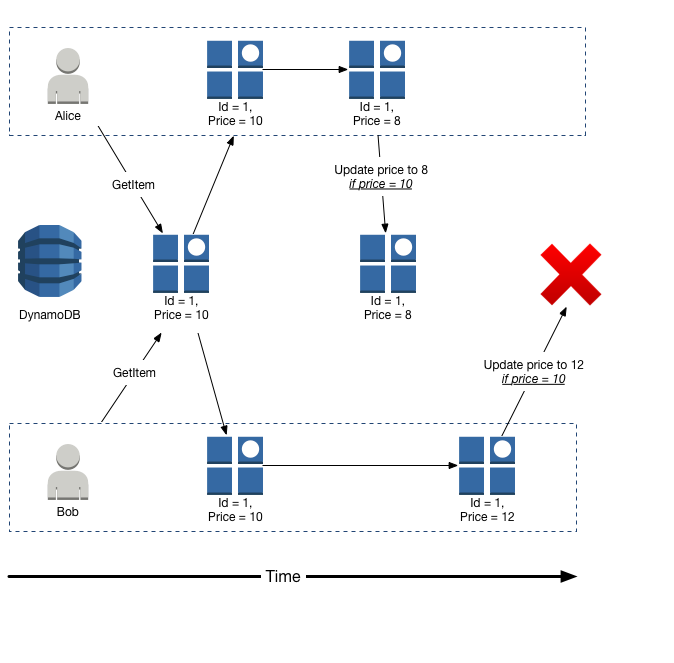
Alice first tries to update `Price` to 8, but only if the current `Price` is 10.
```
aws dynamodb update-item \
--table-name ProductCatalog \
--key '{"Id":{"N":"1"}}' \
--update-expression "SET Price = :newval" \
--condition-expression "Price = :currval" \
--expression-attribute-values file://expression-attribute-values.json
```
The arguments for `--expression-attribute-values` are stored in the `expression-attribute-values.json` file.
```
{
":newval":{"N":"8"},
":currval":{"N":"10"}
}
```
Alice's update succeeds because the condition evaluates to true.
Next, Bob attempts to update the `Price` to 12, but only if the current `Price` is 10. For Bob, the `--expression-attribute-values` parameter looks like the following.
```
{
":newval":{"N":"12"},
":currval":{"N":"10"}
}
```
Because Alice has previously changed the `Price` to 8, the condition expression evaluates to false, and Bob's update fails.
For more information, see [DynamoDB condition expression CLI example](Expressions.ConditionExpressions.md).
### Conditional write idempotence
Conditional writes can be *idempotent* if the conditional check is on the same attribute that is being updated. This means that DynamoDB performs a given write request only if certain attribute values in the item match what you expect them to be at the time of the request.
For example, suppose that you issue an `UpdateItem` request to increase the `Price` of an item by 3, but only if the `Price` is currently 20. After you send the request, but before you get the results back, a network error occurs, and you don't know whether the request was successful. Because this conditional write is idempotent, you can retry the same `UpdateItem` request, and DynamoDB updates the item only if the `Price` is currently 20.
### Capacity units consumed by conditional writes
If a `ConditionExpression` evaluates to false during a conditional write, DynamoDB still consumes write capacity from the table. The amount consumed is dependent on the size of the existing item (or a minimum of 1). For example, if an existing item is 300kb and the new item you are trying to create or update is 310kb, the write capacity units consumed will be the 300 if the condition fails, and 310 if the condition succeeds. If this is a new item (no existing item), then the write capacity units consumed will be 1 if the condition fails and 310 if the condition succeeds.
**Note**
Write operations consume *write* capacity units only. They never consume *read* capacity units.
A failed conditional write returns a `ConditionalCheckFailedException`. When this occurs, you don't receive any information in the response about the write capacity that was consumed. .
To return the number of write capacity units consumed during a conditional write, you use the `ReturnConsumedCapacity` parameter:
+ `TOTAL` — Returns the total number of write capacity units consumed.
+ `INDEXES` — Returns the total number of write capacity units consumed, with subtotals for the table and any secondary indexes that were affected by the operation.
+ `NONE` — No write capacity details are returned. (This is the default.)
**Note**
Unlike a global secondary index, a local secondary index shares its provisioned throughput capacity with its table. Read and write activity on a local secondary index consumes provisioned throughput capacity from the table.