Troubleshoot access denied error messages with authorization ID (Preview)
Important
Access Troubleshooter is in public preview.
Overview
When AWS denies a request for a supported API, the access denied error response usually includes an authorization ID. This ID references the authorization evaluation
for that denied request. To retrieve the details of the evaluation and identify what caused the denial, make a request to the GetRequestAuthorizationDetails
API and provide the authorization ID, or open the link present in the error message. This lets you identify the cause of a denied request in a single call, rather than
resolving denials one at a time.
Note
AWS does not guarantee an authorization ID for each denied request. See When you don't receive an authorization ID in this document.
The following example shows an access denied error message that includes a policy ARN, a link to the AWS Management Console
User: arn:aws:iam::123456789012:user/janedoe is not authorized to perform: iam:CreateInstanceProfile
on resource: arn:aws:iam::123456789012:instance-profile/my-instance-profile
with an explicit deny in an identity-based policy: arn:aws:iam::123456789012:policy/ExampleDenyPolicy.
Go to https://us-east-1.console.aws.amazon.com/iam/home?region=us-east-1#/authorization-details/EXAMPLE1a2b3c4d5e6f7g8h9i0j for complete details,
or call the GetRequestAuthorizationDetails API with the following authorization id: EXAMPLE1a2b3c4d5e6f7g8h9i0j
Concepts and definitions
-
Authorization details. The authorization details include the request context, the evaluations performed, and the policies that were evaluated.
-
Authorization ID. A unique identifier included in a supported access denied error response. It references the authorization evaluation for that denied request, and is the value you pass to the AWS Management Console
link or the GetRequestAuthorizationDetailsAPI. -
Request context. The values of the condition context keys evaluated for the request. This includes global condition context keys and service-specific condition context keys.
-
Evaluation. For each action/resource pair in the request, the condition context keys that applied and the evaluated result:
ALLOW,EXPLICIT_DENY(a policy explicitly denied the action), orIMPLICIT_DENY(no policy allowed the action), and a reference to each policy and statement that matched the action/resource pair. Each reference is a policy ARN (for managed policies) or a URI (for inline and other non-managed policies) that is reused throughout the response. -
Policies evaluated during authorization. The policies AWS considered for the request, including policies that did not match the action/resource pair. Each entry gives the policy type (for example, identity-based, resource-based, SCP, RCP, permissions boundary, or session policy) and the same ARN (for managed policies) or URI used in the evaluations (for inline and other non-managed policies). Use the ARN or URI to match a policy back to the evaluation that referenced it. The “Attached to” field shows the principal ARN of the principal that the evaluated policy is attached to.
Use these results together to identify which policy denied access and why. The evaluation reflects the policies as they were at the time of the denial. Policies might have changed since then.
AWS automatically includes an authorization ID in access denied error responses for supported APIs, but authorization IDs are not guaranteed. In
some cases, AWS does not record the authorization details for a denial, and the error response
does not include an authorization ID. When details are recorded, they might not be available immediately, because AWS records them asynchronously. If a call to
GetRequestAuthorizationDetails returns a not-found response, wait a short time and try again. AWS retains authorization details for 24 hours after
the denial.
Troubleshoot using the AWS Management Console
Choose the link in the access denied error message to open the authorization details in the Access Troubleshooter Console.
-
What to look for. The Access Troubleshooter Console shows the evaluation for each action/resource pair in the request, the result of each one (
Allow,Explicit deny, orImplicit deny), and the policies that were considered. Find the pair that was denied and the policy that caused the denial. See the following screenshoot as an example: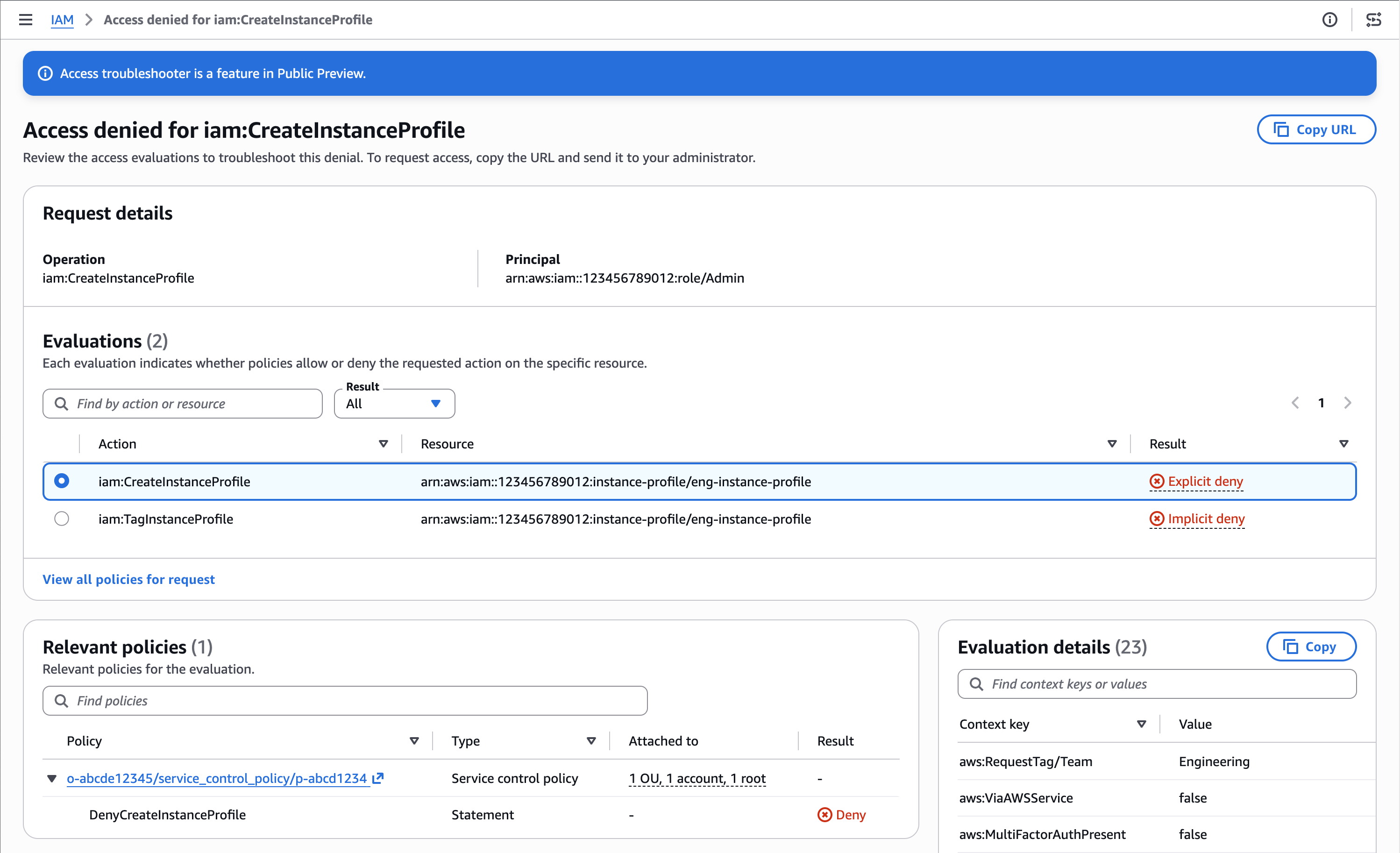
-
Determine whether the denial was intended. Review the evaluation before changing a policy. A denial can be correct, and the cause is sometimes the request context rather than the policy. For example, a request might be missing an expected session tag or coming from an unexpected network path.
-
How to resolve the denial. Locate the corresponding policy and update it to resolve the access issue. For an explicit deny, remove or narrow the
Denystatement for the action. For an implicit deny, add anAllowstatement for the action. For more information, see Edit IAM policies.
Who can access the authorization details. For a request within a single account or a single organization, anyone who is granted access
to iam:GetRequestAuthorizationDetails can access the details of the request. For a request that spans more than one organization, a user in a given
organization can view only the details that pertain to their own organization.
Troubleshoot using AWS API or AWS CLI
To troubleshoot a denial using the AWS API or AWS CLI:
-
Locate the authorization ID in the access denied error response.
-
Call
GetRequestAuthorizationDetailswith the authorization ID, in the same AWS Region where the denial occurred. The following example shows the AWS CLI command:aws iam-toolbox get-request-authorization-details \ --region us-east-1 \ --authorization-id EXAMPLE1a2b3c4d5e6f7g8h9i0j -
Review the evaluation results to identify which policies denied access and the reason for the denial.
-
Update the identified policies to resolve the access issue. For more information, see Edit IAM policies.
When you don't receive an authorization ID
AWS does not return an authorization ID in the following cases:
-
The authorization is too large to record. When a request involves a large number of policies, AWS may decide to not record the request.
-
The service isn't supported yet. See Supported services.
-
The API isn't supported. Some APIs within a supported service don't return an authorization ID.
-
The request type isn't supported. This includes requests made by a service on your behalf and anonymous requests.
If you don't receive an authorization ID, see Troubleshoot access denied error messages for other ways to diagnose the denial.
Additional considerations
Required permissions. To call GetRequestAuthorizationDetails, you must have permissions for the
iam:GetRequestAuthorizationDetails action.
Regional API. GetRequestAuthorizationDetails is a regional API. Call it in the same AWS Region where the access denied
error and authorization ID were generated.
Cross-organization requests. When a denied request involves more than one organization, GetRequestAuthorizationDetails
returns only the details that belong to your own organization. This applies in both directions: If you are in the organization of the denied caller, you see only the
details that pertain to that organization. If you are in the organization of the denied resource, you see only the details that pertain to that organization. Details
owned by another organization, such as that organization's policies or context key values, are not returned.
If you get an access denied error from an API, service or region that does not yet include an authorization ID, see Troubleshoot access denied error messages.
Supported services
Support for GetRequestAuthorizationDetails is rolling out gradually across AWS APIs and AWS Region. The following service(s) support
GetRequestAuthorizationDetails:
-
Most APIs in IAM
