# Retrieving object versions from a versioning-enabled bucket
Versioning in Amazon S3 is a way of keeping multiple variants of an object in the same bucket. A simple `GET` request retrieves the current version of an object. The following figure shows how `GET` returns the current version of the object, `photo.gif`.

To retrieve a specific version, you have to specify its version ID. The following figure shows that a `GET versionId` request retrieves the specified version of the object (not necessarily the current one).
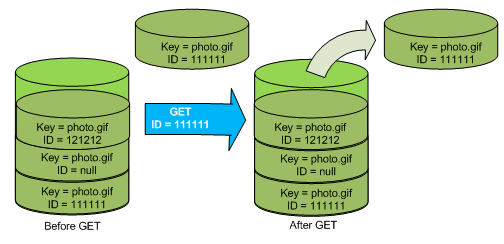
You can retrieve object versions in Amazon S3 using the console, AWS SDKs, or REST API.
**Note**
To access object versions older than 300 versions, you must use the AWS CLI or the object's URL.
## Using the S3 console
1. Sign in to the AWS Management Console and open the Amazon S3 console at [https://console.aws.amazon.com/s3/](https://console.aws.amazon.com/s3/).
1. In the **Buckets** list, choose the name of the bucket that contains the object.
1. In the **Objects** list, choose the name of the object.
1. Choose **Versions**.
Amazon S3 shows all the versions for the object.
1. Select the check box next to the **Version ID** for the versions that you want to retrieve.
1. Choose **Actions**, choose **Download**, and save the object.
You also can view, download, and delete object versions in the object overview panel. For more information, see [Viewing object properties in the Amazon S3 console](view-object-properties.md).
**Important**
You can undelete an object only if it was deleted as the latest (current) version. You can't undelete a previous version of an object that was deleted. For more information, see [Retaining multiple versions of objects with S3 Versioning](Versioning.md).
## Using the AWS SDKs
The examples for uploading objects in nonversioned and versioning-enabled buckets are the same. However, for versioning-enabled buckets, Amazon S3 assigns a version number. Otherwise, the version number is null.
For examples of downloading objects using AWS SDKs for Java, .NET, and PHP, see [Downloading objects](https://docs.aws.amazon.com/AmazonS3/latest/userguide/download-objects.html).
For examples of listing the version of objects using AWS SDKs for .NET and Rust, see [List the version of objects in an Amazon S3 bucket](https://docs.aws.amazon.com/code-library/latest/ug/s3_example_s3_ListObjectVersions_section.html).
## Using the REST API
**To retrieve a specific object version**
1. Set `versionId` to the ID of the version of the object that you want to retrieve.
1. Send a `GET Object versionId` request.
**Example — Retrieving a versioned object**
The following request retrieves version `L4kqtJlcpXroDTDmpUMLUo` of `my-image.jpg`.
```
1. GET /my-image.jpg?versionId=L4kqtJlcpXroDTDmpUMLUo HTTP/1.1
2. Host: bucket.s3.amazonaws.com
3. Date: Wed, 28 Oct 2009 22:32:00 GMT
4. Authorization: AWS AKIAIOSFODNN7EXAMPLE:0RQf4/cRonhpaBX5sCYVf1bNRuU=
```
You can retrieve just the metadata of an object (not the content). For information, see [Retrieving the metadata of an object version](RetMetaOfObjVersion.md).
For information about restoring a previous object version, see [Restoring previous versions](RestoringPreviousVersions.md).